9
GB
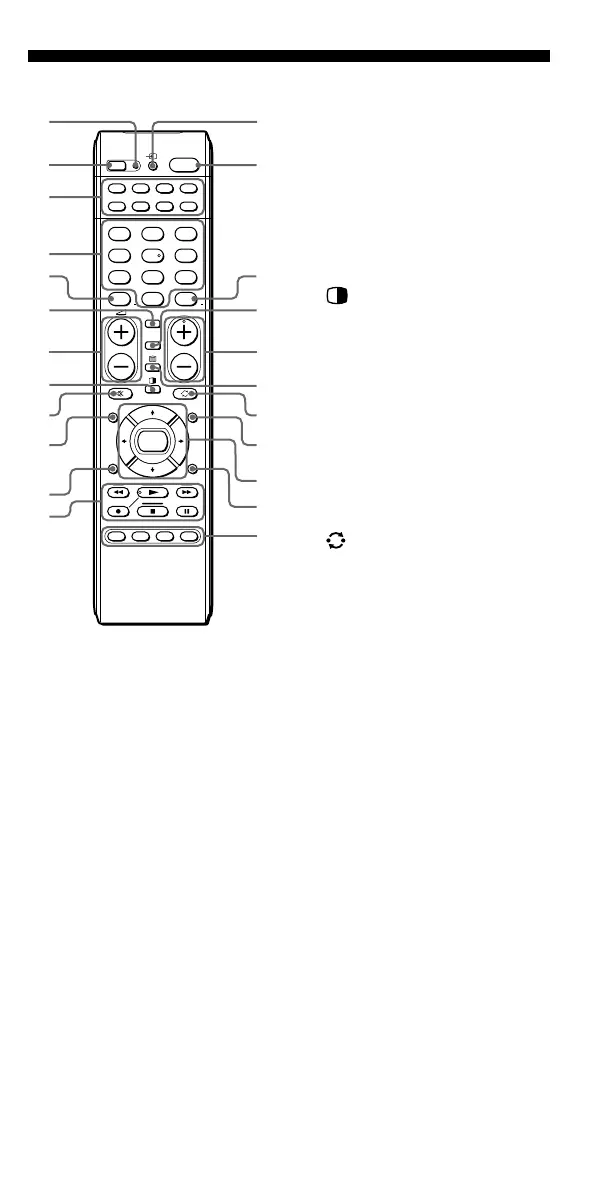
Location of Controls
1 SET indicator
2 SET button
3 Component Select buttons
Light or flash during operation.
4 Number buttons
5 - button
6 DIGITAL button
7 2 (volume) +/– buttons*
8 (PAP) button
9 % (muting) button*
0 GUIDE button
qa RETURN button
qs Player Control buttons
qd t (input select) button
qf 1 (power) button
qg ENT (enter) button
qh ANALOG button
qj PROGRAM +/– buttons
qk / (Teletext) button
ql (recall) button
w; MENU button
wa Cursor Control buttons
ws TOOLS button
wd SYSTEM CONTROL buttons
SET
SATDVDTV CBL
TAPE
CDVCR
1
VIDEO1
2
VIDEO2
3
AUX
4
TUNER
5
CD
6
TAPE
7
MD
8
TV
9
PHONO
0
DVD
GUIDE MENU
TOOLS
SYSTEM CONTROL
AMP
ENT
OK
ABCD
1
-/--
RETURN
ANALOG
DIGITAL
PROGRAM
1
2
qd
qf
qg
qh
qj
qk
ql
w;
wa
wd
ws
1
6
7
8
9
q;
qa
qs
2
5
3
4
About tactile dots
The number 5 button, the N button and PROGRAM + button each have a tactile
dot for ease of use.
* Note on the 2 +/– and % buttons
The Commander controls or mutes the TV’s volume when you select a visual
component. The Commander controls or mutes the amplifier’s volume when you
select an audio component. You can change this setting (page 25).
Note
The function of the control buttons varies depending on settings/operating modes.
The “Table of Preset Functions” (page 39) shows how the Commander generally
operates for each component in the factory preset mode.



 To Next Page