32
RM-VLZ620_U (US) 4-170-639-12(1)
Restoring the Factory
Settings
You can clear all the settings
(manufacturer’s codes, learned
functions, and programmed
consecutive procedures), and reset
the RM-VLZ620 to its factory
settings.
If you want to clear the settings for
any Device Select button, see page
14.
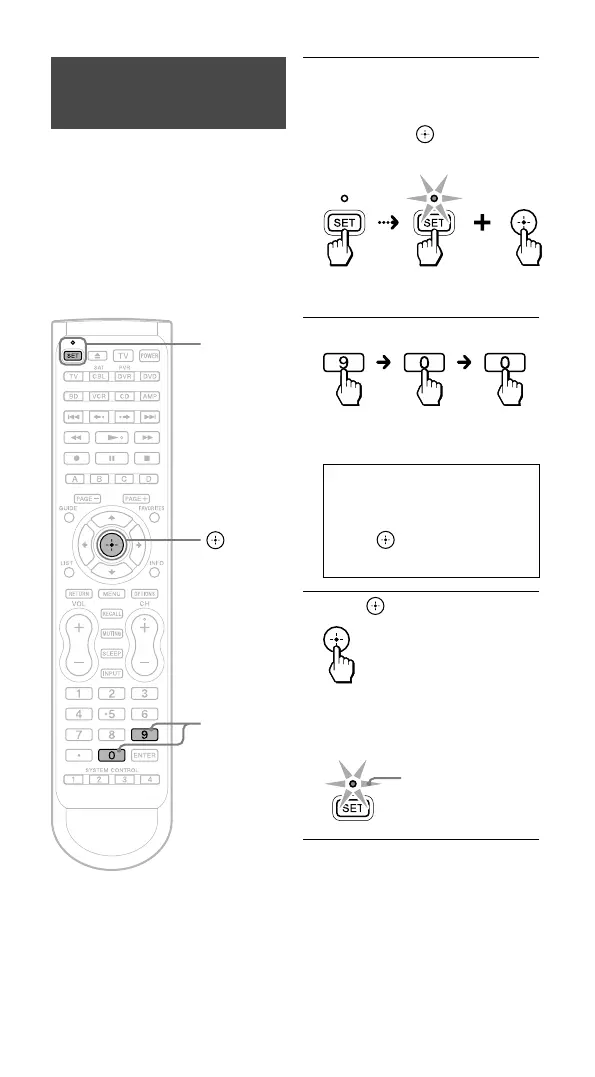
SET/SET
indicator
9, 0
1 Press and hold SET for more
than 3 seconds.
While keeping SET held
down, press , then release
both buttons.
The SET indicator
lights up.
2 Enter 9 - 0 - 0.
The Device Select buttons start
flashing in sequence.
If you want to clear all the
settings, go to Step 3.
To cancel, press any button
except . The SET indicator
flashes once and turns off.
3 Press .
When all the settings have been
cleared, the SET indicator flashes
three times and turns off.
3 flashes



 To Next Page