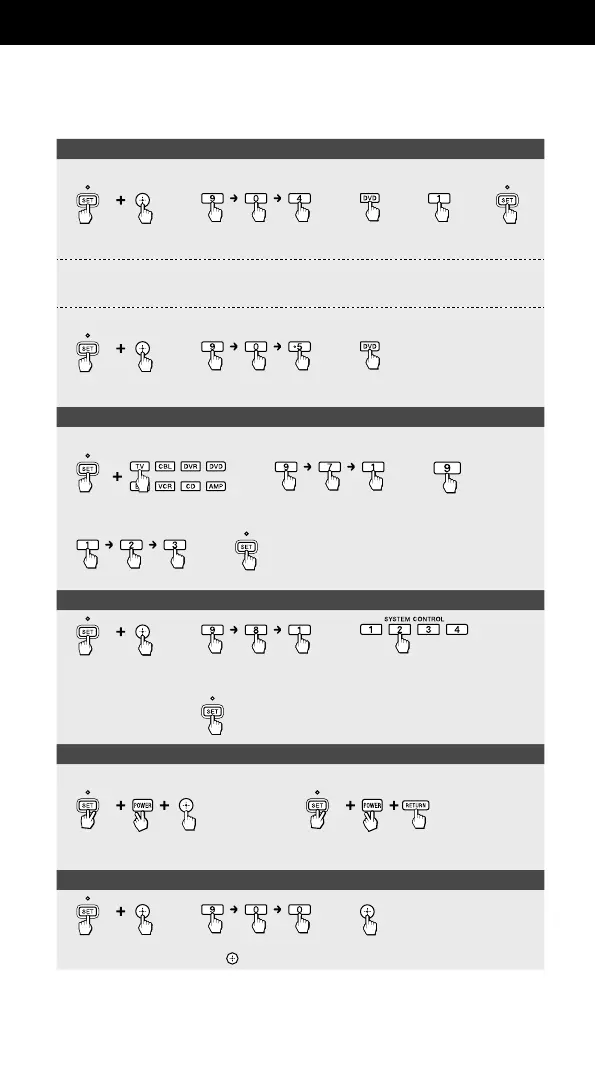
Clearing the learned function (page 23)
[from a single button] (e.g., clear the learned function from number button 1 in DVD mode)
1
Press SET for
over 3 sec.
2
3
4
5
[from a SYSTEM CONTROL or Device Select button] (page 26)
In Step 3 above, press the SYSTEM CONTROL button, or press the Device Select button for over 3 sec., then
skip Step 4.
[all the learned functions under a specific device mode]
1
Press SET for
over 3 sec.
2
3
(e.g., DVD)
Assigning a channel to each number button (page 27)
[e.g., assign to number button 9 in TV mode]
1
Press SET for
over 3 sec.
(e.g., TV)
2
3
4
5
Enter a channel number.
[To clear]
Perform Steps 1 and 2, then press the programmed
number button for over 3 sec.
[To clear]
Perform Steps 1 and 2, then press the programmed
number button for over 3 sec.
Programming the consecutive procedures (page 28)
1
Press SET for
over 3 sec.
2
3
(e.g., SYSTEM CONTROL 2)
4
Program a
consecutive
procedure.
5
[To clear]
Perform Steps 1 and 2, then press the programmed
button for over 3 sec.
[To clear]
Perform Steps 1 and 2, then press the programmed
button for over 3 sec.
Locking the controls (page 31)
[To lock] [To unlock]
Press SET for
over 3 sec.
Press SET for
over 3 sec.
Restoring the factory settings (page 32)
1
Press SET for
over 3 sec.
2
(To cancel, press any button
except before Step 3.)
3
49
RM-VLZ620_U (US) 4-170-639-12(1)


 To Next Page