EasyManua.ls Logo

Sony SB-3335 - Disassembly a and Replacement; Oe I: Front Panel Removal. Se; Speaker Binding Post Removal

Sony SB-3335
15 pages
Print Icon
To Next Page IconTo Next Page
To Previous Page IconTo Previous Page
Loading...
SECTION
2
DISASSEMBLY
AND
REPLACEMENT
Note:
All.
screws
in
this
service
manual
are
2-2.
7
Phillips
type
(cross
TeECess
type)
unless
otherwise
indicated.
|
1.
(-)
:
slotted
head.
|
2:
2-1.
FRONT
PANEL
REMOVAL
1.
Remove
the
top
cover,
then
pull
off
the
MASTER
VOLUME
and
FUNCTION
knobs.
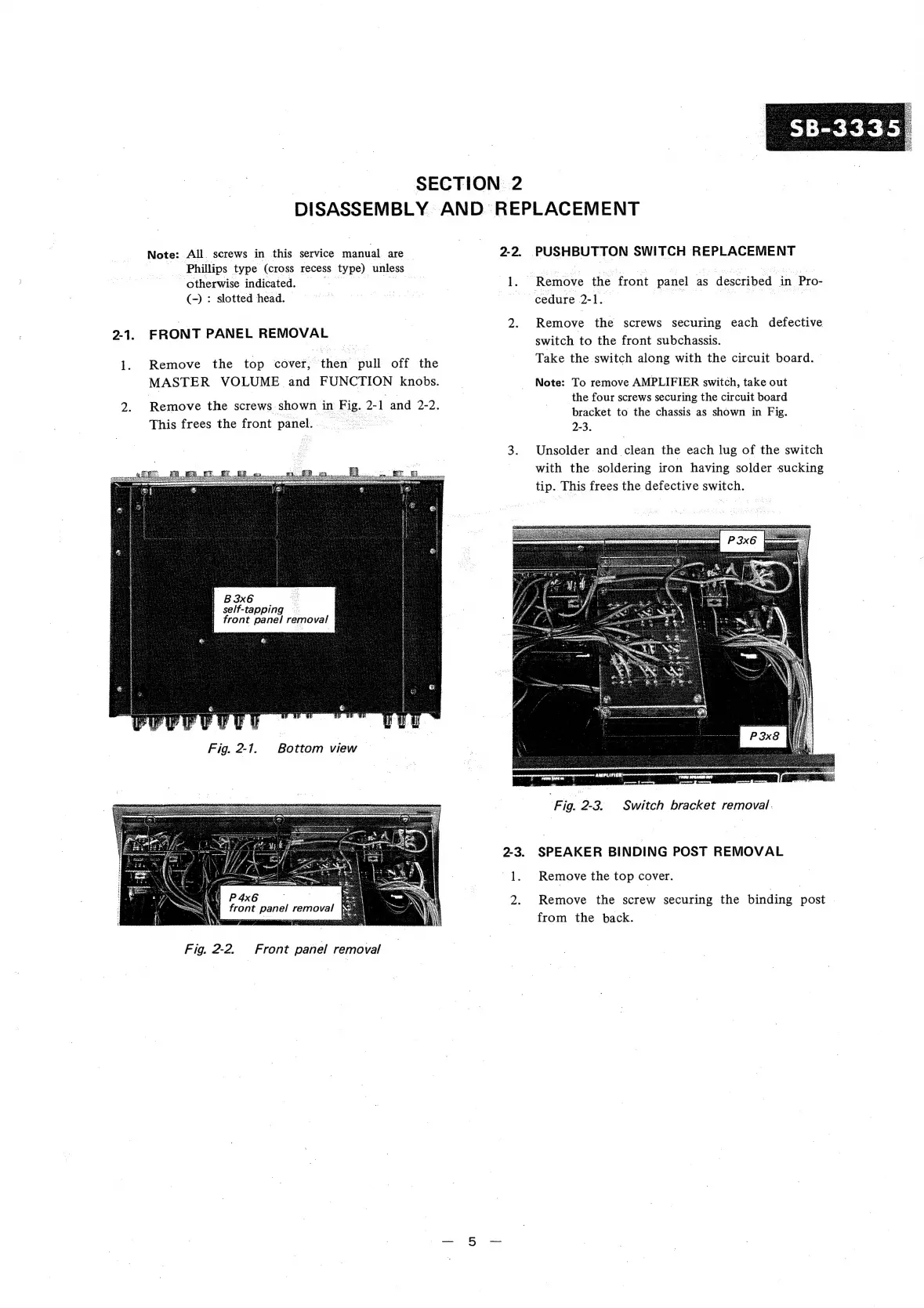
2
Remove
the
screws
shown
in
t
Fig.
2
1
and
2-2.
This
frees
the
front
panel.
TERR
3.
B
3x6
self-tapping
Pee
front
panel
removal
@™
Fig.
2-17.
Bottom
view
Fig.
2-2.
Front
panel
removal
.
een
SWITCH
REPLACEMENT
Remove
the
front
panel
as
described.
in
‘Pro-
cedure
2-1.
Remove
the
screws
securing
each
defective
switch
to
the
front
subchassis.
Take
the
switch
along
with
the
circuit
board.
Note:
To
remove
AMPLIFIER
switch,
take
out
the
four
screws
securing
the
circuit
board
bracket
to
the
chassis
as
shown
in
Fig.
2-3.
Unsolder
and
Gest
the
each
lug
of
the
switch
with
the
soldering
iron
having
solder
sucking
tip.
This
frees
the
defective
switch.
Switch
bracket
removal.
F
ig.
2-3.
SPEAKER
BINDING
POST
REMOVAL
Remove
the
top
cover.
Remove
the
screw
securing
the
binding
post
from
the
back.

Related product manuals