EasyManua.ls Logo

Sony SB-V3000 - Page 9

Sony SB-V3000
79 pages
Print Icon
To Next Page IconTo Next Page
To Previous Page IconTo Previous Page
Loading...
1-
30
6.
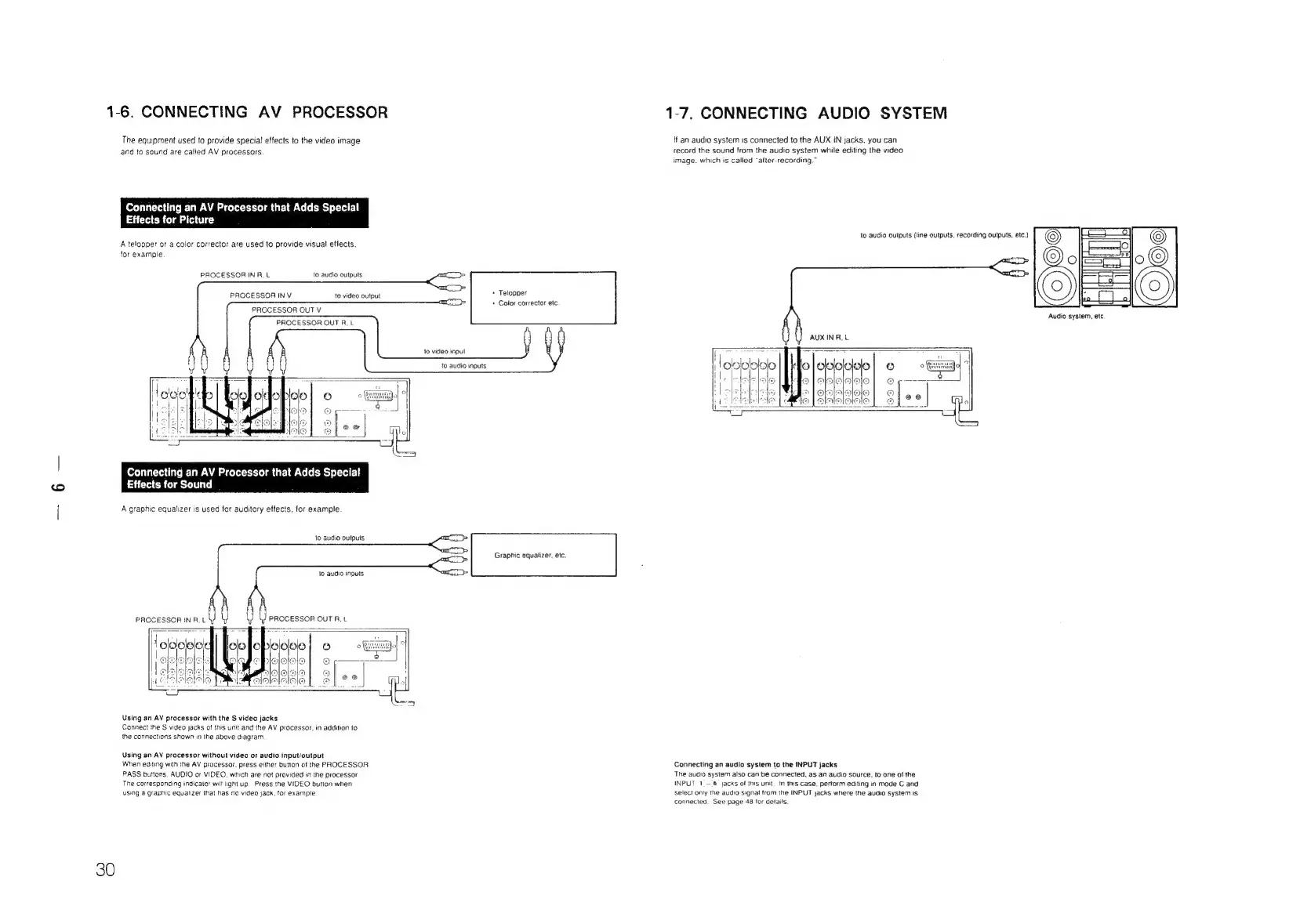
CONNECTING
AV
PROCESSOR
The
equipment
used
to
provide
special
effects
to
the
video
image
and
to
sound
are
called
AV
processors
Connecting
an
AV
Processor
that
Adds
Special!
Effects
for
Picture
A
telopper
or
a
color
corrector
are
used
to
provide
visual
effects,
for
example
PROCESSOR
IN
RA,
L
to
audio
outputs
to
video
output
Telopper
+
Color
corrector
etc
PROCESSOR
IN
V
PROCESSOR
OUT
V
PROCESSOR
OUT
R,
L
to
video
input
to
audio
inputs.
Connecting
an
AV
Processor
that
Adds
Special
Effects
for
Sound
A
graphic
equalizer
is
used
tor
auditory
effects,
for
example
to
audio
outputs
Graphic
equalizer,
etc.
to
audio
inputs
PROCESSOR
OUT
RF,
t
Using
an
AV
processor
with
the
S
video
jacks
Cannect
the
S
video
jacks
of
this
unit
and
the
AV
processor,
in
addition
to
the
connections
shown
in
ihe
above
diagram
Using
an
AV
processor
without
video
or
audio
input/output
When
editing
with
the
AV
processor.
press
either
bution
of
the
PROCESSOR
PASS
buttons,
AUDIO
or
VIDEO.
which
are
not
provided
in
the
processor
The
corresponding
indicator
wilt
light
up.
Press
the
VIDEO
button
when
using
a
graphic
equalizer
that
has
no
video
jack,
tor
example
1-7.
CONNECTING
AUDIO
SYSTEM
lf
an
audio
system
1s
connected
to
the
AUX
iN
jacks,
you
can
record
the
sound
from
the
audio
system
while
editing
the
video
image.
which
is
called
“after-recording.”
to
audio
outputs
{line
outputs,
recording
outputs,
etc.)
AUX
IN
RL
OOOO
alslelaloje
alelalsioie
AIAHOGHTO
Connecting
an
audio
system
to
the
INPUT
jacks
The
audio
system
also
can
be
connected,
as an
audio
source.
to
one
of
the
INPUT
1_-
6
jacks
of
this
unit.
tn
this
case.
perform
editing
in
mode
C
and
select
only
the
audio
signa!
from
the
INPUT
jacks
where
the
audio
system
is
connected.
See
page
48
tor
details.
a
Audio
system,
etc.

Related product manuals