EasyManua.ls Logo

Sony SB-V3000 - Connecting External Equipment

Sony SB-V3000
79 pages
Print Icon
To Next Page IconTo Next Page
To Previous Page IconTo Previous Page
Loading...
1
26
-5.
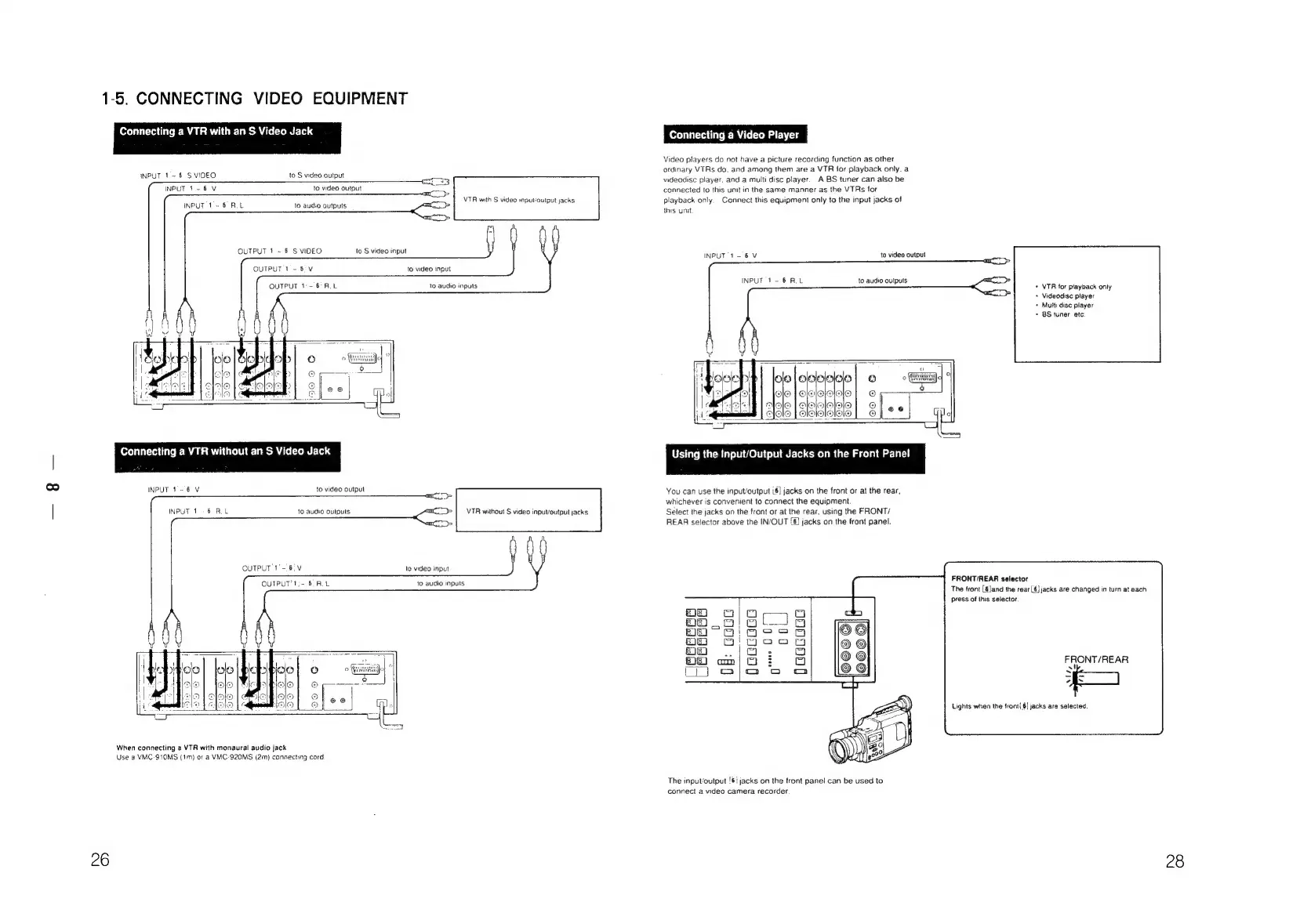
CONNECTING
VIDEO
EQUIPMENT
Connecting
a
VTR
with
an
S
Video
Jack
INPUT
1-6
S
VIDEO
to
S
video
output
INPUT
1-6
V
to
video
output
VTR
with
S
video
inputvoutput
jacks
6RL
INPUT
1
=
to
audio
outputs
OUTPUT
1
~
6
S
VIDEO
to
S
video
input
OUTPUT
1-68°V
to
video
input
OUTPUT
1°-
6
RL
to
audio
inputs
Connecting
a
VTR
without
an
S
Video
Jack
INPUT
1-6
V
to
video
output
6
RL
INPUT
1
to
audio
oulputs
VTR
without
S
video
input/output
jacks
QUTPUT
1°-
6;
V
to
video
input
OUTPUT'1:-.6.
RL
to
audio
inputs
When
connecting
a
VTR
with
monaural
audio
jack
Use
a
VMC-S10MS
(im)
or
a
VMC-920MS
(2m)
connecting
cord
Connecting
a
Video
Player
Video
players
do
not
have
a
picture
recording
function
as
other
ordinary
VTRs
do.
and
among
them
are
a
VTR
for
playback
only.
a
videodisc
player,
and
a
multi
disc
player.
A
BS
tuner
can
also
be
connected
to
this
unit
in
the
same
manner
as
the
VTRs
for
playback
only.
Connect
this
equipment
only
to
the
input
jacks
of
this
unit
INPUT
1-6
V
to
video
output
INPUT
1-6
ROL
to
audio
outputs
+
VTR
for
ptayback
only
+
Videodisc
player
+
Multi
disc
player
+
BS
tuner
etc.
Using
the
Input/Output
Jacks
on
the
Front
Panel
You
can
use
the
input/output
i6]
jacks
on
the
front
or
at
the
rear,
whichever
is
convenient
to
connect
the
equipment
Sélect
the
jacks
on
the
front
or
at
the
rear,
using
the
FRONT/
REAR
selector
above
the
IN/OUT
[6}
jacks
on
the
front
panel.
FRONT/REAR
selector
The
tront
[6]and
the
rear
6}
jacks
are
changed
in
turn
at
each
press
of
this
selector.
FRONT/REAR
x
~
4
Lights
when
the
front(§]
jacks
are
selected.
The
inpuvoutput
'6!
jacks
on
the
front
panel
can
be
used
to
connect
a
video
camera
recorder
28

Related product manuals