EasyManua.ls Logo

Sony SB-V3000 - Connection Procedures

Sony SB-V3000
79 pages
Print Icon
To Next Page IconTo Next Page
To Previous Page IconTo Previous Page
Loading...
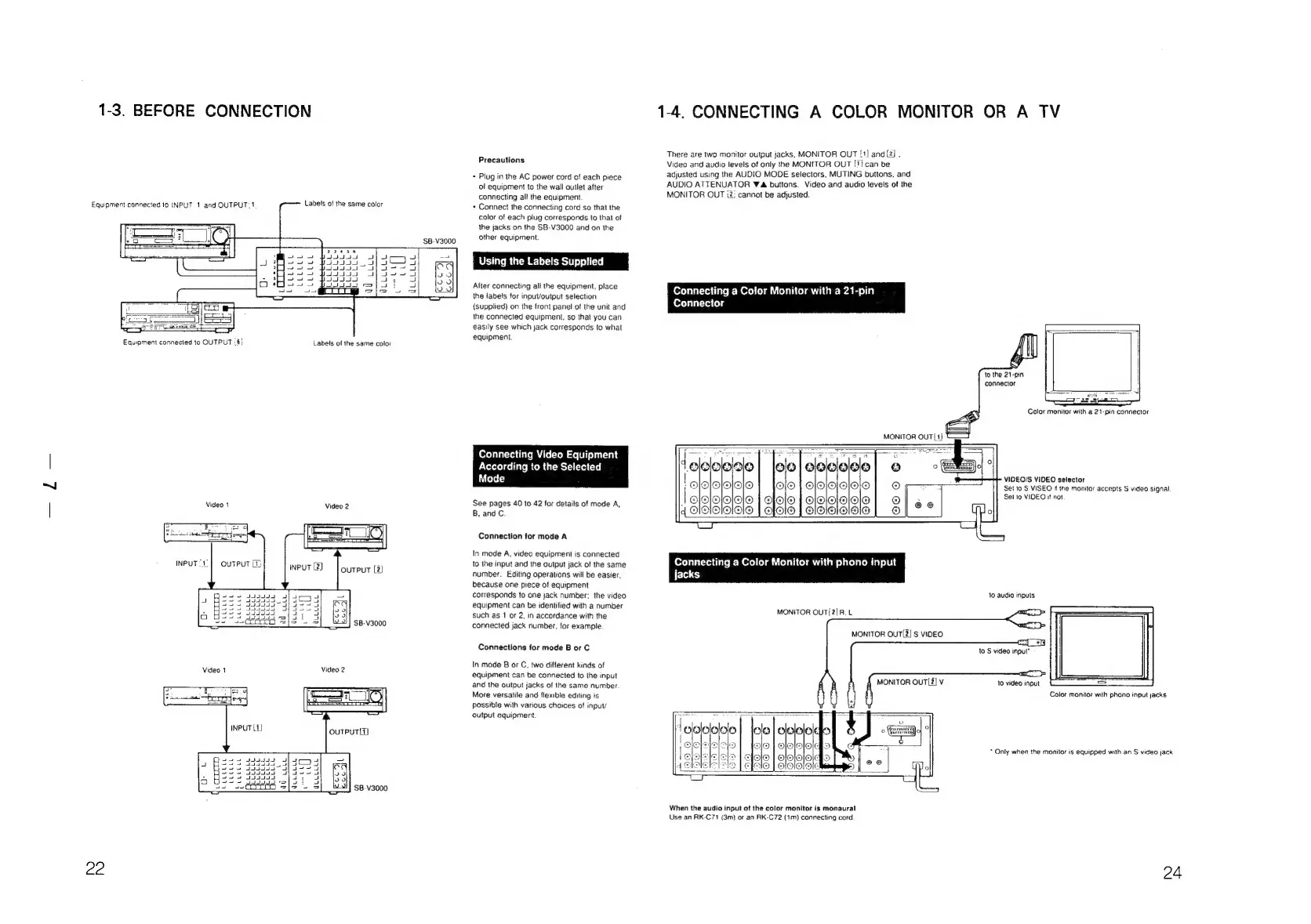
1-3.
BEFORE
CONNECTION
Equipment
connected
10
INPUT
1
and
OUTPUT:1
Equipment
connected
to
OUTPUT
:
6}
Video
1
Labels
of
the
same
color
Labels
of
the
same
color
Video
1
LLLLEL
Ibccece
22
Queuuee
ml
TLLLLLL
Y
icceece
CLLEGE:
WLLL
LE
LLL
ELLE
Ee
ad
cue
5
$B-V3000
wa
Ob
uk
JLLULLL
L
SB-V3000
$B-V3000
JULLLLLE
Precautions
+
Plug
in
the
AC
power
cord
of
each
piece
of
equipment
to
the
wail
outlet
after
connecting
all
the
equipment
+
Connect
the
connecting
cord
so
that
the
calor
of
each
plug
corresponds
to
that
of
the
jacks
on
the
SB-V3000
and
on
the
other
equipment.
After
connecting
ali
the
equipment,
place
the
iabels
for
input/output
selection
(supplied)
on
the
front
panel
of
the
unit
and
the
connected
equipment,
so
that
you
can
easily
see
which
jack
corresponds
to
what
equipment.
Connecting
Video
Equipment
According
to
the
Selected
Mode
See
pages
40
to
42
for
details
of
mode
A,
B,
and
C.
Connection
for
mode
A
In
mode
A,
video
equipment
is
connected
to
the
input
and
the
output
jack
of
the
same
number.
Editing
operations
will
be
easier,
because
one
piece
of
equipment
corresponds
to
one
jack
number:
the
video
equipment
can
be
identified
with
a
number
such
as
1
or
2,
in
accordance
with
the
connected
jack
number,
for
example.
Connections
tor
mode
B
or
C
In
mode
B
or
C,
two
different
kinds
of
equipment
can
be
connected
to
the
input
and
the
output
jacks
of
the
same
number
More
versatile
and
flexible
editing
is
possible
with
various
choices
of
input/
output
equipment
1-4.
CONNECTING
A
COLOR
MONITOR
OR
A
TV
There
are
two
monitor
output
jacks,
MONITOR
OUT
!1]
and
[2]
.
Video
and
audio
levels
of
only
the
MONITOR
OUT
!1}
can
be
adjusted
using
the
AUDIO
MODE
selectors.
MUTING
buttons,
and
AUDIO
ATTENUATOR
Wa
buttons.
Video
and
audio
levels
of
the
MONITOR
OUT
i2:
cannot
be
adjusted.
Connecting
a
Color
Monitor
with
a
21-pin
Connector
to
the
21-pin
connector
Color
monitor
with
a
21-pin
connector
eo
|elelelelele
CjO
{|
C]O|Ol@IO|O
QIO|O
|
G|O|O/O|O/O
QLO!O
{|
SIOIGIO|9!|O
de
Coase
|
olololalolo
|
elelololole
4
Aldlalololo
VIDEO/S
VIDEO
selector
Set
to
S
VISEO
if
the
monitor
accepts
S
video
signal
Set
to
VIDEO
if
not
Connecting
a
Color
Monitor
with
phono
input
jacks
10
audio
inputs
MONITOR
OUT/2]R.
L
MONITOR
OUT[2]
S
VIDEO
to
S
video
input*
MONITOR
OUT[2]
V
to
video
input
Color
monitor
with
phono
input
jacks
*
Only
when
the
monitor
is
equipped
with
an
S
video
jack
When
the
audio
input
of
the
color
monitor
is
monaural
Use
an
RK-C71
(3m)
or
an
AK-C72
(1m)
connecting
cord
24

Related product manuals