EasyManua.ls Logo

Sony SB-V3000 - Page 6

Sony SB-V3000
79 pages
Print Icon
To Next Page IconTo Next Page
To Previous Page IconTo Previous Page
Loading...
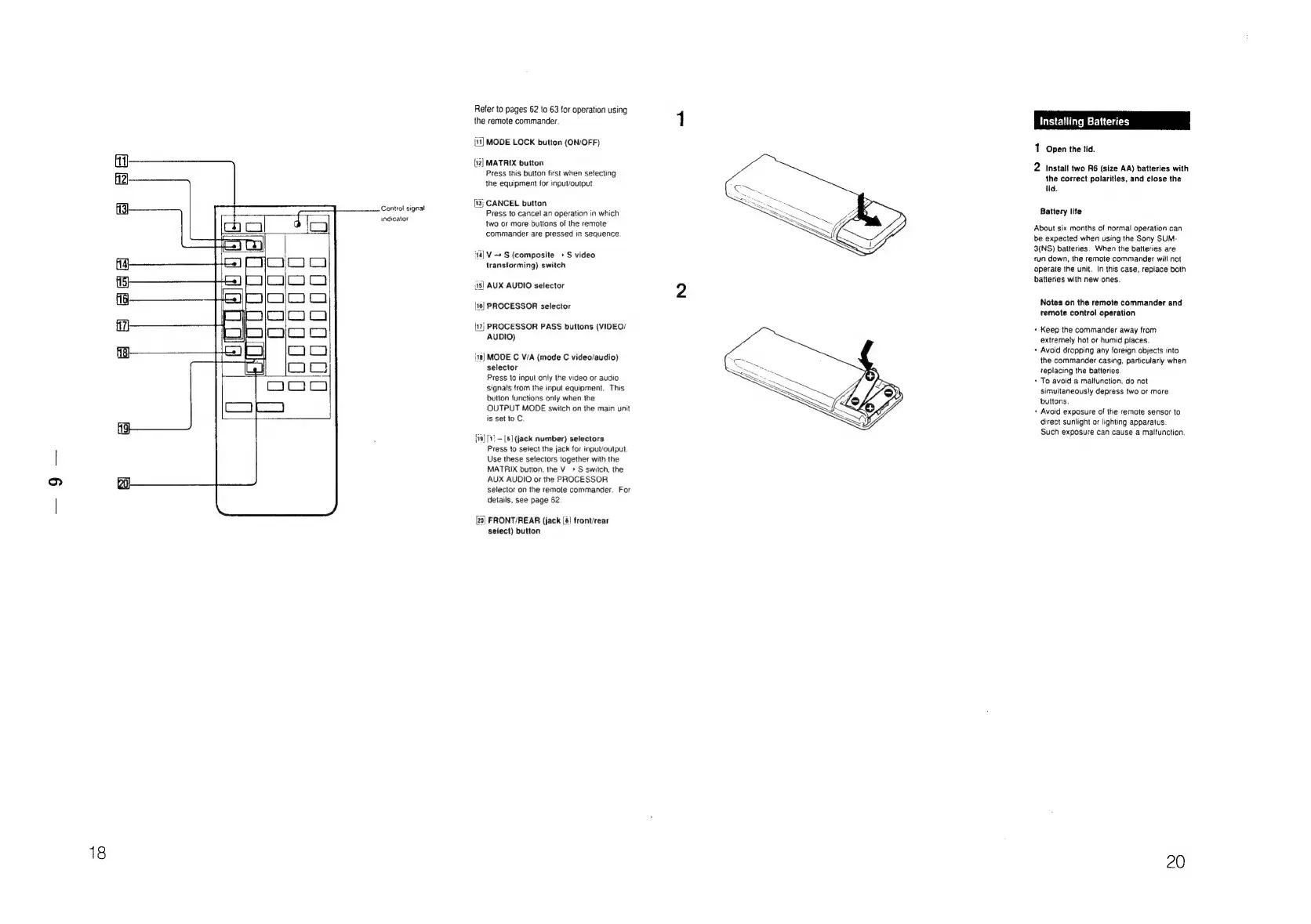
Control
signal
indicator
Refer
to
pages
62
to
63
for
operation
using
the
remote
commander.
[11]
MODE
LOCK
button
(ON/OFF)
(12]
MATRIX
button
Press
this
button
first
when
selecting
the
equipment
for
input/output
(13)
CANCEL
button
Press
to
cancel
an
operation
in
which
two
or
more
buttons
of
the
remote
commander
are
pressed
in
sequence.
'14)
V+
S
(composite
+S
video
transforming)
switch
ss]
AUX
AUDIO
selector
|16)
PROCESSOR
selector
{11)
PROCESSOR
PASS
buttons
(VIDEO/
AUDIO)
ina)
MODE
C
V/A
(mode
C
video/audio)
selector
Press
to
input
only
the
video
or
audio
signals
trom
the
input
equipment.
This
button
functions
only
when
the
OUTPUT
MODE
switch
on
the
main
unit
is
set
to
C
{1a)
(1)
-
[6]
(jack
number)
selectors
Press
to
seiect
the
jack
for
inouYoutput.
Use
these
selectors
together
with
the
MATRIX
button,
the
V+
S
switch,
the
AUX
AUDIO
or
the
PROCESSOR
selector
on
the
remote
commander.
For
details,
see
page
62.
[20]
FRONT/REAR
(jack
(8}
front/rear
select)
button
Installing
Batteries
1
Open
the
tid.
2
Install
two
R6
(size
AA)
batteries
with
the
correct
polarities,
and
close
the
lid.
Battery
life
About
six
months
of
normal
operation
can
be
expected
when
using
the
Sony
SUM-
3(NS)
batteries.
When
the
batteries
are
cun
down,
the
remote
commander
will
not
operate
the
unit.
In
this
case,
replace
both
batteries
with
new
ones.
Notes
on
the
remote
commander
and
remote
control
operation
+
Keep
the
commander
away
from
extremely
hot
of
humid
places.
+
Avoid
dropping
any
foreign
objects
into
the
commander
casing,
particularly
when
replacing
the
batteries.
+
To
avoid
a
malfunction,
do
not
simultaneously
depress
two
or
more
buttons.
*
Avoid
exposure
of
the
remote
sensor
to
direct
sunlight
of
lighting
apparatus.
Such
exposure
can
cause
a
malfunction,
20

Related product manuals