EasyManua.ls Logo

Sony SB-V3000 - Rear Panel and Remote Commander

Sony SB-V3000
79 pages
Print Icon
To Next Page IconTo Next Page
To Previous Page IconTo Previous Page
Loading...
14
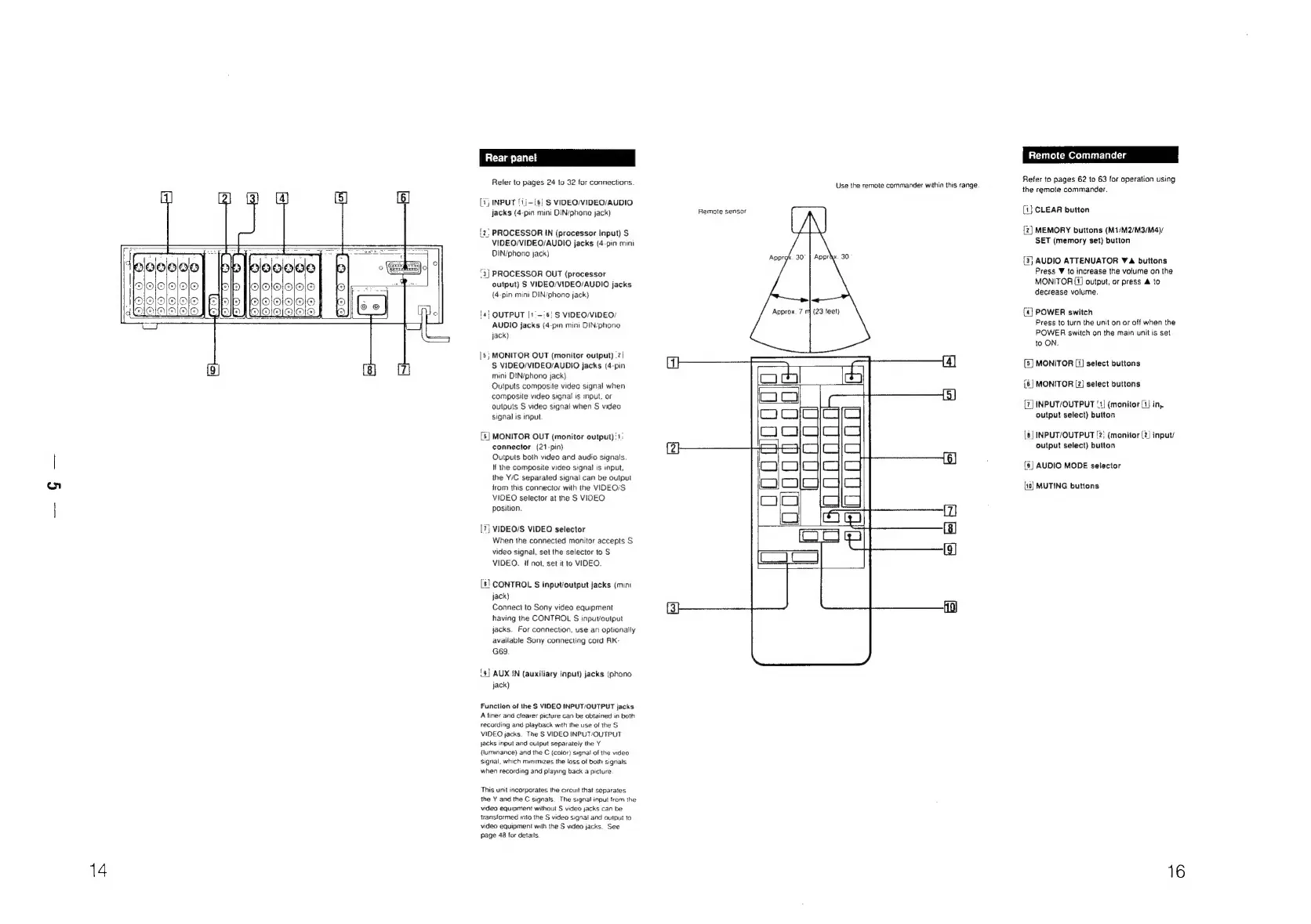
Rear
panet
Refer
to
pages
24
to
32
for
connections.
(i)
INPUT
[ij-{6}
S
VIDEO/VIDEO/AUDIO
Jacks
(4-pin
mini
DIN/phono
jack)
{2?
PROCESSOR
IN
(processor
input)
S
VIDEO/VIDEO/AUDIO
jacks
(4-pin
mini
DIN/phono
jack)
“3)
PROCESSOR
OUT
(processor
output)
S
VIDEO/VIDEQ/AUDIO
jacks
{4-pin
mini
DIN/phono
jack}
14}
OUTPUT
[1'-:6!
S
VIDEO/VIDEO;
AUDIO
jacks
(4-pin
mini
DIN/phono
jack)
[5;
MONITOR
OUT
(monitor
output)
-2/
S
VIDEO/VIDEO/AUDIO
jacks
(4-pin
mini
DIN/phono
jack)
Outputs
composite
video
signal
when
composite
video
signal
is
input.
or
outputs
S
video
signal
when
S
video
signal
is
input
[6]
MONITOR
OUT
(monitor
output)
‘1:
connector
(21-pin)
Outputs
both
video
and
audio
signals.
If
the
composite
video
signal
is
input,
the
Y/C
separated
signal
can
be
output
trom
this
connector
with
the
VIDEO/S.
VIDEO
selector
at
the
S
VIDEO
position.
[7]
VIDEO/S
VIDEO
selector
When
the
connected
monitor
accepts
S
video
signal,
set
the
selector
to
S
VIDEO.
if
not,
set
it
to
VIDEO.
[8]
CONTROL
S
input/output
jacks
(mini
jack)
Connect
to
Sony
video
equipment
having
the
CONTROL
S
inpuvoutput
jacks.
For
connection,
use
an
optionally
available
Sony
connecting
cord
RK-
G69
{9}
AUX
IN
(auxiliary
input)
jacks
(phono
jack)
Function
of
the
S
VIDEO
INPUT/OUTPUT
jacks
A
liner
and
clearer
picture
can
be
obtained
in
both
recording
and
playback
with
the
use
of
the
S
VIDEO
jacks.
The
S
VIDEO
NPUT/OUTPUT
jacks
input
and
oulput
separately
the
Y
(luminance)
and
the
C
(calor)
signa!
of
the
video
signal,
which
minimizes
the
loss
of
both
signals.
when
recording
and
playing
back
a
picture
This
unit
incorporates
the
circuit
that
separates
the
Y
and
the
C
signals.
The
signal
input
from
the
video
equipment
without
S
video
jacks
can
be
wansformed
ito
the
S
video
signai
and
output
to
video
equipment
with
the
S
video
jacks.
See
page
48
for
details
Remote
sensor
Approx.
7
Use
the
remote
commander
within
this
range.
Apprhx.
30
|
Remote
Commander
|
Commander
Refer
to
pages
62
to
63
for
operation
using
the
remote
commander.
[1]
CLEAR
button
[2]
MEMORY
buttons
(M1/M2/M3/M4)/
SET
(memory
set)
button
[3}
AUDIO
ATTENUATOR
V4
buttons
Press
W
to
increase
the
volume
on
the
MONITOR
[1]
output,
or
press
&
to
decrease
volume.
[4]
POWER
switch
Press
to
turn
the
unit
on
or
off
when
the
POWER
switch
on
the
main
unit
is
set
to
ON.
[5]
MONITOR
[1}
select
buttons
{6]
MONITOR
[2]
select
buttons
[7]
INPUT/OUTPUT
'1]
(monitor
{1}
in,
output
select)
button
8|
INPUT/OUTPUT
2;
(monitor
(2)
input/
output
select)
button
[9]
AUDIO
MODE
selector
{10}
MUTING
buttons
16

Related product manuals