70
Connecting the AC adaptor and AC power cord
Warnings
• The socket-outlet shall be installed near the equipment and shall be easily
accessible.
• Do not plug the AC power cord for the console into an electrical outlet until
you have made all other connections.
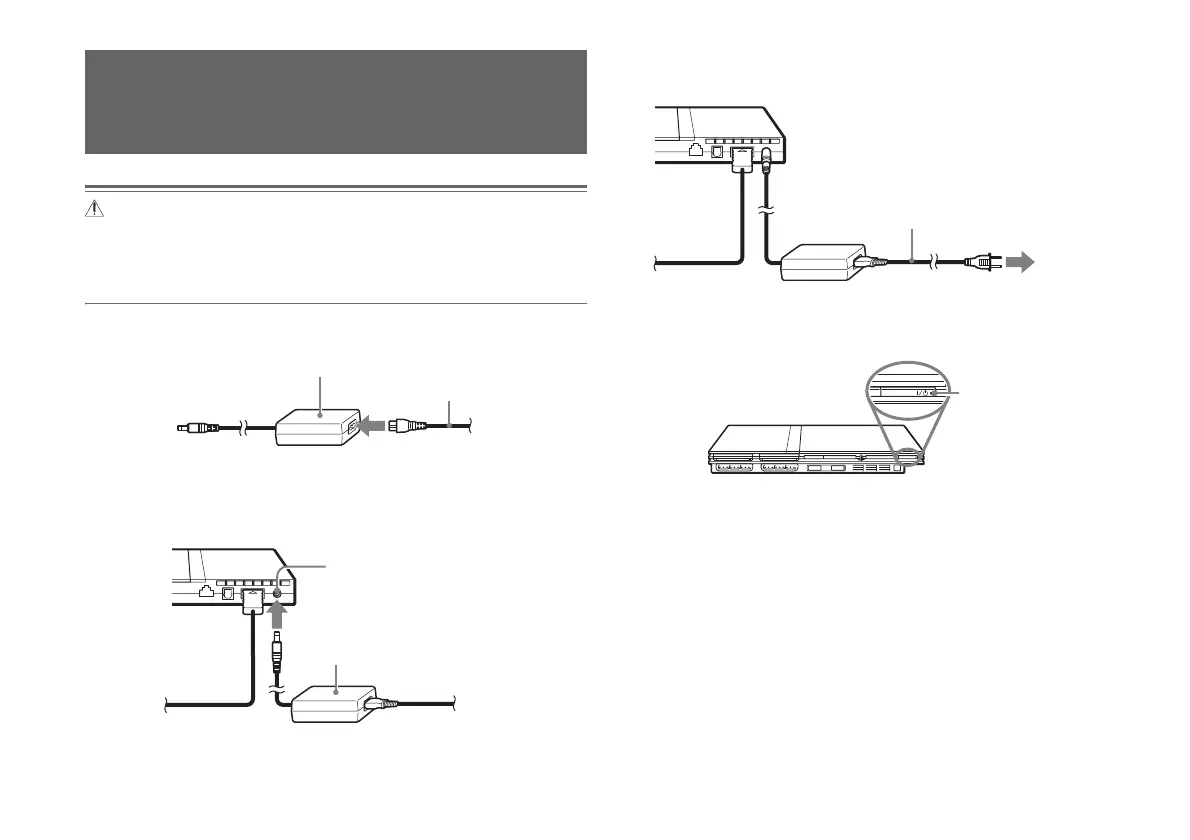
1 Connect the AC power cord to the AC adaptor.
2 Plug the connector of the AC adaptor into the ! DC IN 8.5V
connector on the console rear.
3 Plug the AC power cord into the electrical outlet.
The =/1 (on/standby) indicator on the console front will light up in red
to indicate that the console is in standby mode.
Connecting the AC adaptor and
AC power cord
AC adaptor
AC power cord
Console rear
AC adaptor
! DC IN 8.5V connector
Console rear
AC power cord
To the electrical outlet
Console front
]/1 indicator













 To Next Page