89
Adjusting DVD player settings
DVDs
US
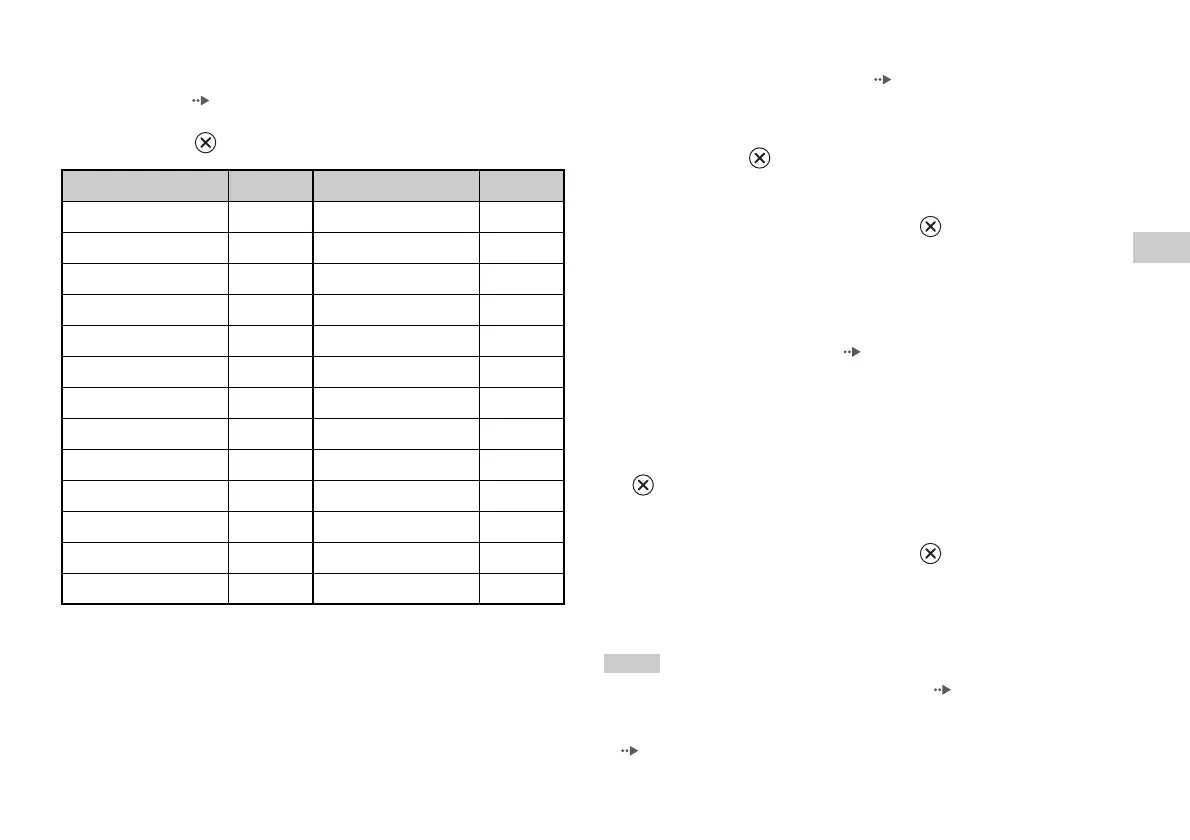
Region code list
To enter a Parental Control region code, select "Other" in step 4 of "Setting
Parental Control" ( page 88). Use the directional buttons to select the
first letter, and then press the right directional button. Then select the next
letter and press the button.
Changing your password
In step 2 of "Setting Parental Control" ( page 88), complete the
following steps:
1 Using the directional buttons, select "Change Password" and
then press the button.
The screen for changing the password is displayed.
2 Select a number, and then press the button.
Repeat step 2 to enter a four-digit password. You are required to enter
it again for confirmation.
Playing a disc restricted by Parental Control
1 Start playback of the DVD ( page 81).
You will be prompted to temporarily change the Parental Control level
to allow playback. This usually occurs immediately at disc start-up but
may also occur at different times depending on the DVD.
2 Using the directional buttons, select "Yes" and then press the
button.
The screen for entering the password is displayed.
3 Select a number, and then press the button.
Repeat step 3 to enter the four-digit password. After entering the
password, playback will begin again. When DVD playback is stopped,
the Parental Control level returns to the original setting.
Notes
• If you forget your password, see "Troubleshooting" ( page 108).
• If you do not set a password, you cannot change the Parental Control settings.
• Some DVDs with the Parental Control feature do not allow use of playback modes
( pages 83 to 85).
Region Code Region Code
Austria AT Malaysia MY
Belgium BE Mexico MX
Canada CA Netherlands NL
China CN Norway NO
Denmark DK Philippines PH
Finland FI Russia RU
France FR Singapore SG
Germany DE Spain ES
Hong Kong HK Sweden SE
Indonesia ID Switzerland CH
Italy IT Taiwan TW
Japan JP Thailand TH
Korea KR United Kingdom GB













 To Next Page