Be sure not to turn off the camera while resetting is in progress.
If you are using a model that supports PlayMemories Camera Apps, when you perform Initialize
or Setting Reset, applications downloaded to the product may be uninstalled. To use these
applications again, reinstall them.
Even if you use this function, all movies and photos are retained.
If an error code beginning with C: or E: is displayed on the camera’s LCD screen, resetting may
not resolve the issue.
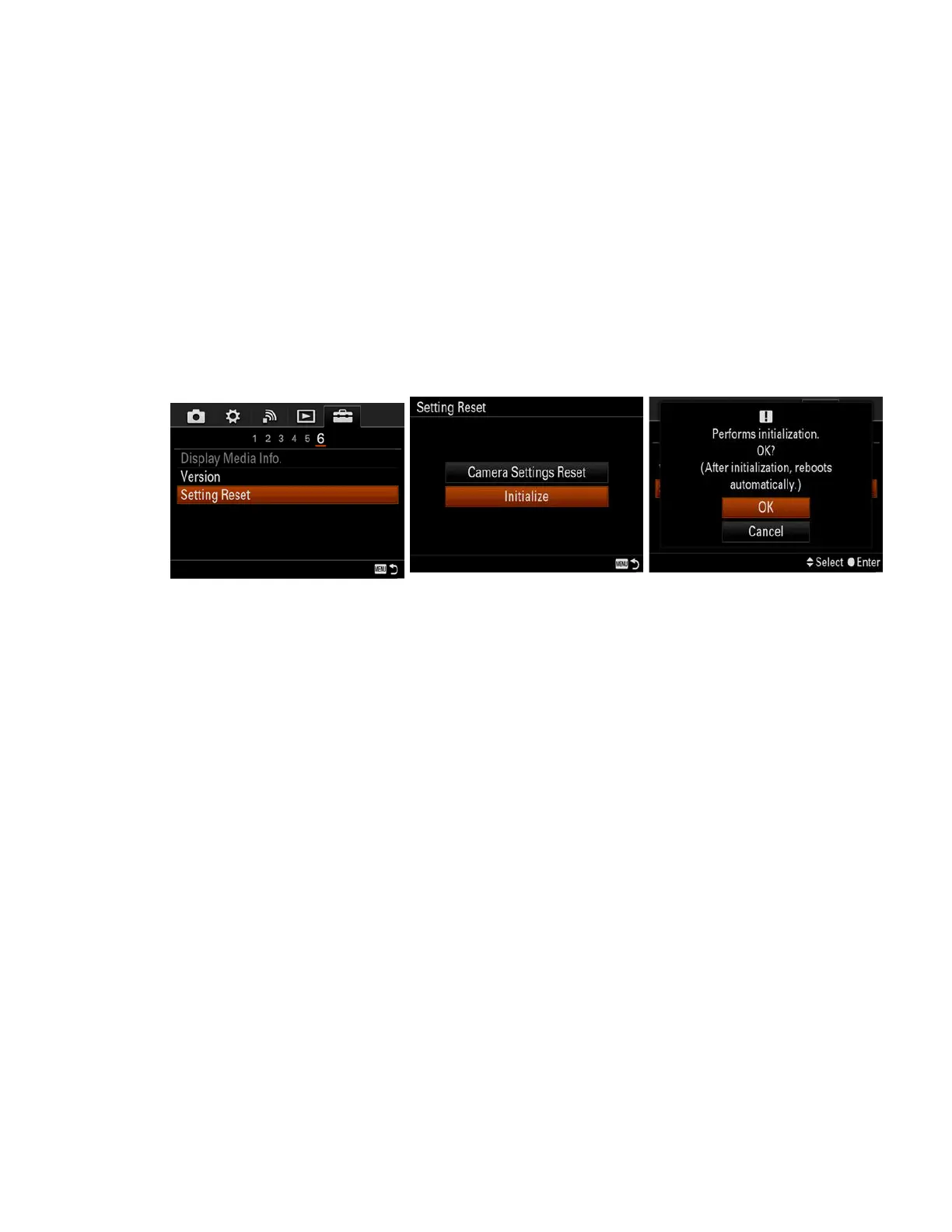
Using an Initialize or RESET option in the menu
1. MENU → Setup → Setting Reset → Initialize → OK
2. Sample Initialize procedure for DSC-RX10
3. After the camera reboots, the time and date settings menu will be displayed. Follow the on-
screen instructions to complete the initial settings.
NOTE:
o Since cameras have different menu system layouts, refer to the instruction manual
specific for your camera model.
o If you want to reset just the shooting settings, do not select Initialize. Instead, select
Camera Settings Reset or REC Settings.
Using a RESET button
1. Locate the RESET button on the camera.
NOTE:
o Only some models have a RESET button. Refer to the manual supplied with your camera
to determine whether it has a RESET button or identify the location of the RESET
button.


 To Next Page