model name [SHAKE-6D]
[4-462-817-11(2)] GB
33
GB
filename[D:\NORM'S JOB\SONY HA\SO130043\SHAKE-6D (PMRF
01)\4462817112_GB\060CDP.fm]
masterpage:Right
USB Transfer
Maximum number of MP3 files that
can be generated
• 298 folders
• 650 files in a folder
• 650 files in REC1-CD or REC1-MP3
folder.
These numbers may vary depending on
the file or folder configuration.
When transferring onto a USB device, a
“MUSIC” folder is created directly below
the “ROOT”. Folders and files are
generated within this “MUSIC” folder as
follows according to the transferring
method and source.
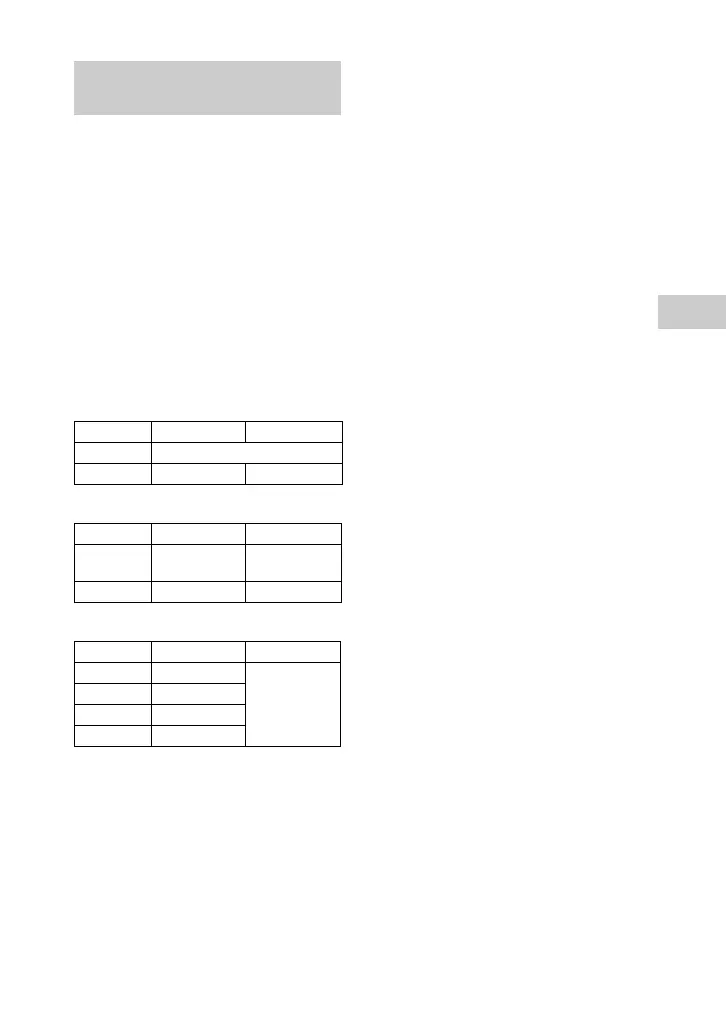
Synchronized Transfer
REC1 Transfer
Analog Transfer
*
Folder and file numbers are assigned serially
thereafter.
Notes on transferring
• While transferring (except analog transfer),
no sound is output.
• CD-TEXT information is not transferred in
the created MP3 audio files.
• The transfer stops automatically if:
– the USB device runs out of space during
transfer.
– the number of audio files or folders on the
USB device reaches the limit.
• If a folder or file that you are trying to transfer
already exists on the USB device with the
same name, a sequential number is added after
the name without overwriting the original
folder or file.
• You cannot perform the following operations
during a transfer:
– Eject the disc.
– Select another track or file.
– Pause playback or find a point in the track or
file.
– Change the function or tuner band.
• When transferring music to a Walkman
®
using “Media Manager for WALKMAN”, be
sure to transfer in MP3 format.
• When connecting a Walkman
®
to the system,
be sure to connect after the display “Creating
Library” or “Creating Database” on the
Walkman
®
has disappeared.
Folder and file generation
rules
Source Folder name File name
Audio files Same as the source
AUDIO CD “CDDA0001”
*
“TRACK001”
*
Source Folder name File name
Audio files “REC1-MP3” Same as the
source
AUDIO CD “REC1-CD” “TRACK001”
*
Source Folder name File name
FM “TUFM0001”
*
“TRACK001”
*
AM “TUAM0001”
*
PC/GAME “EXPG0001”
*
TV/SAT “EXTS0001”
*



 To Next Page