model name [SHAKE-7]
[4-451-239-11(1)] GB
11
GB
filename[D:\NORM'S JOB\SONY HA\SO120050\SHAKE-
7\4451239111_GB\06BAS.fm]
masterpage:Right
Disc/USB Playback
Note
You cannot select a memory during playback or
transfer. Make sure to select a memory before
starting playback or transfer.
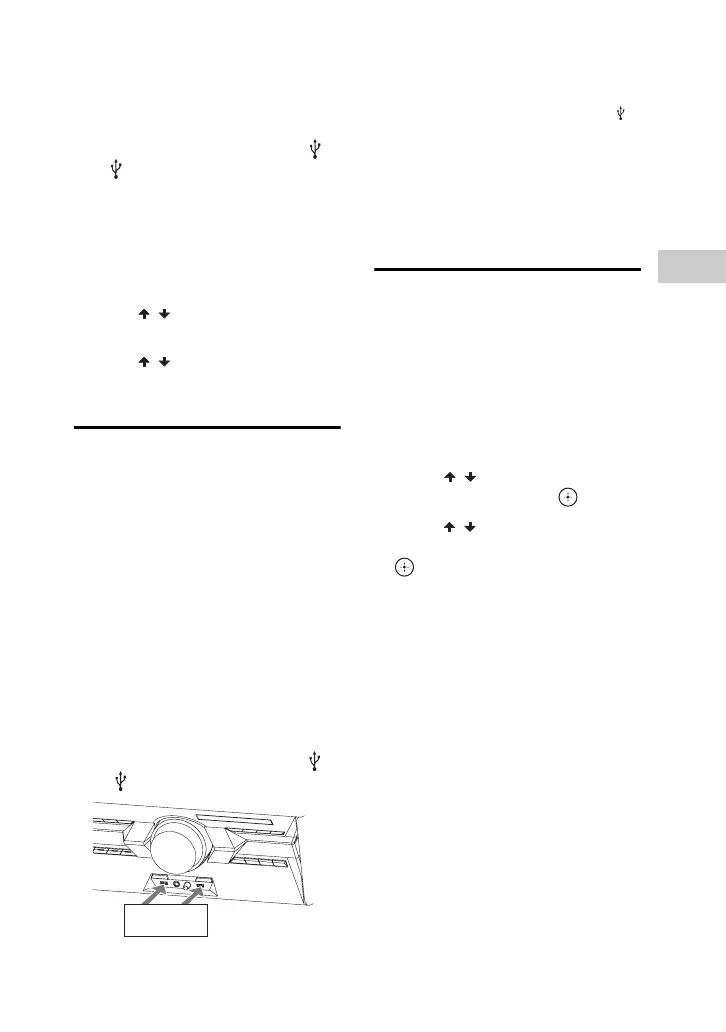
1 Connect the USB device to the A
or B port.
2 Press USB/USB SELECT
repeatedly until “USB A” or “USB B”
lights up in the display panel.
3 Press OPTIONS when playback is
stopped.
4 Press / to select “USB MEM
SEL”, then press ENTER.
5 Press / to select the memory
you want, then press ENTER.
Playing a USB device
The audio formats that can be played back
by this system are as follows:
– MP3: file extension “.mp3”
– WMA: file extension “.wma”
– AAC: file extension “.m4a”, “.mp4” or
“.3gp”
If the audio files have the above file
extension but are not the respective
formats, the system may produce noise or
may malfunction.
1 Press USB repeatedly until
“USB A” or “USB B” lights up in
the display panel.
2 Connect a USB device to the A
or B port.
Note
You can use a USB adaptor (not supplied) to
connect the USB device to the unit if the
USB device cannot be plugged into the
port.
3 Press N.
The audio files are played back in
different orders depending on the play
mode.
Searching a track or
audio file
(Track Search)
1 Press SEARCH.
“SEARCH” lights up in the display
panel.
2 (Audio files only)
Press / to select the folder
you want, then press or N.
3 Press / to select the track or
audio file you want, then press
or N.
The selected track or audio file starts
playback.
Notes on disc
• (For AUDIO CD) This system can recognize
up to 99 tracks.
• (For MP3 dics) This system can recognize up
to
– 999 folders (including root folder).
– 999 MP3 files.
– 250 MP3 files in a folder.
– 8 folders levels (tree structure of files).
• CD-TEXT information is not supported.
Notes on USB device
• This system can recognize up to
– 250 audio files in a folder.
– 3,000 audio files in a USB device.
– 1,000 folders in a USB device (including
root folder).
USB device



 To Next Page