EasyManua.ls Logo

Sony SL-5000 - 1-2-2. Connecting the TV Receiver

Sony SL-5000
81 pages
Print Icon
To Next Page IconTo Next Page
To Previous Page IconTo Previous Page
Loading...
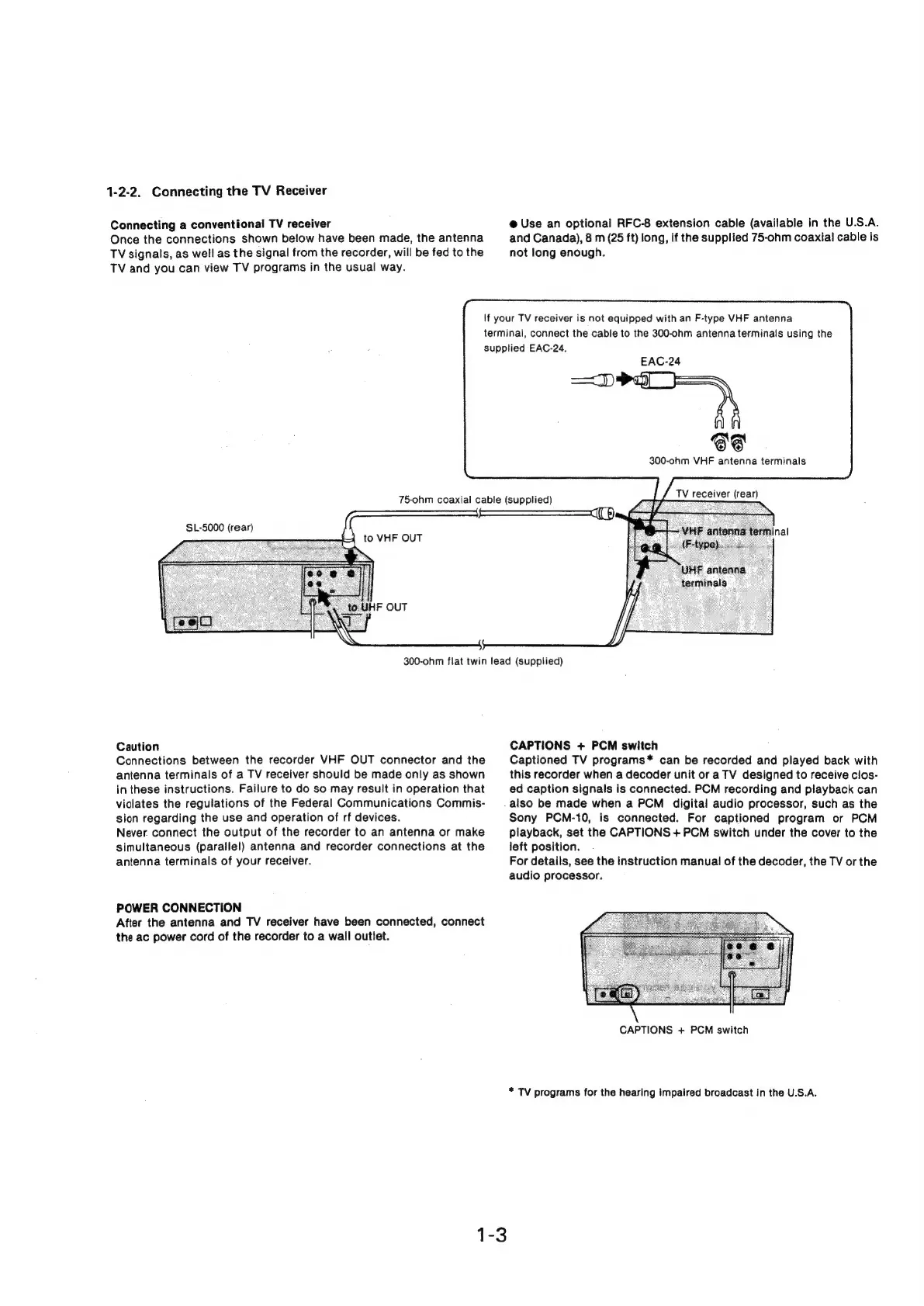
1-2-2.
Connecting
the
TV
Receiver
Connecting
a
conventional
TV
receiver
Once
the
connections
shown
below
have
been
made,
the
antenna
TV
signals,
as
well
as
the
signal
from
the
recorder,
will
be
fed
to
the
TV
and you
can
view
TV
programs
in
the
usual
way.
@
Use
an
optional
RFC-8
extension
cable
(available
in
the
U.S.A.
and
Canada),
8
m
(25
ft)
long,
if
the
supplied
75-ohm
coaxial
cable
is
not
long
enough.
75-ohm
coaxial
cable
(supplied)
If
your
TV
receiver
is
not
equipped
with
an
F-type
VHF
antenna
terminal,
connect
the
cable
to
the
300-ohm
antenna
terminals
using
the
supplied
EAC-24,
ape
EAC-24
66
300-ohm
VHF
antenna
terminals
TV
receiver
(rear)
Inal
'UHF
antenna
terminals
300-ohm
flat
twin lead
(supplied)
Caution
Connections
between
the
recorder
VHF
OUT
connector
and
the
antenna
terminals
of
a
TV
receiver
should
be
made
only
as
shown
in
these
instructions.
Failure
to
do
so
may
result
in
operation
that
violates
the
regulations
of
the
Federal
Communications
Commis-
sion
regarding
the
use
and
operation
of
rf
devices.
Never
connect
the
output
of
the
recorder
to
an
antenna
or
make
simultaneous
(parallel)
antenna
and
recorder
connections
at
the
antenna
terminals
of
your
receiver.
POWER
CONNECTION
After
the
antenna
and
TV
receiver
have
been
connected,
connect
the
ac
power
cord
of
the
recorder
to
a
wall
outlet.
CAPTIONS
+
PCM
switch
Captioned
TV
programs*
can
be
recorded
and
played
back
with
this
recorder
when
a
decoder
unit
or
a
TV
designed
to
receive
clos-
ed
caption
signals
is
connected.
PCM
recording
and
playback
can
also
be
made
when
a
PCM
digital
audio
processor,
such
as
the
Sony
PCM-10,
is
connected.
For
captioned
program
or
PCM
playback,
set
the
CAPTIONS
+
PCM
switch
under
the
cover
to
the
left
position.
For
details,
see
the
instruction
manual
of
the
decoder,
the
TV
or
the
audio
processor.
CAPTIONS
+
PCM
switch
*
TV
programs
for
the
hearing
impaired
broadcast
in
the
U.S.A.
1-3

Related product manuals