EasyManua.ls Logo

Sony SL-5000 - 1-2-3. Connections to a Cable TV (CATV) System

Sony SL-5000
81 pages
Print Icon
To Next Page IconTo Next Page
To Previous Page IconTo Previous Page
Loading...
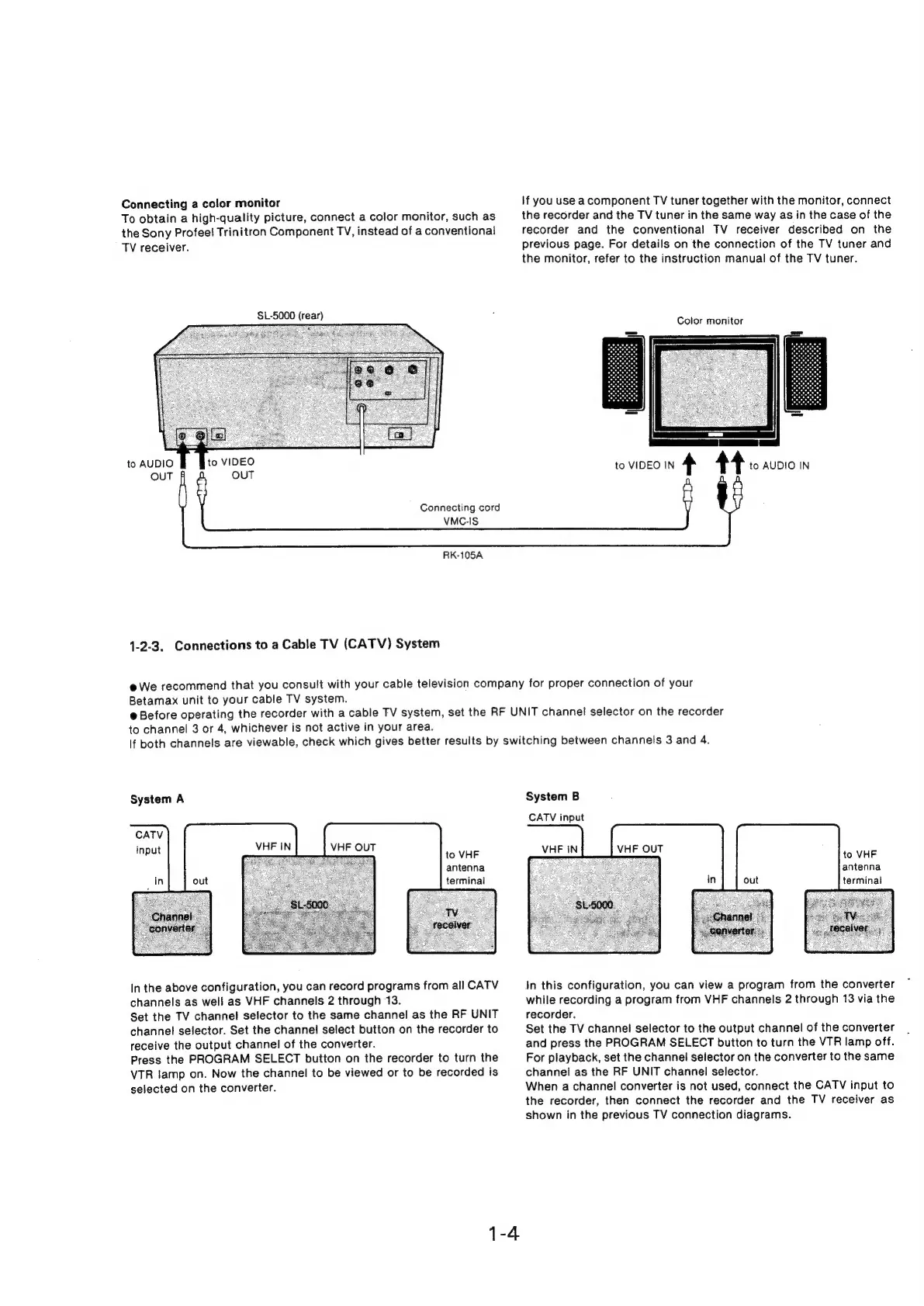
Connecting
a
color
monitor
To
obtain
a
high-quality
picture,
connect
a
color
monitor,
such
as
the
Sony
Profeel
Trinitron
Component
TV,
instead
of
a
conventional
TV
receiver.
$L-5000
(rear)
to
AUDIO
OUT
VMC-IS
RK-105A
1-2-3.
Connections
to
a
Cable
TV
(CATV)
System
Connecting
cord
If
you
use
a
component
TV
tuner
together
with
the
monitor,
connect
the
recorder
and
the
TV
tuner
in
the
same
way
as
in
the
case
of
the
recorder
and
the
conventional
TV
receiver
described
on
the
previous
page.
For
details
on
the
connection
of
the
TV
tuner
and
the
monitor,
refer
to
the
instruction
manual
of
the
TV
tuner.
Color
monitor
[|
to
VIDEO
IN
4
44
to
AUDIO
IN
@
We
recommend
that
you
consult
with
your
cable
television
company
for
proper
connection
of
your
Betamax
unit
to
your
cable
TV
system.
@
Before
operating
the
recorder
with
a
cable
TV
system,
set
the
RF
UNIT
channel
selector
on
the
recorder
to
channel
3
or
4,
whichever
is
not
active
in
your
area.
If
both
channels
are
viewable,
check
which
gives
better
results
by
switching
between
channels
3
and
4.
System
A
VHF
OUT
~
to
VHF
antenna
terminal
In
the
above
configuration,
you
can
record
programs
from
all
CATV
channels
as
well
as
VHF
channels
2
through
13.
Set
the
TV
channel
selector
to
the
same
channel
as
the
RF
UNIT
channel
selector.
Set
the
channel
select
button
on
the
recorder
to
receive
the
output
channel
of
the
converter.
Press
the
PROGRAM
SELECT
button
on
the
recorder
to
turn
the
VTR
lamp
on.
Now
the
channel
to
be
viewed
or
to
be
recorded
is
selected
on
the
converter.
1-4
System
B
CATV
input
to
VHF
antenna
terminal
In
this
configuration,
you
can
view
a
program
from
the
converter
while
recording
a
program
from
VHF
channels
2
through
13
via
the
recorder.
Set
the
TV
channel
selector
to
the
output
channel
of
the
converter
and
press
the
PROGRAM
SELECT
button
to
turn
the
VTR
lamp
off.
For
playback,
set
the
channel
selector
on the
converter
to
the
same
channel
as
the
RF
UNIT
channel
selector.
When
a
channel
converter
is
not
used,
connect
the
CATV
input
to
the
recorder,
then
connect
the
recorder
and
the
TV
receiver
as
shown
in
the
previous
TV
connection
diagrams.

Related product manuals