EasyManua.ls Logo

Sony SL-5000 - 1-4. Setting Recorder Channels; Setting Recorder Channels to Local TV Stations

Sony SL-5000
81 pages
Print Icon
To Next Page IconTo Next Page
To Previous Page IconTo Previous Page
Loading...
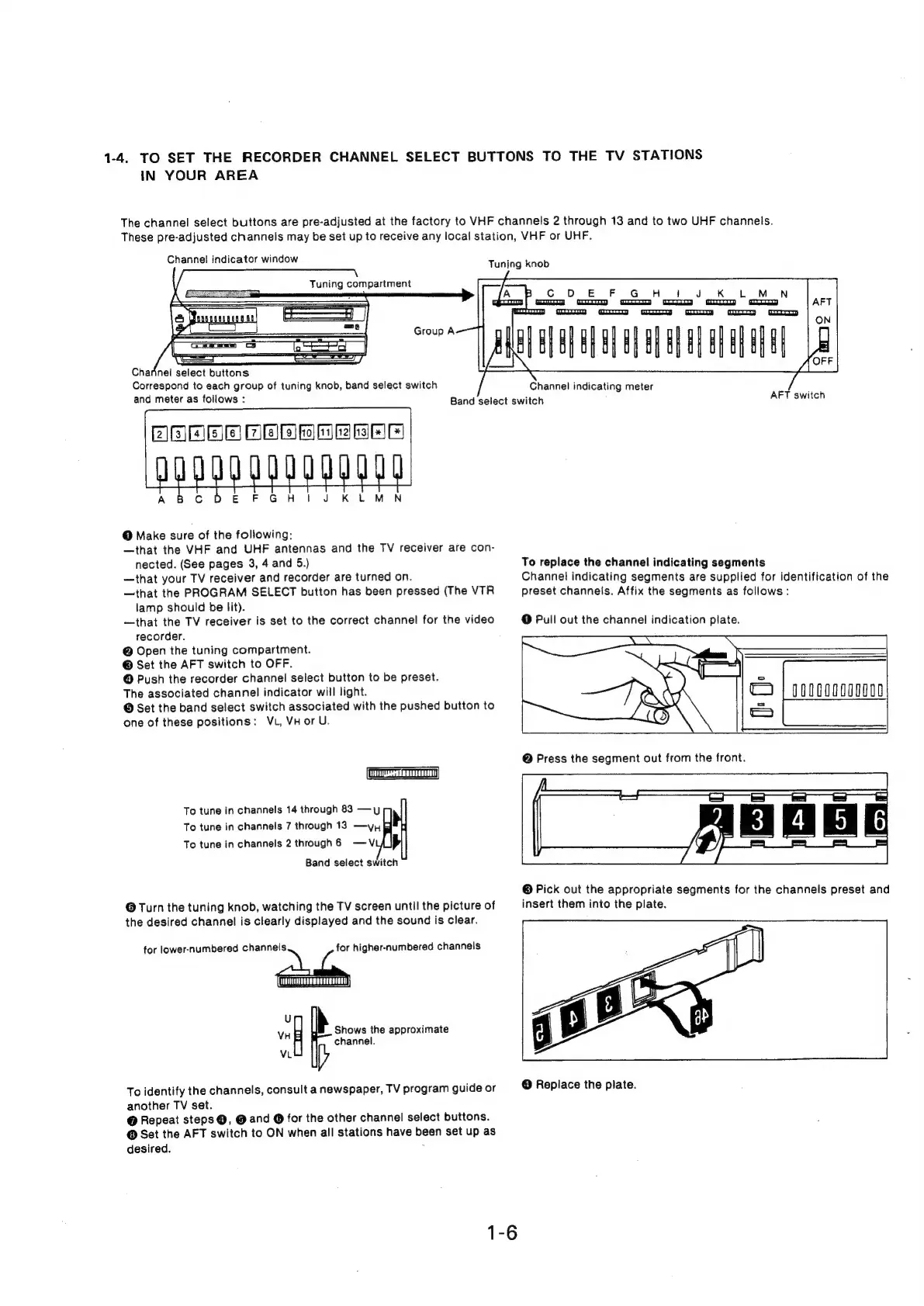
1-4.
TO
SET
THE
RECORDER
CHANNEL
SELECT
BUTTONS
TO
THE
TV
STATIONS
IN
YOUR
AREA
The
channel
select
buttons
are
pre-adjusted
at
the
factory
to
VHF
channels
2
through
13
and
to
two
UHF
channels.
These
pre-adjusted
channels
may
be
set
up
to
receive
any
local
station,
VHF
or
UHF.
Channel
indicator
window
Tuning
compartment
Charinei
select
buttons
Correspond
to
each
group
of
tuning
knob,
band
select
switch
and
meter
as
follows
:
@
Make
sure
of
the
following:
—that
the
VHF
and
UHF
antennas
and
the
TV
receiver
are
con-
nected.
(See
pages
3,
4
and
5.)
—that
your
TV
receiver
and
recorder
are
turned
on.
—that
the
PROGRAM
SELECT
button
has
been
pressed
(The
VTR
lamp
should
be
lit).
—that
the
TV
receiver
is
set
to
the
correct
channel
for
the
video
recorder.
@
Open
the
tuning
compartment.
©
Set
the
AFT
switch
to
OFF.
@
Push
the
recorder
channel
select
button
to
be
preset.
The
associated
channel
indicator
will
light.
@
Set
the
band
select
switch
associated
with
the
pushed
button
to
one
of
these
positions:
Vu,
VH
or
U.
To
tune
in
channels
14
through
83
—y
To
tune
in
channels
7
through
13
—yy
To
tune
in
channels
2
through
6
—V
Band
select
switch
@
Turn
the
tuning
knob,
watching
the
TV
screen
until
the
picture
of
the
desired
channel
is
clearly
displayed
and
the
sound
is
clear.
for
lower-numbered
ee
-
higher-numbered
channels
“9
Ih
VH
Shows
the
approximate
channel.
VL
To
identify
the
channels,
consult
a
newspaper,
TV
program
guide
or
another
TV
set.
@
Repeat
steps
@,
@
and
@
for
the
other
channel
select
buttons.
@
Set
the
AFT
switch
to
ON
when
all
stations
have
been
set
up
as
desired.
:
1-6
Tuning
knob
Band
select
switch
Channel
indicating
meter
AFT
switch
To
replace
the
channel
indicating
segments
Channel
indicating
segments
are
supplied
for
identification
of
the
preset
channels.
Affix
the
segments
as
follows
:
@
Pull
out
the
channel
indication
plate.
©
Pick
out
the
appropriate
segments
for
the
channels
preset
and
insert
them
into
the
plate.
@
Replace
the
plate.

Related product manuals