EasyManua.ls Logo

Sony SL-HF400 - Connection to an Audio Syst@M

Sony SL-HF400
30 pages
Print Icon
To Next Page IconTo Next Page
To Previous Page IconTo Previous Page
Loading...
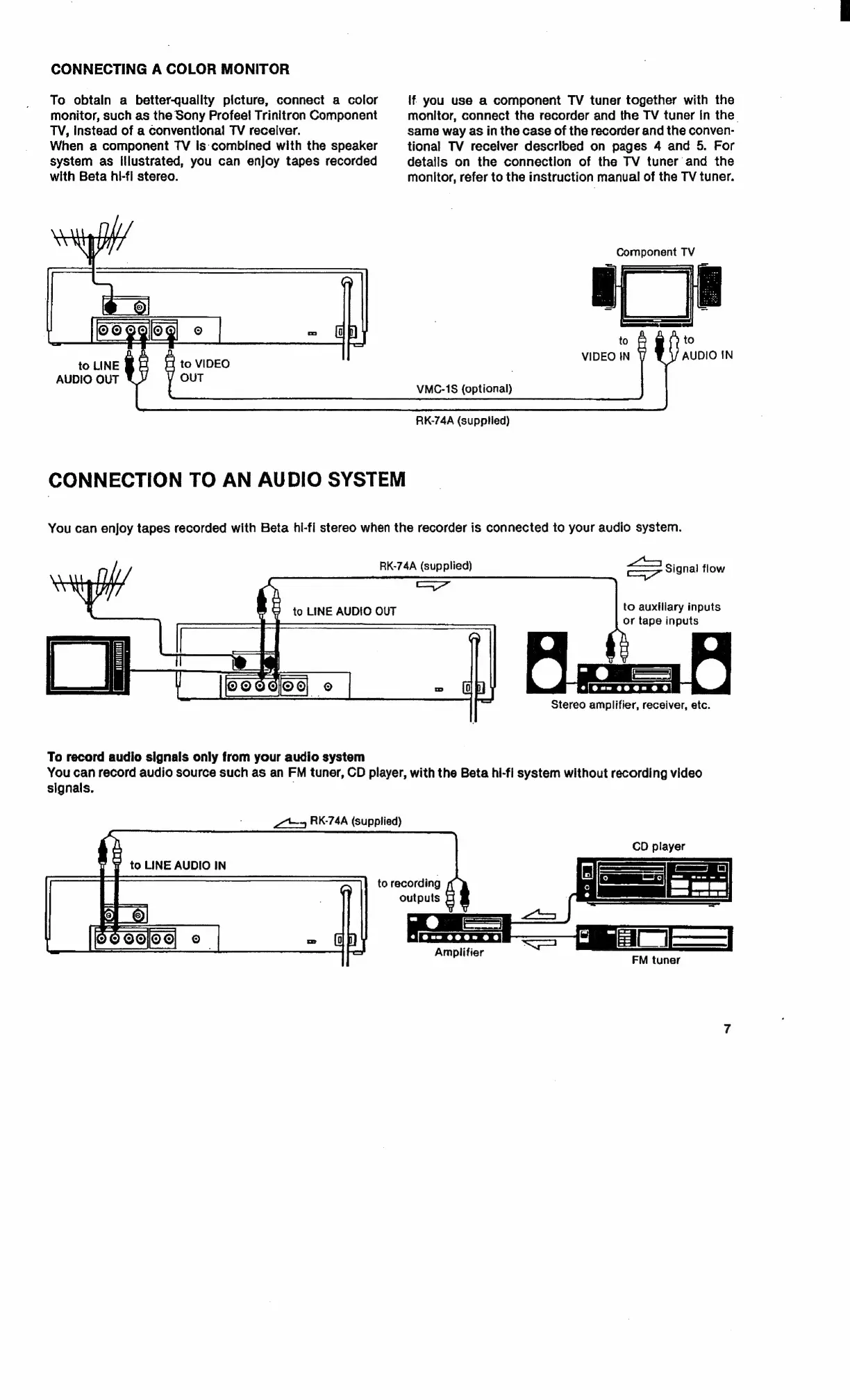
CONNECTING
A
COLOR
MONITOR
To
obtain
a
better-quality
picture,
connect
a
color
if
you
use
a
component
TV
tuner
together
with
the
monitor,
such
as
the
Sony
Profee!
Trinitron
Component
monitor,
connect
the
recorder
and
the
TV
tuner
in
the.
TV,
instead
of
a
conventional
TV
receiver.
same
way
as
in
the
case
of
the
recorder
and
the
conven-
When
a
component
TV
is:
combined
with
the
speaker
tional
TV
receiver
described
on
pages
4
and
5.
For
system
as
Illustrated,
you
can
enjoy
tapes
recorded
details
on
the
connection
of
the
TV
tuner
and
the
with
Beta
hi-fi
stereo.
monitor,
refer
to
the
instruction
manual
of
the
TV
tuner.
ty
Component
TV
=
rT
CS)
2
=
OF
oA
Ee
VIDEO
IN
AUDIO
IN
to
LINE
BE
4
to
VIDEO
Y
OUT
AUDIO
OUT
:
VMC-1S
(optional)
RK-74A
(supplied)
CONNECTION
TO
AN
AUDIO
SYSTEM
You
can
enjoy
tapes
recorded
with
Beta
hi-fl
stereo
when
the
recorder
is
connected
to
your
audio
system.
f,
|
RK-74A
(supplied)
Primo
Signal
flow
NLA
TY,
Ni
"
ee
|
2
to
LINE
AUDIO
OUT
to
auxiliary
inputs
or
tape
inputs
Te
Stereo
amplifier,
receiver,
etc.
To
record
audio
signals
only
from
your
audio
system
You
can
record
audio
source
such
as
an
FM
tuner,
CD
player,
with
the
Beta
hi-fi
system
without
recording
video
signals.
~~
RK-74A
(supplied)
CD
player
to
LINE
AUDIO
IN
to
recording
outputs
o|
ror.)
(s)
Amplifier
FM
tuner

Related product manuals