EasyManua.ls Logo

Sony SLV-SE210B - User Manual

Sony SLV-SE210B
52 pages
Print Icon
To Next Page IconTo Next Page
Loading...
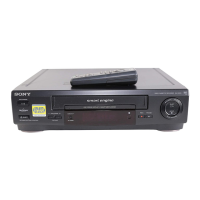
Photo: SLV-SE210
SLV-SE210B/SE210D/SE210G/
SX110A/SX110B
RMT-V257D/V257E
SERVICE MANUAL
France Model
SLV-SE210B/SX110B
Italy Model
Germany Model
North Europe Model
SLV-SE210D/SX110A
UK Model
SLV-SE210G
VIDEO CASSETTE RECORDER
SPECIFICATIONS
Refer to the SERVICE MANUAL of VHS
MECHANICAL ADJUSTMENT MANUAL
VII for MECHANICAL ADJUSTMENTS.
(9-921-790-11)
TS-10 MECHANISM
System
Channel coverage
PAL (I): (SLV-SE210G)
UHF B21 to B69
PAL (B/G)
(SLV-SE210B/SE210D/SX110B/
SX110A):
VHF E2 to E12
Italiens VHF A to H
UHF E21 to E69
CATV S01 to S05, S1 to S20
HYPER S21 to S41
SECAM (L)
(SLV-SE210B/SX110B):
VHF F2 to F10
UHF F21 to F69
CATV B to Q
HYPER S21 to S41
RF output signal
(SLV-SE210G/SE210D/SX110D)
UHF channels 21 to 69
Aerial out
75-ohm asymmetrical aerial socket
Tape speed
SP: PAL 23.39 mm/s
(recording/playback)
NTSC 33.35 mm/s
(playback only)
SECAM
(SLV-SE210B/SX110B)
23.39 mm/s
(recording/playback)
MESECAM
(SLV-SE210B/SE210D/SX110B/
SX110D)
23.39 mm/s
(recording/playback)
LP: PAL (SLV-SE210G)
11.70 mm/s
(recording/playback)
NTSC (SLV-SE210G)
16.67 mm/s
(playback only)
Maximum recording/playback time
10 hrs. in LP mode (with E300 tape)
(SLV-SE210G)
5 hrs. in SP mode (with E300 tape)
Rewind time
Approx. 60 sec. (with E180 tape)
Inputs and outputs
AV1 (EURO AV)
21-pin
Video input: pin 20
Audio input: pins 2 and 6
Video output: pin 19
Audio output: pins 1 and 3
AV2 IN (SLV-SE210B/SE210D)
21-pin
Video input: pin 20
Audio input: pins 2 and 6
General
Power requirements
240 V: (SLV-SE210G)
230 V: (SLV-SE210B/SE210D/
SX110A/SX110B)
AC, 50 Hz
Power consumption
15 W
3 W (ECO. MODE is set to ON,
Standby mode)
Operating temperature
5 C to 40 C
Storage temperature
–20 C to 60 C
Dimensions
Approx. 360 × 94 × 255 mm (w/h/d)
including projecting parts and controls
Mass
Approx. 2.8 kg (SLV-SE210G)
Approx. 2.6 kg (SLV-SE210B/
SE210D/SX110A/SX110B)
Supplied accessories
Remote commander (1)
R6 (size AA) batteries (2)
Aerial cable (1)
PERITEL cable (1)
(SLV-SE210B/SX110B)
Design and specifications are subject to
change without notice.

w
w
w
.
x
i
a
o
y
u
1
6
3
.
c
o
m
Q
Q
3
7
6
3
1
5
1
5
0
9
9
2
8
9
4
2
9
8
T
E
L
1
3
9
4
2
2
9
6
5
1
3
9
9
2
8
9
4
2
9
8
0
5
1
5
1
3
6
7
3
Q
Q
TEL 13942296513 QQ 376315150 892498299
http://www.xiaoyu163.com

Table of Contents

Questions and Answers

  • J
    Jennifer WilliamsSep 10, 2025
    What to do if Sony SLV-SE210B VCR power is on but not operating?
    • B
      Becky MartinezSep 12, 2025
      If the power is on but the VCR isn't operating, moisture condensation may have occurred. Turn the power off, unplug the mains lead, and let the VCR dry for over three hours.
  • E
    Eric ClarkAug 23, 2025
    Why doesn't the timer work on my Sony SLV-SE210B?
    • K
      Kelly Mills DDSAug 23, 2025
      Several factors can prevent the timer from operating correctly. Ensure the clock is set, a tape is inserted, and the safety tab hasn't been removed from the tape. Also, verify the tape isn't at its end, a program has been set for timer recording, and your timer settings are past the current time. If the VCR was disconnected from the mains for over an hour, reset the clock and timer. As a last resort, turn the power off and unplug the mains lead.
  • T
    Tracy JonesAug 25, 2025
    How to improve picture quality on Sony SLV-SE210B?
    • D
      diane46Aug 25, 2025
      If your picture isn't clear, try resetting the RF channel output of your VCR, as existing broadcasts may be interfering. Adjust the tracking using the PROGRAM +/– buttons on the VCR. Also, the video heads may be dirty; clean them using a Sony T-25CLD, E-25CLDR, or T-25CLW video head cleaning cassette. Avoid using other commercially available liquid cleaning cassettes, as they may damage the video heads. If the problem persists, the video heads may need replacement by a Sony service facility.
  • B
    Bianca HarrisAug 27, 2025
    What to do if playback picture doesn't appear on Sony SLV-SE210B?
    • B
      Billy FuentesAug 27, 2025
      First, make sure the TV is set to the video channel. If you are using a monitor, set it to video input. Also, if the VCR is connected to the TV with the Scart cable, ensure the VCR indicator is lit in the display window by using the t TV/VIDEO button on the remote.
  • J
    Jaime HamiltonAug 28, 2025
    Why is my Sony SLV-SE210B remote not working?
    • E
      Erika LeeAug 28, 2025
      If the remote isn't working, ensure you're pointing it at the remote sensor on the VCR. Replace the batteries with new ones if they are weak. Also, check that the [TV] / [VIDEO] remote control switch is set correctly.
  • T
    travis78Aug 29, 2025
    Why isn't the VPS/PDC function working on my Sony SLV-SE210B VCR?
    • H
      Heather TuckerAug 29, 2025
      Several factors can affect the VPS/PDC function. First, ensure the clock and date are set correctly. Next, verify the VPS/PDC time you set is accurate. If the broadcast didn't send the correct VPS/PDC information or if reception is poor, the VCR might not start recording.
  • B
    Brenda RiveraSep 18, 2025
    How to clean my Sony SLV-SE210B VCR?
    • T
      thomassmithSep 18, 2025
      Clean the cabinet, panel, and controls with a dry, soft cloth, or a soft cloth slightly moistened with a mild detergent solution. Do not use any type of solvent, such as alcohol or benzine.
  • C
    carrangelaSep 12, 2025
    How to fix vertical rolling during picture search on Sony VCR?
    • J
      Jeffrey BeardSep 12, 2025
      If the picture rolls vertically during picture search, adjust the vertical hold control on the TV or monitor.
  • F
    fwalshSep 8, 2025
    What to do if the power switch doesn't work on Sony SLV-SE210B VCR?
    • S
      Sydney RamirezSep 8, 2025
      If the power switch isn't functioning, connect the mains lead to the mains securely.
  • C
    Christine RobinsonSep 5, 2025
    Why does my Sony SLV-SE210B VCR eject the tape when I press record?
    • S
      Sarah FrazierSep 5, 2025
      If the tape is ejected when you press record, the safety tab has been removed. To record on this tape, cover the tab hole.

Sony SLV-SE210B Specifications

General IconGeneral
TypeVCR
Video FormatVHS
Playback SpeedSP, LP, EP
Number of Heads4
Remote ControlYes
Recording SpeedSP, LP
InputsAntenna
OutputsComposite, RF

Related product manuals