–
5
–
3. EEPROM INITIALIZATION AND DISCHARGING THE BACKUP CAPACITOR
3-1. NV-RAM (EEPROM) Initialization Clear the EEPROM Using the TEST Button on the JIG Remote Controller
1) Plug the VCR into the mains.
Switch on the VCR by pressing (ON/STANDBY) on the remote controller.
2) Press (TEST) button on the JIG remote controller and released.
3) Within 2 seconds, press the (CLEAR) button on the remote controller.
Result: The EEPROM will be cleared.
4) During the clearing, the “TEST” indication flashes on the front of the VCR.
The process will finish after a few seconds.(2-3 seconds)
5) After exiting the display “TEST” to normal display.
6) Press the (ON/STANDBY) button to switch off the VCR.
7) Disconnect the power supply the VCR.
It is important that you make sure ;
Do not plug the VCR into the mains after clearing EEPROM to ensure that Auto set up procedure works correctry for end users.
3-2. NV-RAM (EEPROM) Initialization Clear the EEPROM without Using the TEST Button on the JIG Remote Controller
1) Plug the VCR into the mains.
Switch on the VCR by pressing (ON/STANDBY) on the remote controller.
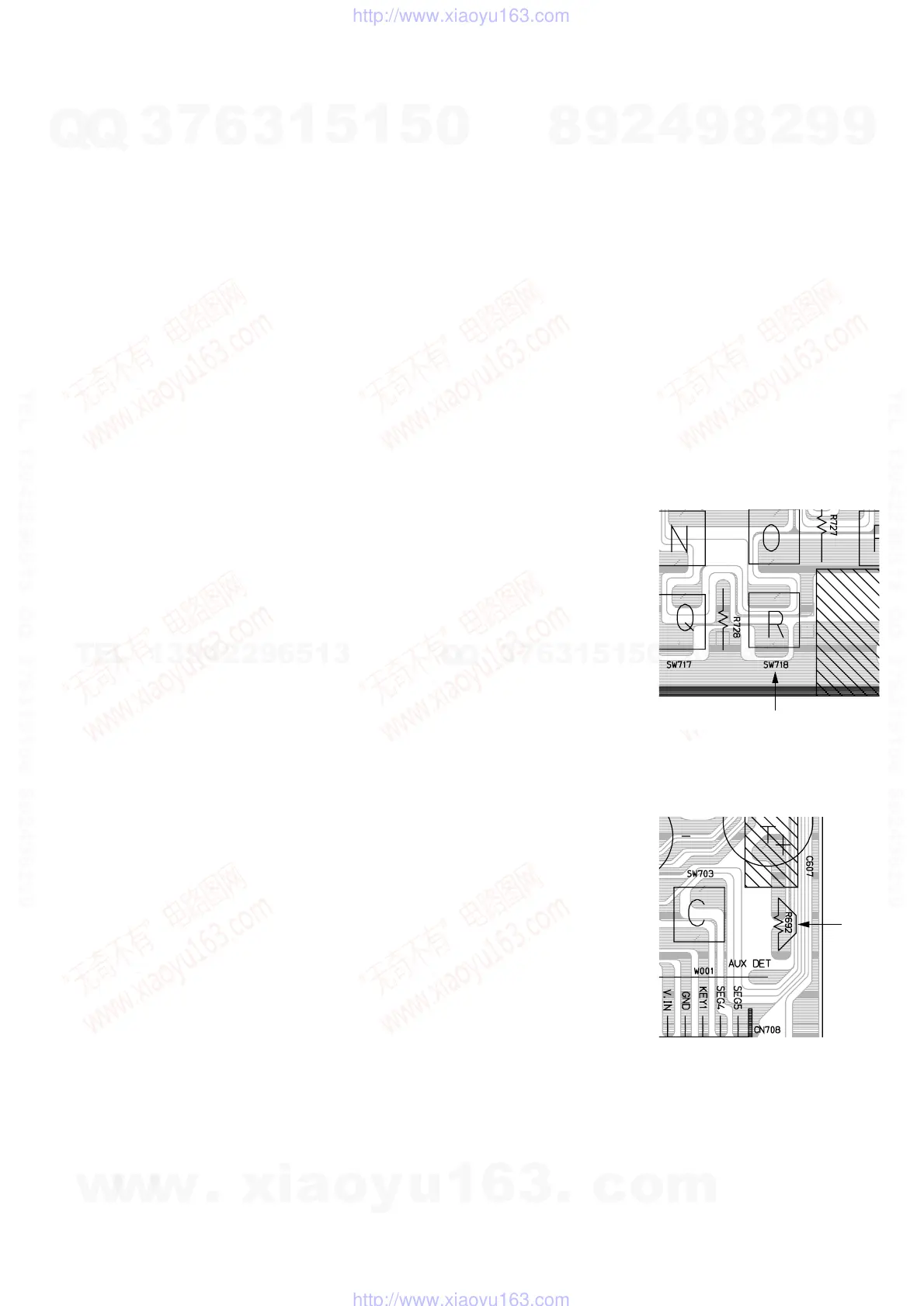
2) Press the TACT switch (SW718) on the main PCB and released.
3) Within 2 seconds, press the (CLEAR) button on the remote controller.
Result: The EEPROM will be cleared.
4) During the clearing, the “TEST” indication flashes on the front of the VCR.
The process will finish after a few seconds.(2-3 seconds)
5) After exiting the display “TEST” to normal display.
6) Press the (ON/STANDBY) button to switch off the VCR.
7) Disconnect the power supply the VCR.
It is important that you make sure ;
Do not plug the VCR into the mains after clearing EEPROM to ensure that Auto set up procedure works correctry for end users.
3-3. MICOM RESET (Backup Release)
The automatic adjustment cannot be executed unless the backup battery is discharged even if the
memory is initialized.
Release the backup power as follows only when the adjustment is going to be mode in an ealier
time after the power is turned off.
1) Open the Top cabinet.
2) Short the R692 to TU Shield GND for a few seconds. (1 or 2 seconds)
3) Now the VCR all cleared EEPROM and reseted MICOM same as factory pre-set.



 To Next Page