Getting Started
28
US
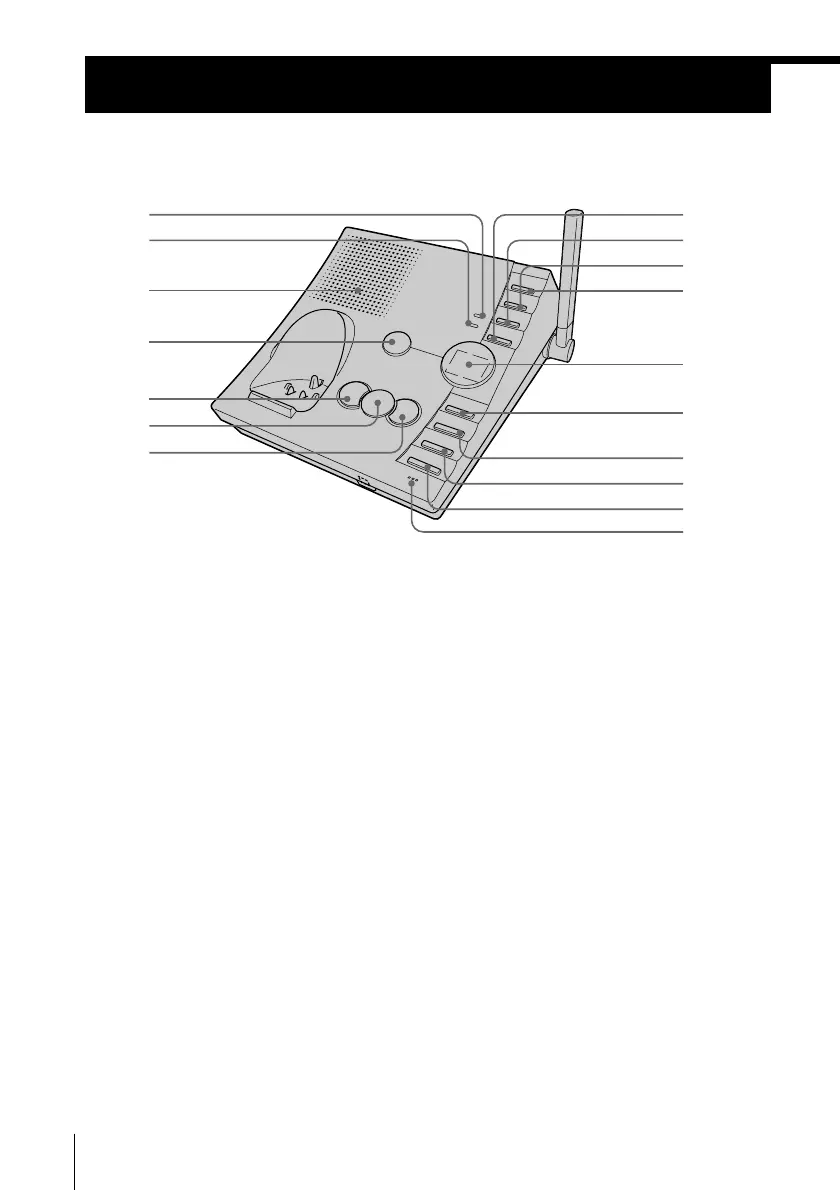
Identifying the parts
Refer to the pages indicated in parentheses for details.
Base unit
1 CHARGE lamp (p. 14)
Lights while the battery is being
charged.
2 IN USE lamp (p. 32)
Lights when the handset is in use.
3 Speaker
4 ANSWER ON/OFF button
(p. 59, 60)
Turns the answering function on or
off. Lights when the answering
function is on, and flashes when a
new message is recorded.
5 REPEAT ./REVIEW button
(p. 61)
Press once to repeat the current
message or twice to go back to the
previous message.
Keep the button pressed for a
playback review of the current
message.
6 MESSAGE PLAY/STOP button
(p. 60)
Plays back recorded messages.
7 SKIP >/QUICK button (p. 61)
Press to skip to the next message.
Keep the button pressed for quick
playback of messages.
8 ERASE button (p. 24, 63)
9 MEMO REC button (p. 65)
Records a memo message.
0 VOL – button (p. 61)
Adjusts the speaker volume.
qa VOL + button (p. 61)
Adjusts the speaker volume.
qa
0
9
qs
qd
qf
qj
qh
qg
3
4
5
8
2
1
6
7



 To Next Page