46
US
Telephone Features
Phone Directory (continued)
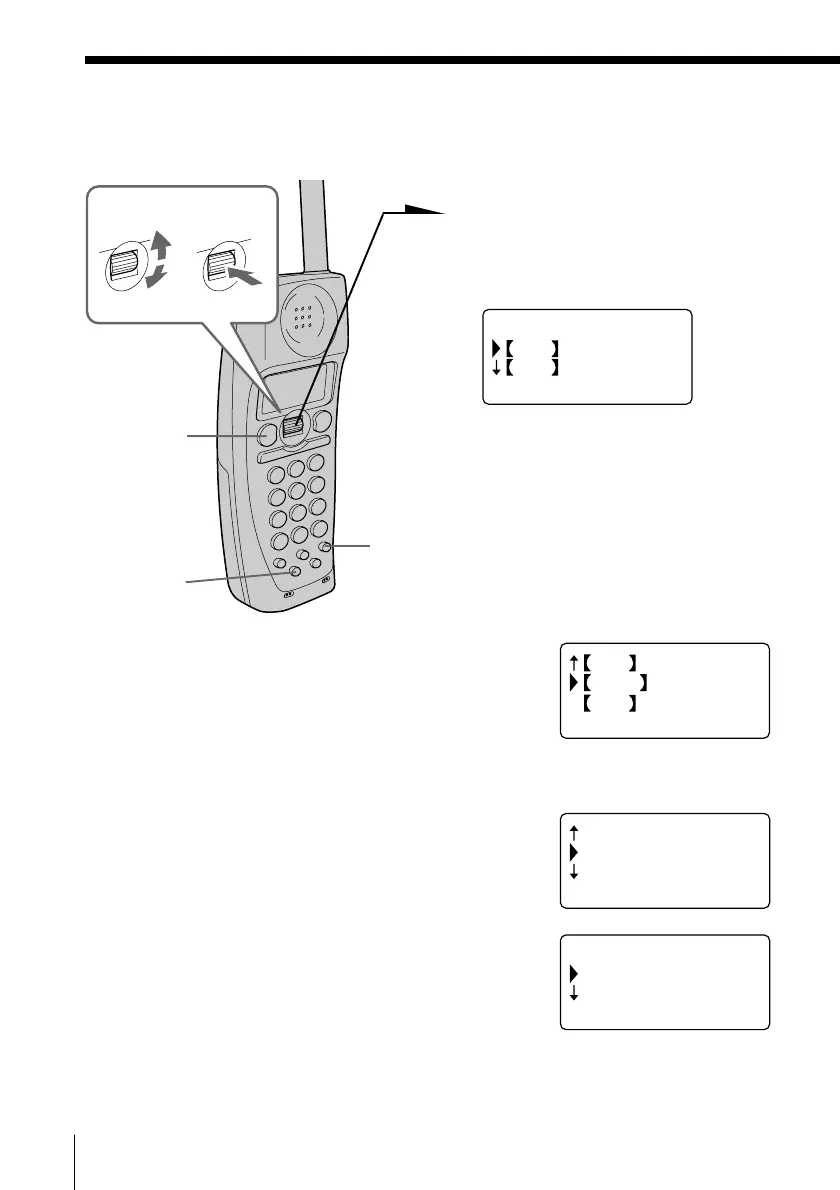
Making calls from the Phone Directory
1 Press Jog Dial.
“PHONE DIRECTORY”
appears on the display.
2 Turn Jog Dial to select an alphabet group
([ABC], [DEF]...) which includes the initial
character of the name you want to search for,
and then press Jog Dial.
If a numbers or a symbol is the initial character,
select the “[etc]” group.
3 Select the name you want to call by turning Jog
Dial.
4 Press Jog Dial.
PHONE DIRECTORY
ABC
DEF
RING OFFMASSAGEOLDNEW
Turn Press
(TALK)
(PGM)
(EZ ACCESS)
TUV
WXYZ
etc
RING OFFMASSAGEOLDNEW
BROWN JOHN
SONY
SMITH JOHN
RING OFFMASSAGEOLDNEW
(GO BACK)
DIAL
EDIT
RING OFFMASSAGEOLDNEW


 To Next Page
 Loading...






