64
US
Caller ID Features
Using the Caller ID list
By using the Caller ID list, you can call back a phone number from the
Caller ID list easily or store numbers from the Caller ID list into the
Phone Directory.
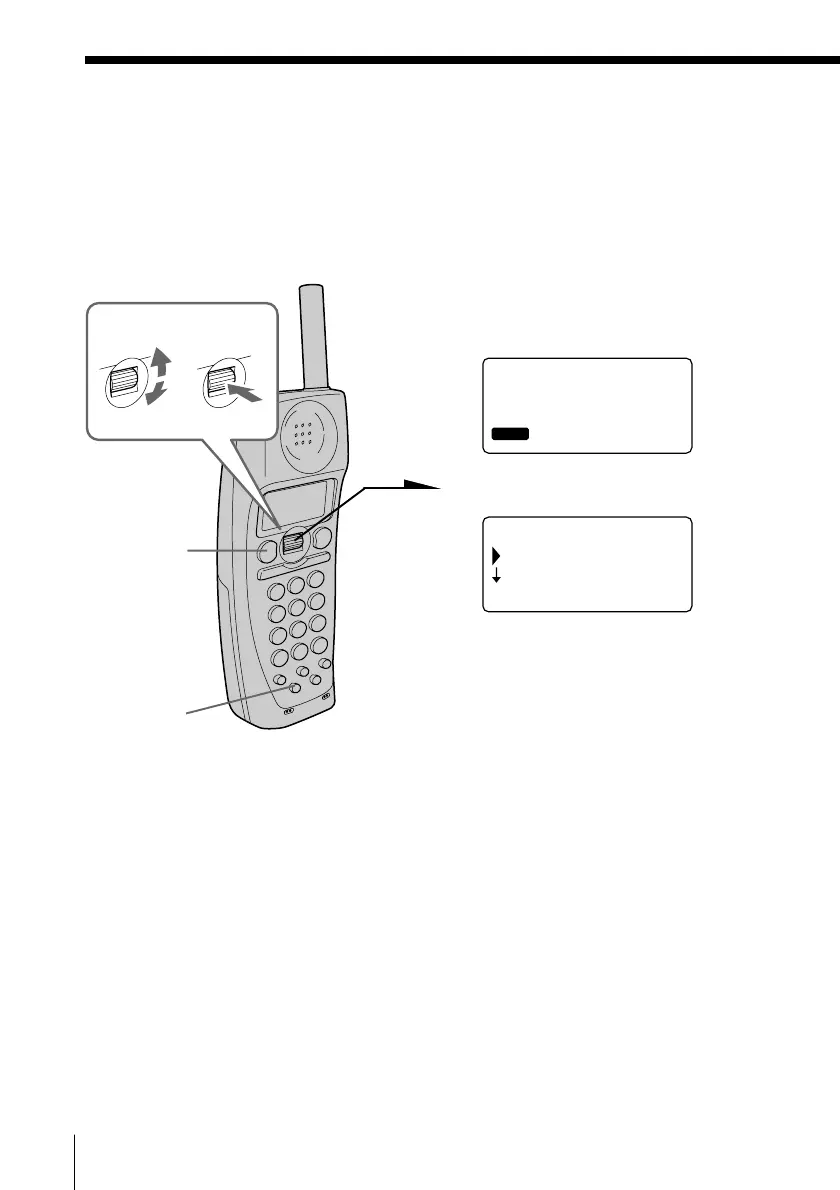
Calling back a number from the Caller ID list
1 Display the phone number you
want to call from the Caller ID
list (see page 61).
2 Press Jog Dial.
3 Turn Jog Dial to choose “DIAL”,
and then press Jog Dial.
The phone automatically dials
the displayed number.
Notes
• If the area code is not entered, “ENTER AREA CODE” will appear on the
display, and you will not be able to call back. Enter the area code (see page
17).
• Do not allow more than 60 seconds to elapse during the operation procedure.
• If the number displayed in step 1 is not the one you should call back, you can
change the number of digits of the phone number as described on page 66.
• If the phone is connected to a Private Branch Exchange (PBX), you may not
be able to call back from the Caller ID list because an outside line access digit
is necessary.
Tips
• You may press (TALK) on the cordless handset (on the base phone, pick up
the handset or press (SPEAKERPHONE)) to make a call instead of doing steps
2 and 3.
• If an access number of the long distance call is set up with the EZ access
function, you can add the access number to the phone number and make a
call by pressing (EZ ACCESS) after step 3. For setting up the EZ access
function, see page 23.
• When you select “(GO BACK)”, you can return to the previous set display by
pressing Jog Dial.
SMITH JOHN
1-201-123-4567
01 7.04 4:53PM
RING OFF
MASSAGEOLDNEW
(GO BACK)
DIAL
PROGRAM
RING OFFMASSAGEOLDNEW
(TALK)
(EZ ACCESS)
Turn Press


 To Next Page
 Loading...






