Need help?
Do you have a question about the Sony SRG 300 and is the answer not in the manual?
Discusses the limit of controlling up to 7 cameras with the Sony SRG 300 Device Core and recommendations for more.
Explains device configuration options, specifically VISCA over IP/Serial, and provides an example for setup.
Details the function of dip switches on the Sony SRG-300 for controlling IP or Serial connection.
Lists the various controllable actions for the Sony SRG-300 within the Device Core.
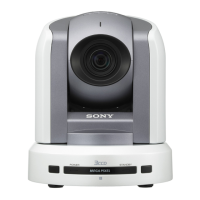
The Sony SRG-300 is a versatile PTZ (Pan-Tilt-Zoom) camera designed for professional video applications, offering extensive control capabilities and integration options. It's a robust device that can be seamlessly integrated into various control systems, particularly those utilizing SKAARHOJ controllers, to manage its numerous parameters.
At its core, the Sony SRG-300 functions as a high-definition color video camera with advanced robotic control over its pan, tilt, and zoom movements. This allows for dynamic shot composition and tracking in environments such as broadcast studios, conference rooms, educational facilities, and live event venues. The camera supports various video output formats, including 1080p, 1080i, and 720p, at different frame rates, making it adaptable to diverse production requirements.
The camera's primary control interface is through VISCA over IP or VISCA over Serial, enabling remote operation from a central control system. This flexibility in communication protocols ensures compatibility with a wide range of existing infrastructure. When using VISCA over IP, the camera can be directly connected to a network, allowing for control from any networked device running the appropriate software. For serial control, an Ethernet-to-Serial converter is required, bridging the gap between modern IP networks and traditional serial communication.
The device core for the Sony SRG-300, as implemented in SKAARHOJ controllers, exposes a comprehensive set of actions, allowing granular control over nearly every aspect of the camera's operation. These actions include fundamental movements like pan, tilt, and zoom, which can be controlled with varying speeds and in both continuous and binary modes. Beyond basic movements, the camera offers sophisticated image control features. Users can adjust exposure settings, including iris, shutter speed, and gain, to achieve optimal brightness and clarity in different lighting conditions. White balance controls, including one-push auto white balance and manual R/B gain adjustments, ensure accurate color reproduction. Further image refinement is possible through chroma suppress, aperture gain, noise reduction, and various picture effects.
The camera also supports preset management, allowing operators to store and recall specific camera positions and settings quickly. This is invaluable for fast-paced productions where rapid scene changes are necessary. Features like "Preset Drive" and "PTZ Cruise Control" enhance automation capabilities, enabling smooth transitions between predefined shots or automated sequences. "PTZ Trace" suggests the ability to record and replay complex pan, tilt, and zoom movements, further streamlining operations. "Speed Limit" controls the maximum speed of pan, tilt, and zoom movements, ensuring smooth and controlled camera operation.
The Sony SRG-300 is designed for ease of use within a professional workflow, especially when paired with SKAARHOJ controllers. The integration allows for the control of multiple cameras from a single device core, provided they have consecutive IP addresses, which simplifies setup and management for multi-camera productions. While the system is tested for up to 7 cameras per device core, the documentation advises against exceeding this limit without additional device cores due to potential performance and stability concerns.
Setting up the camera for control involves configuring the device core within the controller's firmware application. For IP control, the camera's IP address needs to be correctly set and recognized by the controller. For serial control, the "Device Core Options" in the controller's configuration page must be set to enable VISCA over Serial, typically through a code like "D0:0=1". This setting, along with the correct baud rate and serial type (RS232), must match the camera's physical dip switch settings and the Ethernet-to-Serial converter's configuration.
The camera features physical dip switches on its bottom panel, which are crucial for selecting the communication method (LAN or VISCA over Serial) and other operational parameters. These switches provide a hardware-level configuration that complements the software settings. For instance, specific dip switch combinations enable LAN control while disabling VISCA over Serial, or vice versa, ensuring that the camera communicates through the intended channel.
When using an Ethernet-to-Serial converter, such as the USR-TCP232-306, careful configuration is required. The converter's static IP address must match the IP settings of the SRG-300 Device Core. Additionally, the serial port settings on the converter, including baud rate, data size, parity, and stop bits, must align with the camera's requirements, typically 9600 baud rate and RS232 serial type for VISCA.
The "Serial Monitor" feature within the controller's Firmware Application is a vital diagnostic tool. It provides real-time feedback on the connection status and communication between the controller and the camera. This allows operators to confirm that the device configuration is correctly detected and that commands are being sent and received, aiding in troubleshooting any connection issues. Messages like "Connection to cam 1 established, pulling status" indicate a successful link.
The camera's ability to store and recall presets is a significant operational advantage. This allows for quick changes between different shots, such as wide-angle views, close-ups of speakers, or specific stage positions, without manual adjustment. The "Camera Select" action further enhances multi-camera setups, allowing operators to switch control between different SRG-300 units seamlessly.
While the manual primarily focuses on integration and operational setup, several aspects touch upon maintenance and troubleshooting. The "Serial Monitor" is a key tool for diagnosing communication problems. If the controller is not detecting the camera or if commands are not being executed, the serial monitor can display error messages or indicate a lack of communication, guiding the user towards the source of the problem.
Regular checks of the camera's physical dip switch settings are important, especially if communication issues arise or if the camera's control method needs to be changed. Ensuring these switches are set correctly according to the desired LAN or serial control mode is a fundamental step in troubleshooting.
For Ethernet-to-Serial converter setups, maintaining the correct IP address and serial port settings on the converter is crucial. Any changes to the network environment or the camera's serial configuration would necessitate re-checking and potentially re-configuring the converter. The web interface of the converter provides access to these settings, allowing for adjustments as needed.
The mention of "firmware application" and "check for updates" implies that the controller's firmware, and potentially the camera's firmware, may receive updates. Keeping the controller's firmware up-to-date is a general best practice for maintaining optimal performance, compatibility, and accessing new features or bug fixes. While not explicitly detailed for the camera's firmware, it's a common maintenance task for such devices.
The documentation also implicitly suggests a structured approach to multi-camera setups. By recommending against exceeding 7 cameras per device core and suggesting additional device cores for larger setups, it guides users towards configurations that are more likely to be stable and performant, thereby reducing potential maintenance headaches related to system overload or instability. The emphasis on consecutive IP addresses for multiple cameras also simplifies network management and troubleshooting in a multi-camera environment.
In summary, the Sony SRG-300 is a highly controllable PTZ camera with extensive features for image adjustment and robotic movement. Its integration with SKAARHOJ controllers offers a powerful and flexible control solution, supported by clear guidelines for setup, operation, and basic troubleshooting through tools like the serial monitor and careful configuration of both hardware (dip switches) and software (device core options, converter settings).
 General
| Image Sensor | 1/2.8-Type Exmor CMOS |
|---|---|
| Optical Zoom | 12x |
| Camera Type | PTZ |
| Horizontal Resolution | 1000 TV lines |
| Signal System | NTSC/PAL |
| Video Output | HD: HDMI, 3G-SDI |
| Audio Input | 1 channel, RCA pin jack |
| Audio Output | 1 channel, RCA pin jack |
| Storage Temperature | -20°C to +60°C (-4°F to +140°F) |


 To Next Page