Need help?
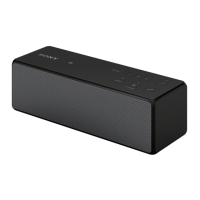
Do you have a question about the Sony SRS-X7 and is the answer not in the manual?
Provides instructions for connecting the unit to a Wi-Fi network using a smartphone or iPhone.
Details the process of connecting the unit to a Wi-Fi network using a router's WPS button.
Explains how to connect the unit to a Wi-Fi network using a personal computer and a LAN cable.
Guide to playing music from a PC using the Media Go software.
Instructions for playing music from a PC or Mac using iTunes and AirPlay.
Details how to play music from iPhone, iPod touch, or iPad using AirPlay.
Guide to accessing internet music services using the SongPal app on a smartphone or iPhone.
Resolving issues related to connecting the unit to a Wi-Fi or home network.
Addressing problems with distorted sound, humming, noise, or low sound levels.
Troubleshooting BLUETOOTH pairing with SongPal and iTunes AirPlay detection.
Guidance for issues when the I/O (on/standby) indicator is flashing red.
Procedure to check the Wi-Fi signal strength (reception sensitivity) of the unit.
Explanation of how to use the Bluetooth/Network standby function for automatic unit startup.
Steps to initialize the unit to factory defaults when troubleshooting fails.
Customizing sound settings like ClearAudio+ and other audio preferences via the app.
Accessing and enjoying various music services through the SongPal application.
Playing music stored on a PC or DLNA server over the network using the app.
Details on the wireless LAN antenna, volume, power, network, and Bluetooth pairing controls.
Description of the N-Mark, update button, network switches, reset button, WPS, LAN port, and power jack.
Information within the Help Guide on listening to music on PC/Mac devices.
Information within the Help Guide on listening to music on smartphones and Walkman devices.
Details on updating the unit's software covered in the Help Guide.
 General
| Product type | 2.1 portable speaker system |
|---|---|
| On/off switch | Yes |
| Product color | White |
| Volume control | Digital |
| Driver diameter | 48 mm |
| Woofer diameter | 62 mm |
| Number of drivers | - |
| Number of speakers | 1 |
| Audio output channels | 2.1 channels |
| Impedance | 8 Ω |
| Frequency range | - Hz |
| RMS rated power | 32 W |
| Bluetooth version | 3.0+HS |
| Bluetooth profiles | A2DP, AVRCP |
| USB 2.0 ports quantity | USB 2.0 ports have a data transmission speed of 480 Mbps, and are backwards compatible with USB 1.1 ports. You can connect all kinds of peripheral devices to them. |
| Connectivity technology | Wired & Wireless |
| Recommended usage | Mobile phone / Smartphone |
| Power source type | Battery |
| Battery life (max) | 6 h |
 Weight and Dimensions
| Depth | 60 mm |
|---|---|
| Width | 300 mm |
| Height | 132 mm |
| Weight | 1900 g |


 To Next Page