EasyManua.ls Logo

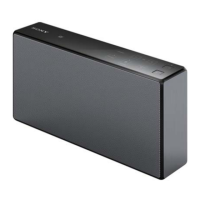
Sony SRS-X9 - User Manual

Sony SRS-X9
28 pages
Print Icon
To Next Page IconTo Next Page
Loading...
Personal Audio System
Enjoy Music over Your
Wi-Fi Network
Read this document first.
SRS-X9
Enjoy Music over Your
Wi-Fi Network
GB

Other manuals for Sony SRS-X9

Questions and Answers

  • K
    Kristina CarterAug 16, 2025
    What to do if there is no sound or low sound level on my Sony Stereo System?
    • D
      Dr. Chloe ContrerasAug 16, 2025
      If you're experiencing no sound or a low sound level, verify that both your Sony Stereo System and the connected device are powered on. Also, check that the connected device is playing audio and increase the volume on both the unit and the connected device.
  • D
    Don CastilloAug 18, 2025
    What to do if the Bluetooth connection between my Sony Stereo System and smartphone is not possible?
    • B
      Briana AndersonAug 18, 2025
      If a BLUETOOTH connection between the unit and smartphone/iPhone is not possible using “SongPal”, bring the unit and BLUETOOTH device to within 1 m of each other. If the (BLUETOOTH) indicator is not flashing quickly, tap and hold the (BLUETOOTH) PAIRING button until the indicator starts flashing quickly.
  • B
    Brian HenryAug 21, 2025
    What to do if my Sony Stereo System has distorted sound or noise?
    • E
      Elizabeth DouglasAug 22, 2025
      If your Sony Stereo System's output is distorted or has humming/noise, try these steps: Connect the unit and wireless router/PC via a LAN cable instead of Wi-Fi. Reduce the volume on the connected device. Disable any equalizer function on the connected device. Also, keep the unit away from microwave ovens, other wireless devices, and metal objects.
  • A
    Ariel PachecoAug 25, 2025
    Why is there no sound coming from my Sony SRS-X9?
    • N
      natashawalshAug 25, 2025
      If your Sony Stereo System has no sound or a low sound level, check that both the unit and the connected device are turned on. Increase the volume on both the unit and the connected device. Ensure that the connected device is actively playing audio.
  • T
    Troy JimenezAug 27, 2025
    How to fix distorted sound or humming noise on my Sony SRS-X9 Stereo System?
    • B
      Brenda PerkinsAug 28, 2025
      To address distorted sound, humming, or noise, try connecting your Sony Stereo System and wireless router/PC via a LAN cable instead of Wi-Fi. Reduce the volume of the connected device, and if it has an equalizer function, turn it off. Also, keep the unit away from metal objects, microwave ovens, and other wireless devices.
  • C
    Connie KirbyAug 30, 2025
    How to fix a Wi-Fi connection problem on my Sony SRS-X9 Stereo System?
    • S
      shuffmanAug 30, 2025
      To resolve Wi-Fi connection issues between your Sony Stereo System and your home network, ensure you're using the 2.4 GHz frequency band (IEEE 802.11 b/g) as the unit doesn't support IEEE 802.11a/n or 5 GHz bands. If using the SongPal app, first connect your smartphone to Wi-Fi. Disconnect any LAN cables and restart the unit. Verify your wireless router is on and move the unit and router closer. Devices using the 2.4 GHz band can interfere, so move the unit away from them or turn them off.
  • O
    ortizrhondaSep 2, 2025
    What to do if iTunes cannot find my Sony SRS-X9 via AirPlay?
    • L
      Lindsay SmithSep 3, 2025
      If iTunes cannot find your Sony Stereo System via AirPlay, ensure the PC with iTunes is connected to your home network. Also, update your iTunes software to the latest version.
  • J
    Jeremiah WilkersonSep 5, 2025
    Why is my Sony Stereo System Wi-Fi connection not working?
    • M
      Michele MathewsSep 6, 2025
      A Wi-Fi connection may not be possible because the unit does not support IEEE 802.11a/n or other 5 GHz frequency bands. Use the 2.4 GHz frequency band (IEEE 802.11 b/g) for the Wi-Fi network. If a LAN cable is connected, disconnect it and restart the unit. Devices that use the 2.4 GHz frequency band, such as a microwave oven, BLUETOOTH or digital cordless device, may interrupt Wi-Fi communication, so move the unit away from such devices or turn them off. Check that your wireless router is turned on. When setting a Wi-Fi network using the “SongPal” app on your smartphone/iPhone, connect your smartphone/iPhone to a Wi-Fi network beforehand.
  • J
    Jacob OrtegaSep 9, 2025
    Why can't iTunes find my Sony SRS-X9 via AirPlay?
    • C
      Cindy RichardsonSep 9, 2025
      If iTunes cannot find the unit via AirPlay, ensure that the PC with iTunes installed is connected to your home network. Also, update the software version of iTunes to the latest version.
  • S
    scottcurrySep 12, 2025
    What does it mean when the indicator light on my Sony SRS-X9 Stereo System is flashing red?
    • T
      Todd BirdSep 12, 2025
      If the ?/? (on/standby) indicator is flashing red, the unit is in the protect mode. Unplug the AC power cord of the unit, then plug it in again and turn on the unit. If the indicator continues to flash, consult your nearest Sony dealer or the shop where you purchased the unit.

Summary

Connecting to your Wi-Fi network

Connecting to Wi-Fi using a smartphone or iPhone

Connect the unit to your Wi-Fi network using a smartphone or iPhone.

Connecting to Wi-Fi via a wireless router with a WPS (AOSS) button

Connect to Wi-Fi using a wireless router with a WPS or AOSS button.

Connecting to Wi-Fi using a personal computer (PC)

Connect the unit to your Wi-Fi network using a personal computer and LAN cable.

Playing music

Playing music on your PC (Software: Media Go)

Play music stored on your PC using the Media Go software.

Playing music on your PC;Mac (Software: iTunes)

Play music from your PC/Mac using iTunes and the AirPlay feature.

Playing music on your iPhone;iPod touch;iPad (AirPlay)

Play music from your iPhone, iPod touch, or iPad using AirPlay.

Playing Internet music services using your smartphone;iPhone (Software: SongPal)

Enjoy Internet music services using the SongPal app on your smartphone/iPhone.

Playing music on your PC (Software: Windows Media Player)

Play music from your PC using the Windows Media Player software.

Troubleshooting

About SongPal

Parts and controls

About Help Guide

Sony SRS-X9 Specifications

General IconGeneral
BrandSony
ModelSRS-X9
CategoryStereo System
LanguageEnglish

Related product manuals