Need help?
Do you have a question about the Sony SSC-C350P and is the answer not in the manual?
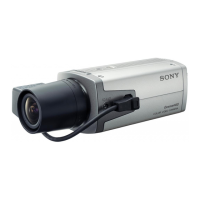
This document describes the Sony CCD Color Video Camera models SSC-C350P and SSC-C370P, and the CCD Black-and-white Video Camera models SSC-M350CE and SSC-M370CE. These cameras utilize a 1/2-inch CCD (Charge Coupled Device) for image capture.
The SSC-C350P and SSC-C370P are color video cameras, while the SSC-M350CE and SSC-M370CE are black-and-white video cameras. All models are designed for various shooting conditions, offering high sensitivity to produce clear pictures even in gloomy environments.
A key feature is the CCD IRIS function, which automatically adjusts the sensitivity of the camera based on the incident light level. This ensures that the video signal remains at a suitable level, even when a manual iris lens is attached. This function effectively manages exposure without requiring manual adjustments to the iris.
The cameras also incorporate an Electronic Shutter function, providing eight selectable shutter speeds. This allows users to adapt the camera to different shooting scenarios, from standard motion to capturing fast-moving objects with reduced blur. The shutter speeds range from 1/50 second up to 1/10000 second, offering flexibility for various lighting and motion requirements.
For multi-camera setups, External Synchronization is supported. This feature enables multiple cameras to be synchronized using a single reference signal. This is particularly useful in professional environments where cameras are controlled by a video switcher, allowing seamless transitions between camera feeds without causing picture distortion on the monitor screen.
The color models (SSC-C350P/C370P) include an Automatic Adjustment of White Balance. This function offers two modes: Automatic White Balance (AWB) and Automatic Tracing White Balance (ATW). In AWB mode, the adjusted white balance value is stored in memory, providing a consistent color balance for stable lighting conditions. In ATW mode, the camera continuously adjusts the white balance to adapt to changing lighting conditions, ensuring an appropriate color balance is always maintained.
The SSC-C370P and SSC-M370CE models offer High Resolution due to a higher number of CCD picture elements (approximately 437,000), ensuring detailed image capture.
The cameras are designed for flexible power supply options. They can be operated directly with a 12 V DC power supply. Alternatively, they can be used with a YS-W130P or YS-W230P camera adaptor (not supplied). When using the adaptor, a single 75-ohm coaxial cable carries the video output signal, power supply input, and external synchronizing signal, simplifying cabling.
Lens Mounting: The cameras support C-mount auto-iris lenses. For auto-iris lenses, a supplied plug allows connection of the lens cable to the camera's LENS connector. The manual provides detailed instructions for soldering lens cable wires to the plug, including pin assignments for power supply, video signal output (for auto-iris control), and ground. The lens mount is designed to accommodate lenses with screw threads projecting no more than 9 mm from the mounting surface. The cameras are designed for 1/2-inch CCD lenses.
Internal Switch Settings: Before installation, users need to set internal switches by removing the upper cover of the camera body. These switches control the AGC (Automatic Gain Control), CCD IRIS function, and SHUTTER speed. The AGC switch toggles automatic gain control on or off. The CCD IRIS switch activates or deactivates the automatic sensitivity adjustment. The SHUTTER switch, effective when CCD IRIS is off, allows selection of one of eight fixed shutter speeds.
Connecting to a 12 V DC Power Supply: When using a direct 12 V DC power supply, the MODE switch must be set to 'B'. The camera can operate with either an internal or external synchronizing signal. For internal synchronization, the video output connects directly to a video monitor. For external synchronization, a synchronizing signal generator connects to the VS IN connector, and the video output connects to a monitor.
Connecting to a YS-W130P Camera Adaptor: When using the YS-W130P adaptor, the MODE switch must be set to 'A'. This setup allows for a combined power cable, simplifying connections. The manual provides a table of maximum cable lengths for different coaxial cable types (RG-59B/U, RG-6A/U, RG-11A/U).
Synchronized Cameras: For multi-camera systems, the output video signal of one camera can synchronize others. The YS-W130P adaptor can be used for two cameras, while the YS-W230P adaptor is recommended for more than two cameras, supporting up to four.
White Balance Adjustment (for color models): For the SSC-C350P and SSC-C370P, white balance adjustment is crucial. The AWB mode allows users to point the camera at a white object, press the LOCK button, and store the calculated white balance setting indefinitely. The ATW mode continuously adjusts white balance to changing lighting conditions.
Troubleshooting: In case of any operational problems, users are advised to contact their Sony service representative.
CCD Characteristics (Normal Phenomena): The manual also describes certain phenomena that may be observed when using a CCD camera, which are not indicative of a fault:
These descriptions help users understand expected camera behavior under certain conditions, distinguishing normal operation from potential malfunctions.
 General
| Lens Mount | CS mount |
|---|---|
| S/N Ratio | 50 dB |
| Sensor Type | 1/3 inch CCD |
| Scanning System | Interlaced |
| Power | 12V DC |
| Signal System | NTSC |
| Operating Temperature | -10 to +50 °C |
| Lens Type | Vari-focal |


 To Next Page