22
EN
STR-AZ7000ES/STR-AZ5000ES/STR-AZ3000ES
5-037-019-11(1)
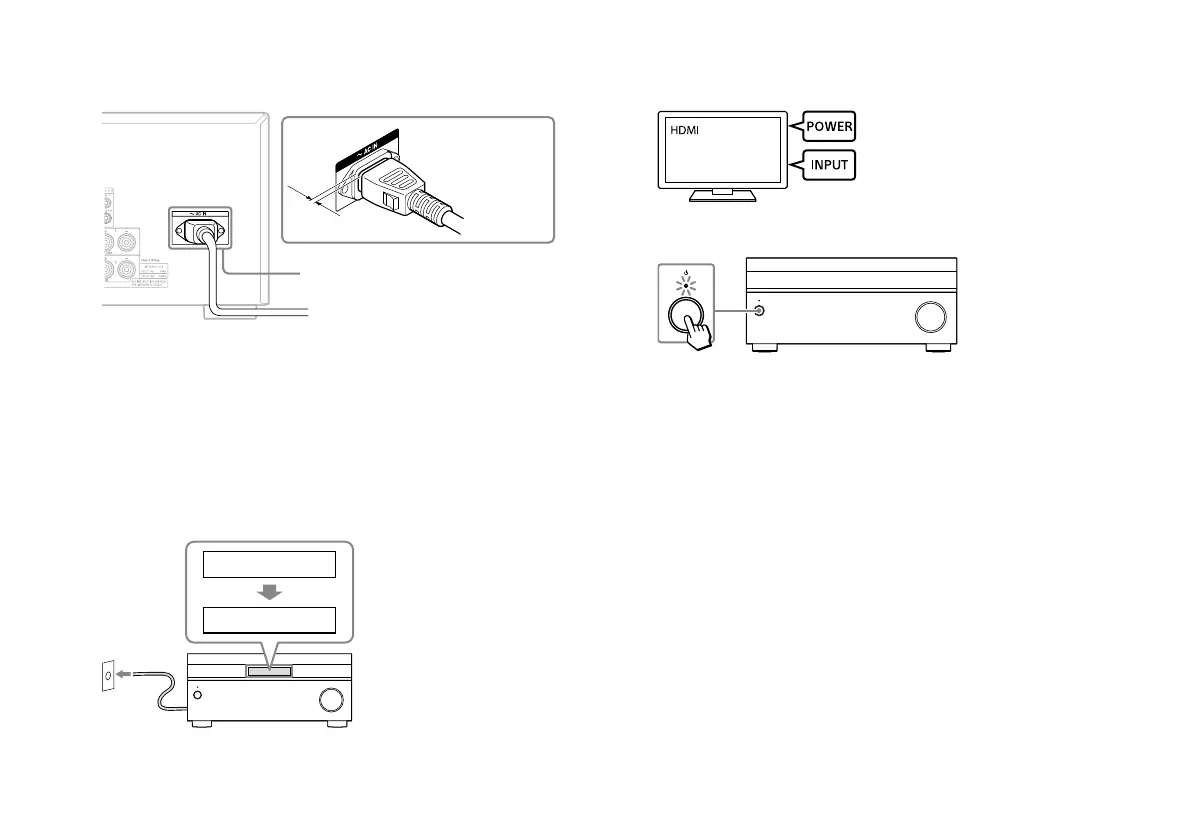
4 Connect the supplied AC power cord (mains lead) to the AC IN
terminal on the receiver firmly.
AC power cord
(mains lead)
(supplied)
*
AC IN terminal
* Space remains between the plug and the rear panel even
when the power cord (mains lead) is inserted firmly. The cord is
supposed be connected this way. This is not malfunction.
5 Connect the AC power cord (mains lead) to a wall outlet.
Before connecting the AC power cord (mains lead), be sure to
make connections for speakers and the other devices.
“HELLO” appears on the display panel and then switches to
“PLEASE WAIT.”
You cannot turn on the receiver until the “PLEASE WAIT” display
disappears.
PLEASE WAIT
HELLO
To the wall
outlet
6 Turn on the TV, and then switch the input of the TV to which
the receiver is connected.
7 Press (power) to turn on the receiver.











 To Next Page