1
POWER ---*ON I
13 o I_
o
o i | i • i
o nDDDI 1 I i
'8 '0" ' '
TAPE/DAT
OUT __
:_:' ,--Tuner :"_
I VCR l
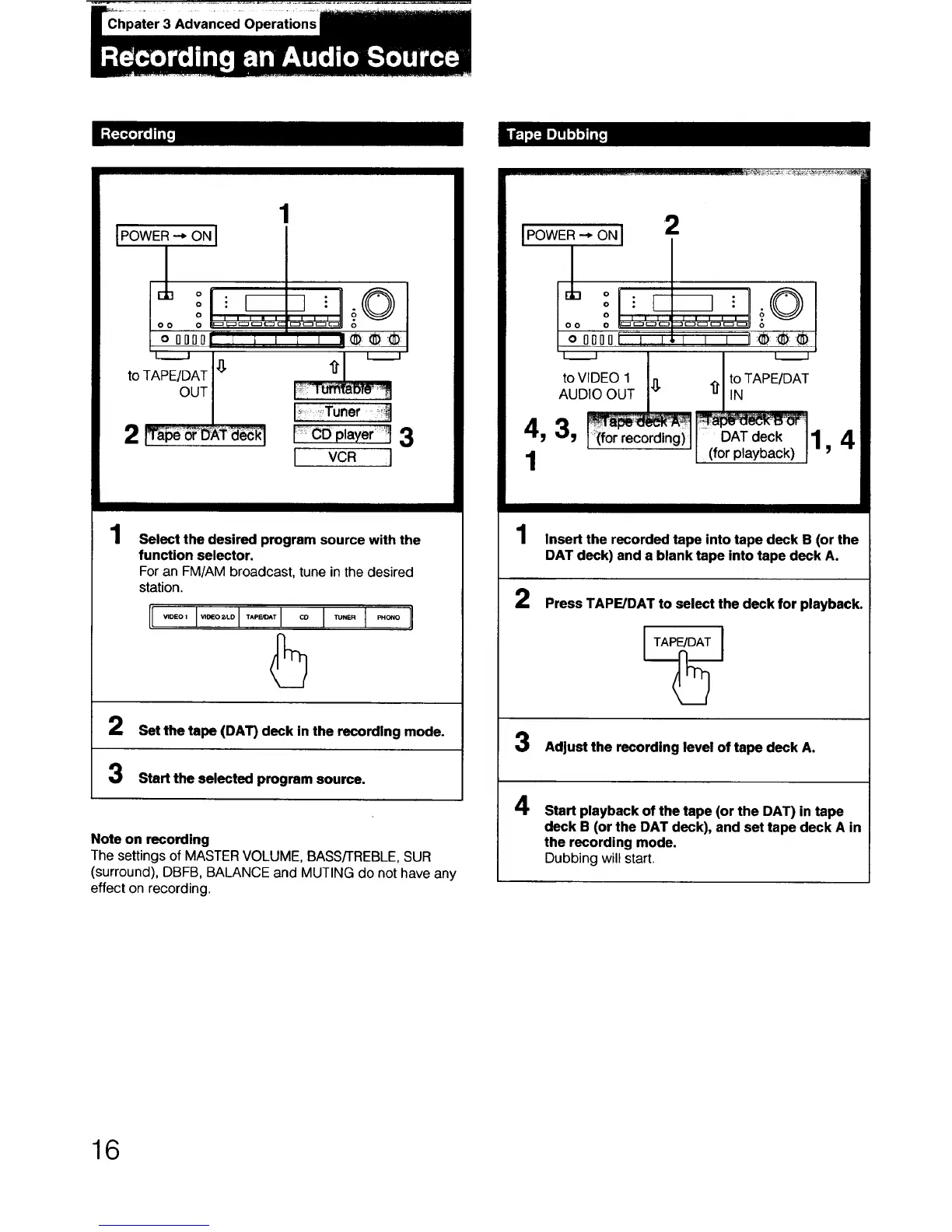
1
Select the desired program source with the
function selector.
For an FM/AM broadcast, tune in the desired
station.
5
2 Set the tape (DAT) deck in the recording mode.
Start the selected program source.
Note on recording
The settings of MASTER VOLUME, BASS/TREBLE, SUR
(surround), DBFB, BALANCE and MUTING do not have any
effect on recording.
2
IPowe -.o l
J
"!LI- L" ©
o o ::_ c_'_' ' 'm
oooooi ! I I I I I:_::®::_
_ , L.____
to VIDEO 1 _ £ to TAPE/DAf
AUDIO OUT IN
4, 3,
DAT deck
-II (for playback)
/
1
2
i
Insert the recorded tape into tape deck B (or the
DAT deck) and a blank tape into tape deck A.
Press TAPFJDAT to select the deck for playback.
TAPE/DAT
Adjust the recording level of tape deck A.
4
Start playback of the tape (or the DAT) in tape
deck B (or the DAT deck), and set tape deck A in
the recording mode.
Dubbing will start.
16



 To Next Page