The Dolby Pro LogicSurround Decoderhas the same
functions for playback,suchas movietheatersand givesa
theater-likeexperienceinyourlisteningroom,naturally
reproducingthe audiosoundfield.
The STR-D611 and STR-D511 incorporate a decoder which
reproduces the specially encoded surround sound of Dolby
surround video programs.
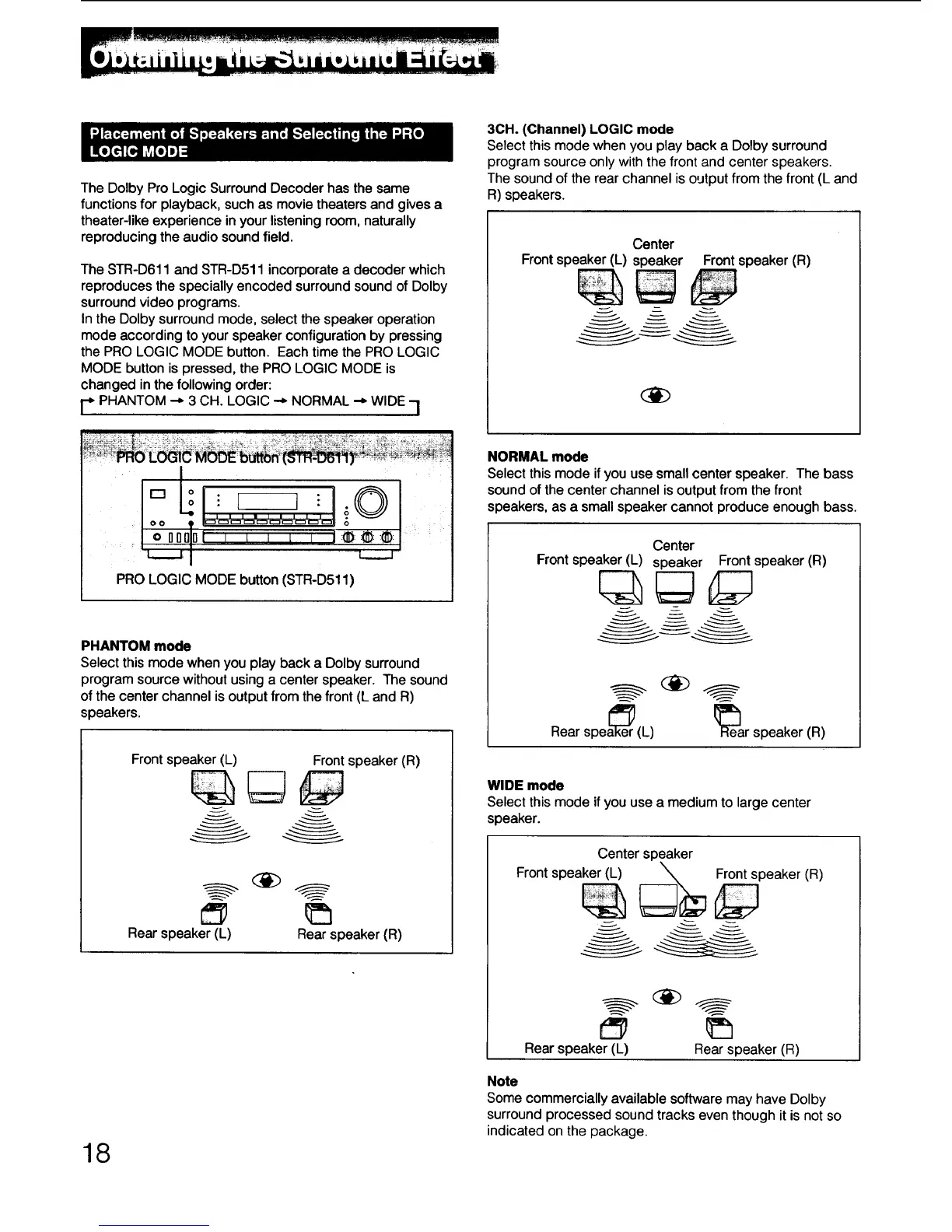
In the Dolby surround mode, select the speaker operation
mode according to your speaker configuration by pressing
the PRO LOGIC MODE button. Each time the PRO LOGIC
MODE button is pressed, the PRO LOGIC MODE is
changed in the following order:
r* PHANTOM --," 3 CH. LOGIC -,- NORMAL "-_ WIDE "i
Do ©
ill|llll I
oo ___ o
_L...._J
PRO LOGIC MODE button (STR-D511)
PHANTOM mode
Select this mode whenyou play back a Dolbysurround
programsourcewithoutusinga centerspeaker. The sound
ofthe centerchannelisoutputfromthe front(L and R)
speakers.
Front speaker (L) Front speaker (R)
Rear speaker (L) Rear speaker (R)
18
3CH. (Channel) LOGIC mode
Select this mode when you play back a Dolby surround
program source only with the front and center speakers.
The sound of the rear channel is output from the front (L and
R) speakers.
Center
Front speaker (L) speaker Front speaker (R)
NORMAL mode
Select this mode ifyou usesmallcenter speaker. The bass
soundofthe centerchannelis outputfromthe front
speakers,as a smallspeakercannotproduce enoughbass.
Center
Front speaker (L) speaker Front speaker (R)
Rear
spea_er (L) R_ear speaker (R)
WIDE mode
Select this mode if you use a medium to large center
speaker.
Center speaker
Front speaker (L) _ Front speaker (R)
Rear speaker (L) Rear speaker (R)
Note
Some commercially available software may have Dolby
surround processed sound tracks even though it is not so
indicated on the package.



 To Next Page