IdeloJ u pJ uuuud_ng tl]rOUgl] [I)u cileok hst below, examine the connec[ions a_Jd the
procedures outlined in the manual.
Should any problem persist after you have checked the following items, consult your
nearest Sony dealer.
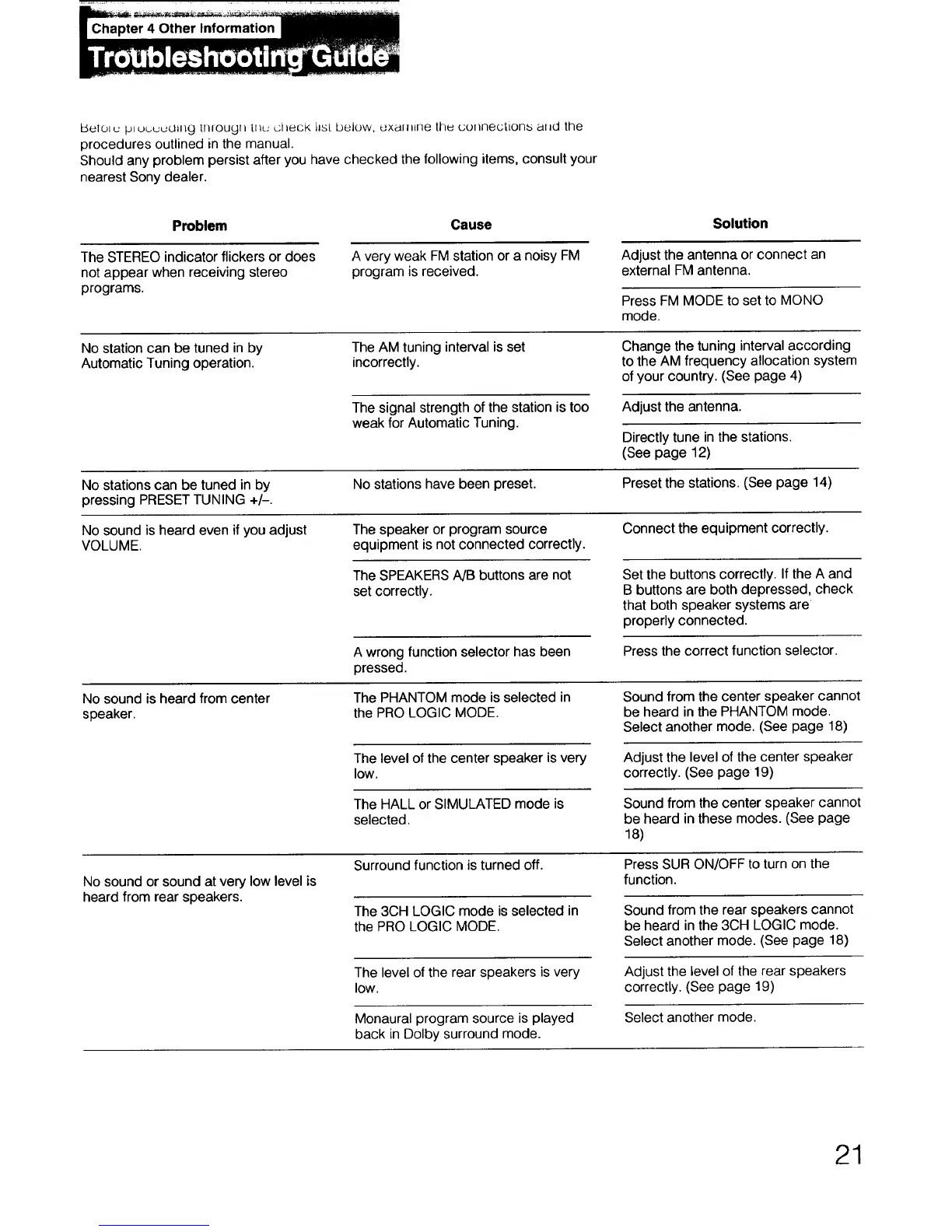
Problem Cause
Solution
Adjust the antenna or connect an
external FM antenna.
Press FM MODE to set to MONO
mode.
The STEREO indicator flickers or does
not appear when receiving stereo
programs.
A very weak FM station or a noisy FM
program is received.
No station can be tuned in by
Automatic Tuning operation.
The AM tuning interval is set
incorrectly.
Change the tuning interval according
to the AM frequency allocation system
of your country. (See page 4)
The signal strength of the station is too
weak for Automatic Tuning.
Adjust the antenna.
Directly tune in the stations.
(See page 12)
No stations can be tuned in by No stations have been preset. Preset the stations. (See page 14)
pressing PRESET TUNING +/-.
No sound is heard even if you adjust The speaker or program source Connect the equipment correctly.
VOLUME. equipment is not connected correctly.
The SPEAKERS A/B buttons are not
set correctly.
Set the buttons correctly. If the A and
B buttons are both depressed, check
that both speaker systems are
properly connected.
A wrong function selector has been
pressed.
Press the correct function selector.
No sound is heard from center
speaker.
The PHANTOM mode is selected in
the PRO LOGIC MODE.
Sound from the center speaker cannot
be heard in the PHANTOM mode.
Select another mode. (See page 18)
The level of the center speaker is very
low.
Adjust the level of the center speaker
correctly. (See page 19)
The HALL or SIMULATED mode is
selected.
Sound from the center speaker cannot
be heard in these modes. (See page
18)
No sound or sound at very low level is
heard from rear speakers.
Surround function is turned off.
The 3CH LOGIC mode is selected in
the PRO LOGIC MODE.
Press SUR ON/OFF to turn on the
function.
Sound from the rear speakers cannot
be heard in the 3CH LOGIC mode.
Select another mode. (See page 18)
The level of the rear speakers is very
low.
Adjust the level of the rear speakers
correctly. (See page 19)
Select another mode.
Monaural program source is played
back in Dolby surround mode.
21



 To Next Page