Problen= Cause _olutlot_
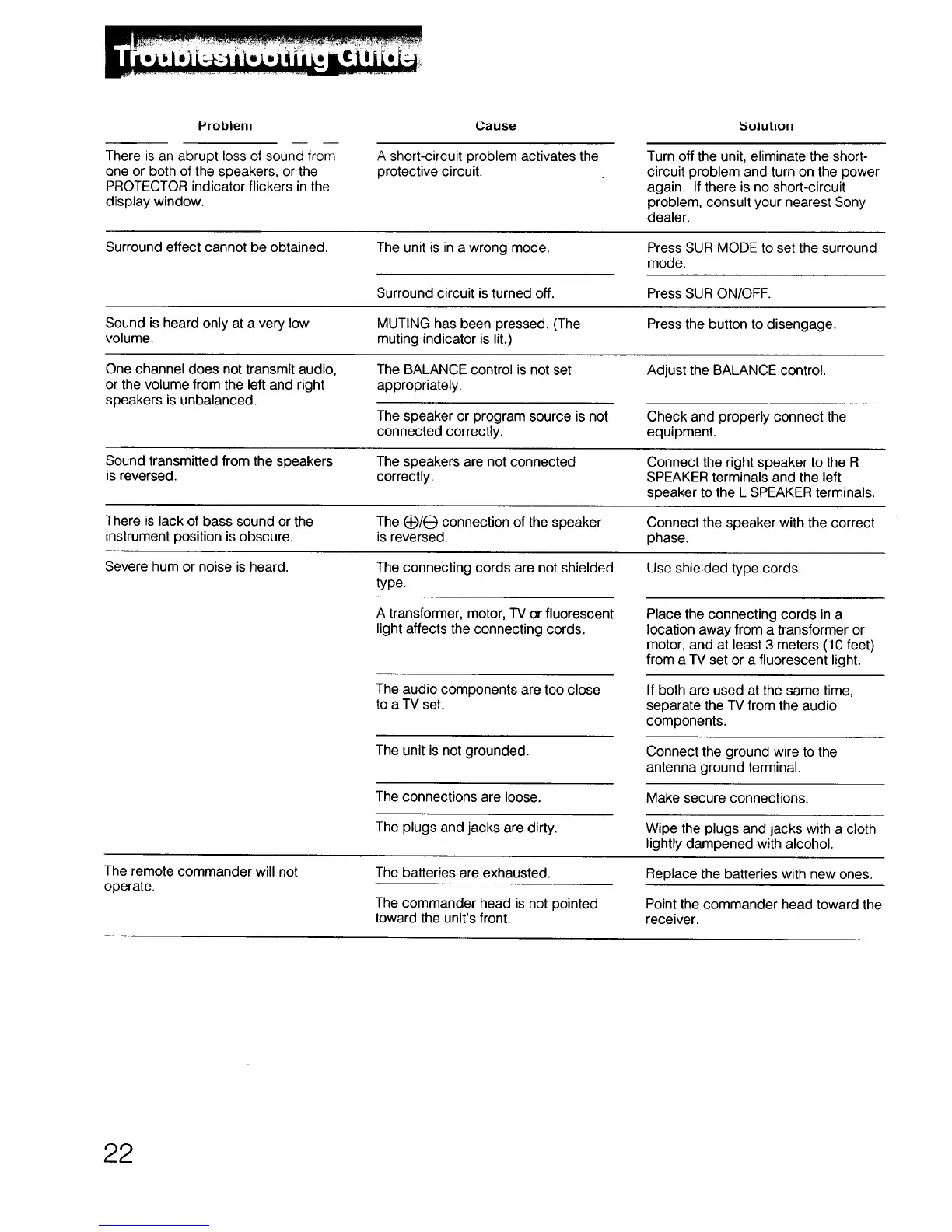
There is an abrupt loss of sound from
one or both of the speakers, or the
PROTECTOR indicator flickers in the
display window.
A short-circuit problem activates the
protective circuit.
Turn off the unit, eliminate the short-
circuit problem and turn on the power
again. If there is no short-circuit
problem, consult your nearest Sony
dealer.
Surround effect cannot be obtained.
The unit is in a wrong mode.
Press SUR MODE to set the surround
mode.
Surround circuit is turned off. Press SUR ON/OFF.
Sound is heard only at a very low MUTING has been pressed. (The Press the button to disengage.
volume, muting indicator is lit.)
One channel does not transmit audio, The BALANCE control is not set Adjust the BALANCE control.
or the volume from the left and right appropriately.
speakers is unbalanced.
The speaker or program source is not
connected correctly.
Check and properly connect the
equipment.
Sound transmitted from the speakers The speakers are not connected Connect the right speaker to the R
is reversed, correctly. SPEAKER terminals and the left
speaker to the L SPEAKER terminals.
There is lack of bass sound or the The (_)/(_ connection of the speaker Connect the speaker with the correct
instrument position is obscure, is reversed, phase.
Severe hum or noise is heard. The connecting cords are not shielded Use shielded type cords.
type.
A transformer, motor, TV or fluorescent
light affects the connecting cords.
The audio components are too close
to a TV set.
The unit is not grounded.
The connections are loose.
The plugs and jacks are dirty.
Place the connecting cords in a
location away from a transformer or
motor, and at least 3 meters (10 feet)
from a TV set or a fluorescent light.
If both are used at the same time,
separate the TV from the audio
components.
Connect the ground wire to the
antenna ground terminal.
Make secure connections.
Wipe the plugs and jacks with a cloth
lightly dampened with alcohol.
The remote commander will not
operate.
The batteries are exhausted.
The commander head is not pointed
toward the unit's front.
Replace the batteries with new ones.
Point the commander head toward the
receiver.
22



 To Next Page