Chpater 3 Advanced Operations
1
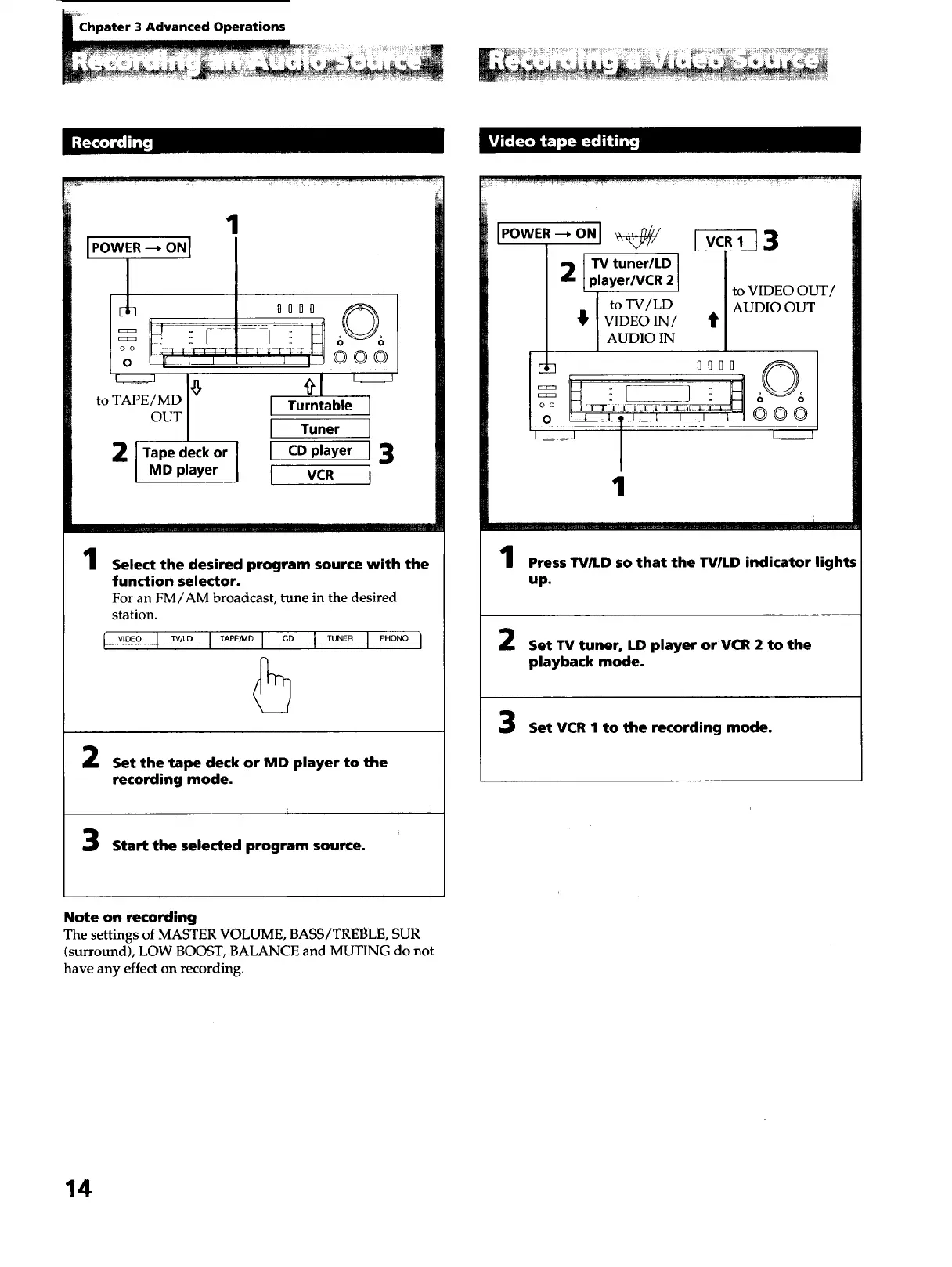
to TAPE / MD
OUT
2 l Tape deck or
MD player
1010 60 6
[ Turntable J
[ Tuner ]
t CDplayer J3
I vc. t
1
Select the desired program source with the
function selector.
For an FM/AM broadcast, tune in the desired
station.
l _,D_o-4_° I _° I °° -1-_°_ I _"°"°I
5
Set the tape deck or MD player to the
recording mode.
Start the selected program source.
2 [TV tuner/LD
player/VCR 2
to TV/LD
_' VIDEO IN/
AUDIO IN
[]_ IIOI
o o ;2--[_t ._:I ]Ei[TL
1
I_._Tl 3
to VIDEO Ot
AUDIO OUT
it
@00
....1 .... I ..... i
Press TVILD so that the TV/LD indicator lights
up.
Set TV tuner, LD player or VCR 2 to the
playback mode.
Set VCR I to the recording mode.
Note on recording
The settings of MASTER VOLUME, BASS/TREBLE, SUR
(surround), LOW BOOST, BALANCE and MUTING do not
have any effect on recording.
14



 To Next Page