EasyManua.ls Logo

Sony STR-D865 - Video Component Connection; TV;VCR Hookups

Sony STR-D865
28 pages
Print Icon
To Next Page IconTo Next Page
To Previous Page IconTo Previous Page
Loading...
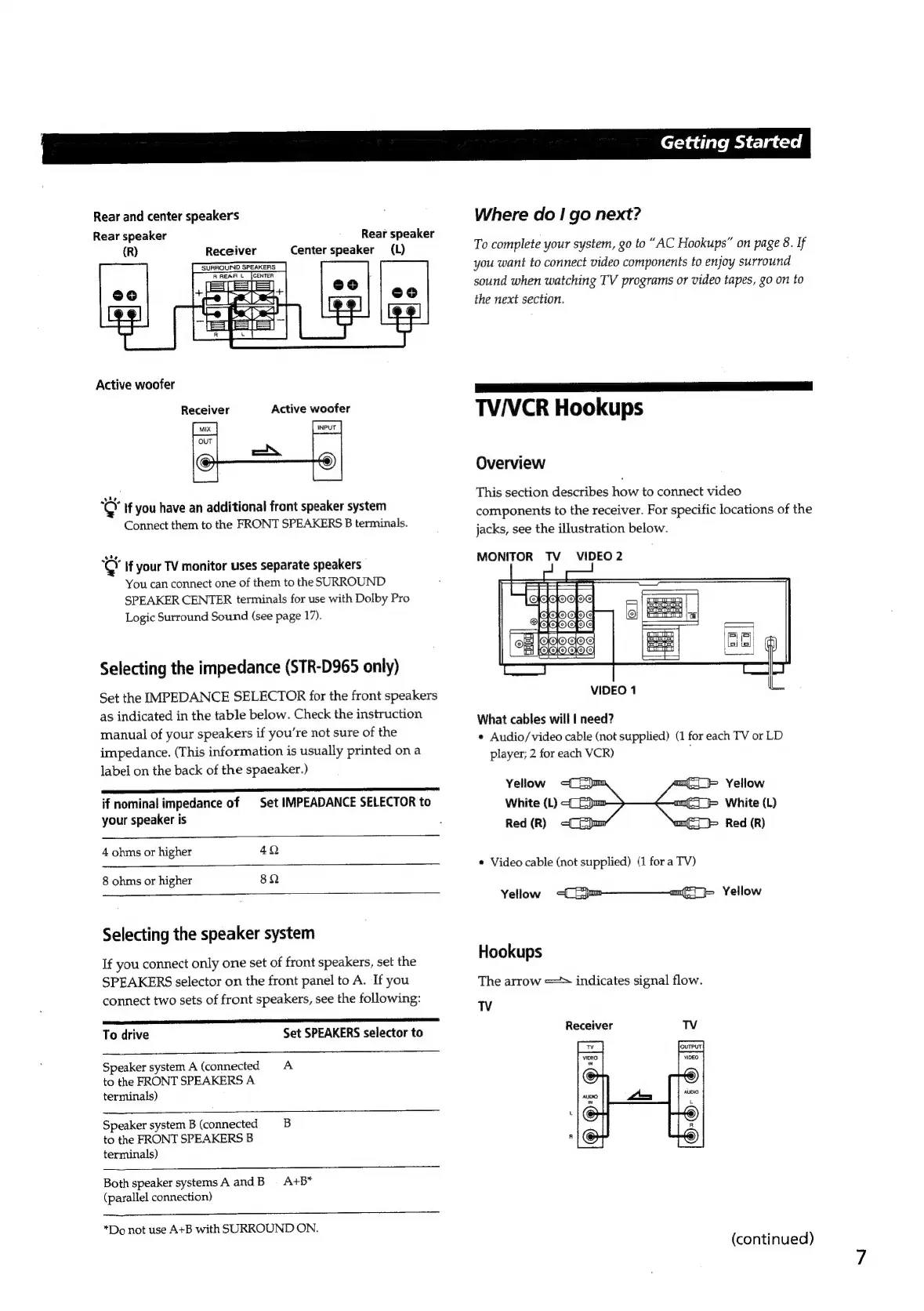
Rear
and
center
speakers
Rear
speaker
(R)
Receiver
Rear
speaker
Center
speaker
(L)
Active
woofer
Receiver
Active
woofer
¢
If
you
have
an
additional
front
speaker
system
Connect
them
to
the
FRONT
SPEAKERS
B
terminals.
xe}
if
your
TV
monitor
uses
separate
speakers
You
can
connect
one
of
them
to
the
SURROUND
SPEAKER
CENTER
terminals
for
use
with
Dolby
Pro
Logic
Surround
Sound
(see
page
17).
Selecting
the
impedance
(STR-D965
only)
Set
the
IMPEDANCE
SELECTOR
for
the
front
speakers
as
indicated
in
the
table
below.
Check
the
instruction
manual
of
your
speakers
if
you're
not
sure
of
the
impedance.
(This
information
is
usually
printed
on
a
label
on
the
back
of
the
spaeaker.)
if
nominal
impedance
of
|
Set
IMPEADANCE
SELECTOR
to
your
speaker
is
4
ohms
or
higher
4Q
8
ohms
or
higher
8Q
Selecting
the
speaker
system
If
you
connect
only
one
set
of
front
speakers,
set
the
SPEAKERS
selector
on
the
front
panel
to
A.
If
you
connect
two
sets
of
front
speakers,
see
the
following:
To
drive
Set
SPEAKERS
selector
to
Speaker
system
A
(connected
A
to
the
FRONT
SPEAKERS
A
terminals)
Speaker
system
B
(connected
B
to
the
FRONT
SPEAKERS
B
terminals)
Both
speaker
systems
A
and
B
=
A+B*
(parallel
connection)
*Do
not
use
A+B
with
SURROUND
ON.
|
Getting
Started
Where
do
I
go
next?
To
complete
your
system,
go
to
“AC
Hookups”
on
page
8.
If
you
want
to
connect
video
components
to
enjoy
surround
sound
when
watching
TV
programs
or
video
tapes,
go
on
to
the
next
section.
TV/VCR
Hookups
Overview
This
section
describes
how
to
connect
video
components
to
the
receiver.
For
specific
locations
of
the
jacks,
see
the
illustration
below.
MONITOR
TV
VIDEO
2
VIDEO
1
What
cables
will
|
need?
¢
Audio/video
cable
(not
supplied)
(1
for
each
TV
or
LD
player;
2
for
each
VCR)
Yellow
fF
Yellow
White
(L)
White
(L)
Red
(R)
Red
(R)
*
Video
cable
(not
supplied)
(1
for
a
TV)
Yellow
4
{jam——mi}
Yellow
Hookups
The
arrow
=>
indicates
signal
flow.
TV
Receiver
TV
(continued)

Other manuals for Sony STR-D865

Related product manuals