STR-DA3700ES 4-287-971-21(1) GB
3
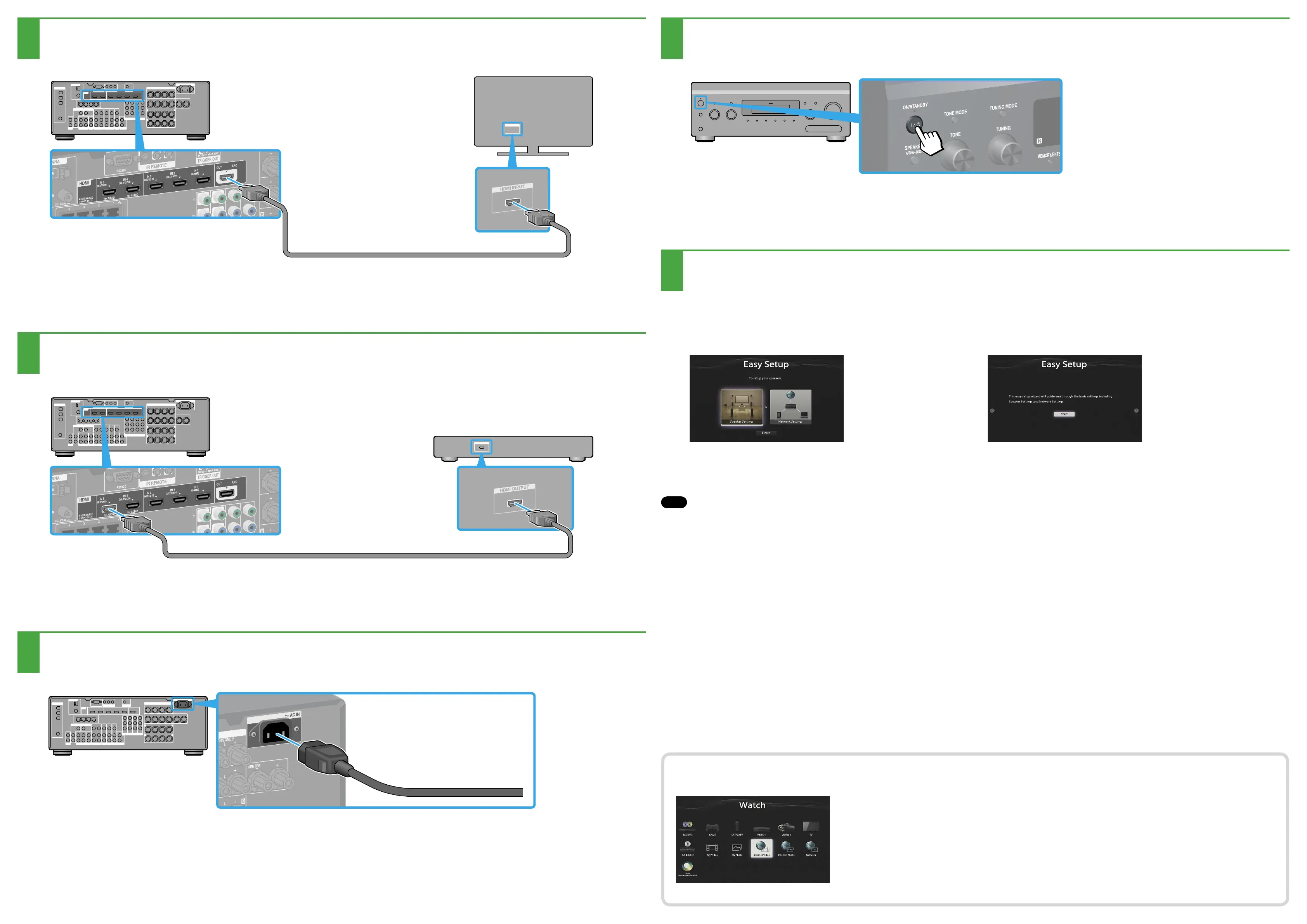
Connecting the monitor
4
Connecting a Blu-ray Disc Player
5
Connect all power cords last
6
Turning on the receiver
7
Setting up the receiver
After performing steps 1 to 7, start playback on the Blu-ray Disc Player.
Note
Set up the Blu-ray Disc Player so that it is able to output multi-channel audio signals. For a Sony Blu-ray Disc Player, set “HDMI Audio Output” to “Auto” (as of September 1, 2011).
You can enjoy Internet video content easily using the receiver.
After making the connections and the settings shown above, if you connect the receiver to
a router via a LAN cable, you can enjoy Internet video by simply selecting the content you
want.
For details on the connection of the LAN cable, refer to “5: Connecting to the network” in
the operating instructions supplied with the receiver. For details on the operation, refer to
“Internet video” in the operating instructions supplied with the receiver.
Switch the input of the TV to the input to which the receiver is connected.
When you turn on the receiver for the first time, the EULA screen appears on the TV screen. Agree to EULA to proceed to the Easy
Setup screen, then set up the receiver in accordance with the instructions on the Easy Setup screen.
To the wall outlet

















 To Previous Page