Getting Started
masterpage:Right
lename[E:\SEM_Janet\Data_DB895D\J9050665_2598514111DB895DCEL\2598514111\GB03
ON_STR-DB895D-CEL.fm]
17
GB
model name1[STR-DB895D]
[2-598-514-11(1)]
Required cords
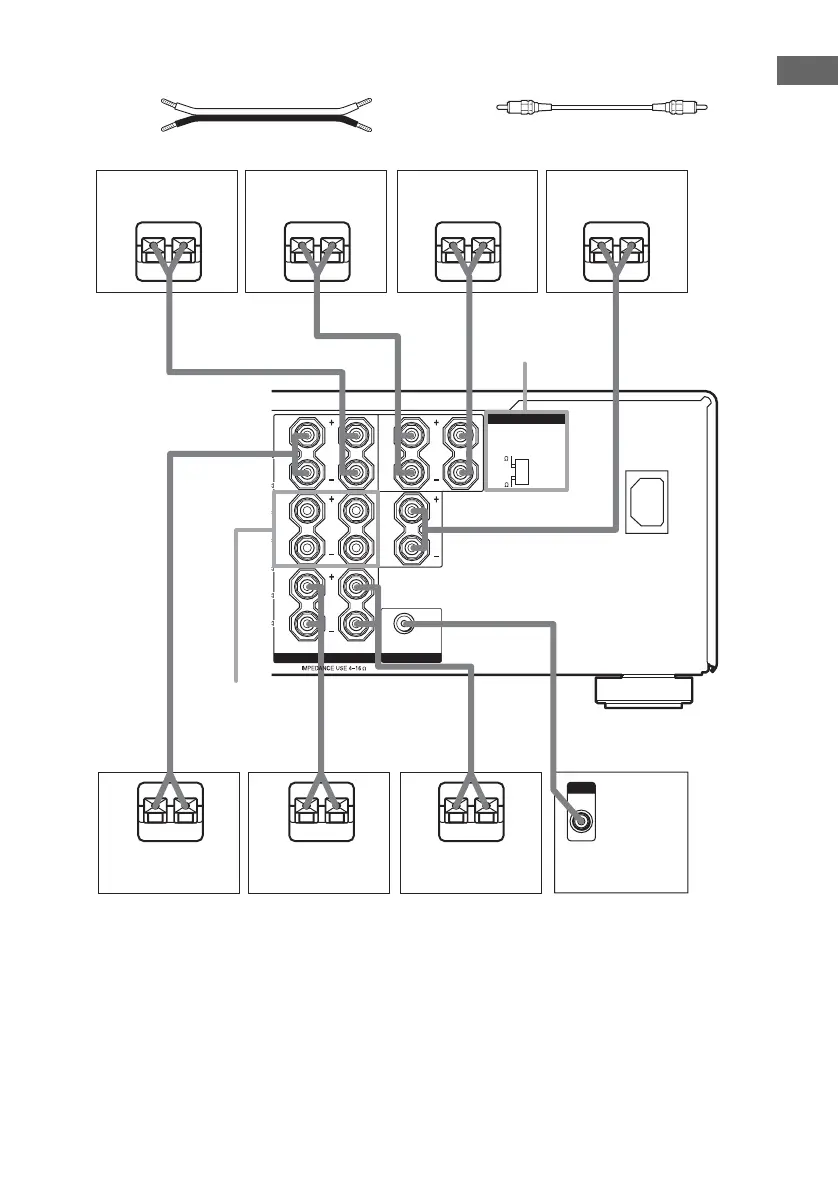
A Speaker cords (not supplied)
(+)
B Monaural audio cord (not supplied)
Black
(–)
1)
If you have an additional front speaker system, connect them to the SPEAKERS FRONT B terminals. You can
select the front speakers you want to use with SPEAKERS (OFF/A/B/A+B) button. For details, see “Selecting the
speaker system” (page 49).
2)
If you connect only one surround back speaker, connect it to the SPEAKERS SURR BACK L terminal.
3)
Models of area code CEL only.
SUB WOOFER
RLRL
RL
RL
FRONT
B
CENTER
~ AC IN
FRONT
A
AUDIO OUT
IMPEDANCE SELECTOR
4
8
Ee
AA
Ee
A
Ee
A
Ee
SPEAKERS
FRONT B
1)
IMPEDANCE
SELECTOR
3)
E
e
A
E
e
A
INPUT
AUDIO
IN
B
E
e
A
SURR
BACK
SPEAKERS
SURR
Surround speaker
(Right)
Surround speaker
(Left)
Sub woofer
Surround back
speaker (Right)
2)
Surround back
speaker (Left)
2)
Center speaker
Front speaker
(Left)
Front speaker
(Right)
GB01COV_STR-DB895D-CEL.book Page 17 Wednesday, June 15, 2005 9:28 AM










 To Next Page