7
GB
Getting Started
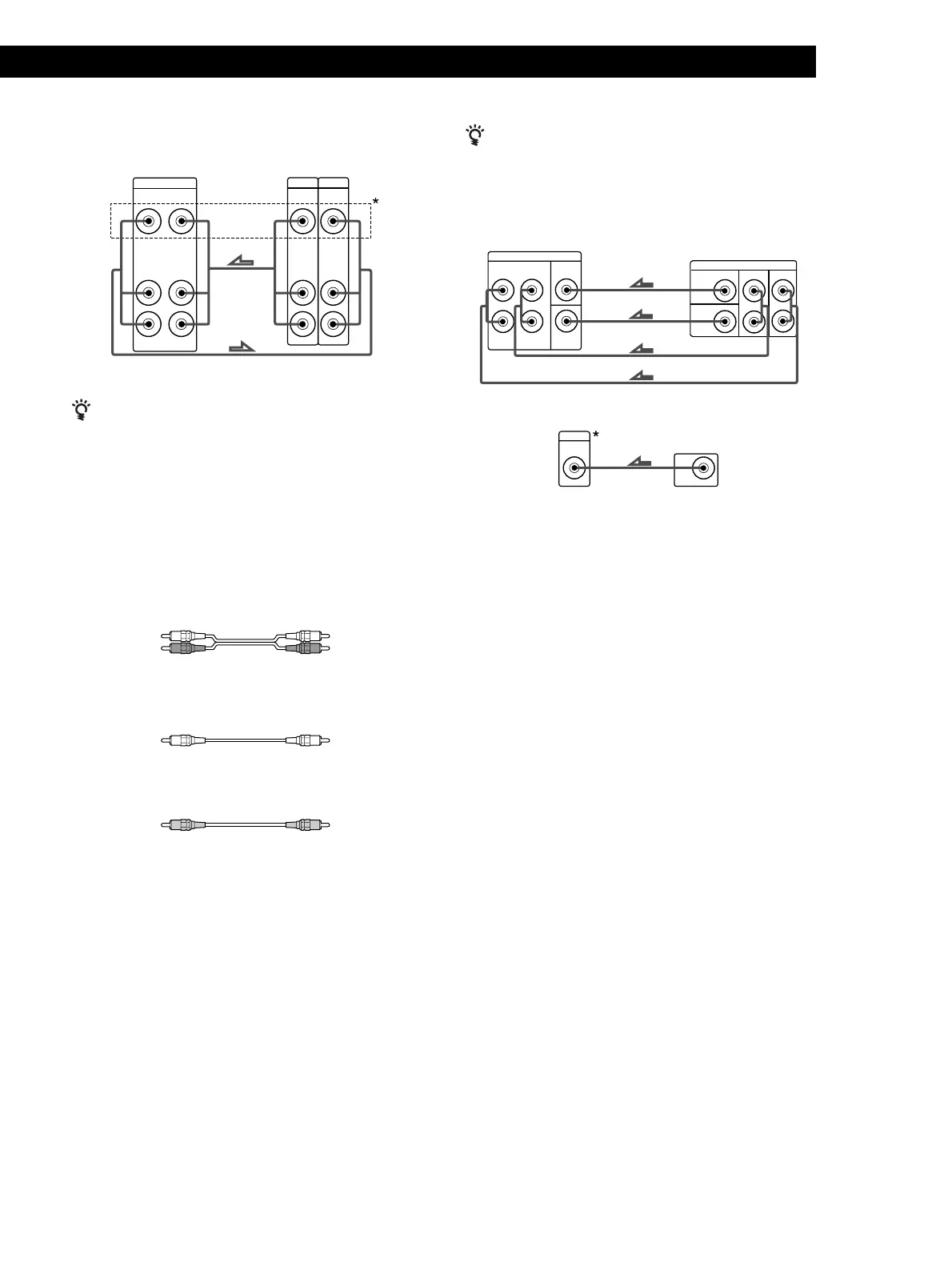
VCR
AUDIO IN
VIDEO
VIDEO IN
AUDIO
OUTPUT
VIDEO
AUDIO
INPUT
VIDEO
AUDIO OUT
L
R
VIDEO OUT
L
R
*STR-DE345 only
Use the function buttons (TV/SAT, CD, MD/TAPE etc.)
to select the VIDEO AUDIO OUT signal. You can record
this audio signal by connecting a recording component
such as a cassette deck (to the VIDEO AUDIO OUT
jack).
DVD player/Dolby Digital decoder
What cords will I need?
• Audio cords (not supplied) (1 for each 5.1 CH/DVD
FRONT and REAR jacks)
• Monaural audio cord (not supplied) (1 for each 5.1
CH/DVD CENTER and SUB WOOFER jacks)
• Video cord (not supplied) (1 for the 5.1 CH VIDEO
IN jack) (STR-DE345 only)
White (L)
Red (R)
White (L)
Red (R)
Black
Black
Yellow
Yellow
Receiver
Receiver
VCR
Receiver
You can play decoded Dolby Digital soundtracks through the
speakers connected to the receiver.
If you have a Dolby Digital decoder you can amplify a
decoded Dolby Digital soundtrack with the following
connections.
FRONTREARCENTER
WOOFER
PRE OUT
5.1 CH/DVD
FRONT REAR CENTER
SUB
WOOFER
L
R
VIDEO
VIDEO IN
5.1 CH
*STR-DE345 only
Where do I go next?
Go on to the next section to connect the speakers.
Dolby Digital
decoder, etc.
Dolby Digital
decoder, etc.







 To Next Page