26
GB
C:\Documents and
Settings\pc13\Desktop\JC060016_2680065111DG700_GB\2680065111\GB03CON_STR-
DG700-CEL.fm
masterpage: Left
STR-DG700
2-680-065-11 (1)
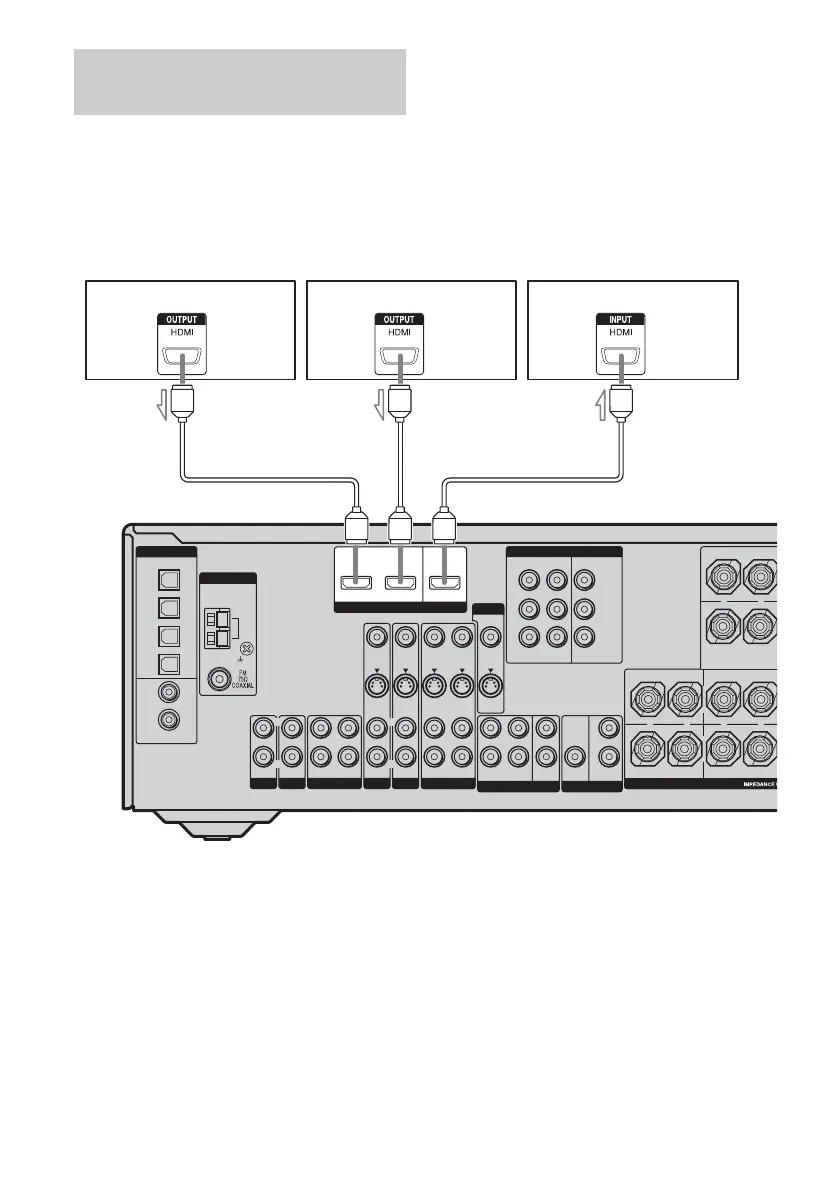
HDMI is the abbreviated name for High-
Definition Multimedia Interface. It is an
interface which transmits video and audio
signals in digital format.
The sound is output from the TV speaker only
when a playback component and this receiver,
as well as this receiver and the TV are
connected via a HDMI jack. To output the
sound from the supplied speakers and to take
advantage of the multi channel surround
sound, be sure to
– connect the digital audio jacks on the
playback component to the receiver.
– turn off or mute the TV’s volume.
Notes on HDMI connections
• The multi/stereo area audio signals of a
Super Audio CD are not output.
• Turn on the receiver when the video and
audio of a playback component are being
output to a TV via the receiver. If the power
supply of the receiver is not turned on,
neither video nor audio is transmitted.
• Audio signals (sampling frequency, bit
length, etc.) transmitted from a HDMI jack
may be restricted by the connected
component. Check the setup of the
connected component if the image is poor or
the sound does not come out of a component
connected via the HDMI cable.
• Refer to the operating instructions of each
component connected for details.
Hooking up components with
HDMI jacks
DIGITAL
VIDEO 1
IN
VIDEO 2
IN
MD/
TAPE
IN
MD/
TAPE
OUT
DVD
IN
SA-CD/
CD
IN
COAXIAL
OPTICAL
ANTENNA
AM
HDMI
ASSIGNABLE
L
R
AUDIO IN
VIDEO IN
DVD
AUDIO IN
S-VIDEO
IN
VIDEO IN
VIDEO 2
AUDIO IN
S-VIDEO
IN
VIDEO OUT
VIDEO 1
AUDIO OUT
S-VIDEO
OUT
VIDEO IN
S-VIDEO
IN
L
R
SA-CD
/
CD
MD/TAPE
OUT
L
R
IN
IN
AUX
IN
L
R
VIDEO OUT
S-VIDEO
OUT
MONITOR
SURROUND BACK
CENTER
+
–
SURROUND FRONT A
R
R
L
L
+
–
+
–
SPEAKERS
SUB
WOOFER
SURROUND
PRE OUT
L
R
SURROUND
SUB
WOOFER
CENTER
FRONT
L
R
MULTI CH IN
DVD
IN
VIDEO 2
IN
MONITOR
OUT
COMPONENT VIDEO
Y
ASSIGNABLE
P
B
/C
B
/B–Y
P
R
/C
R
/R–Y
DVD IN VIDEO 2 IN
MONITOR OUT
DVD player Satellite tuner TV monitor, projector, etc.
AAA
A HDMI cable (not supplied)
We recommend that you use a Sony HDMI cable.
GB01COV_STR-DG700-CEL.book Page 26 Wednesday, February 15, 2006 4:11 PM



 To Next Page