EasyManua.ls Logo

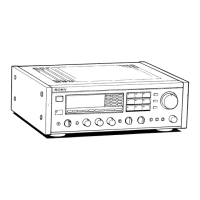
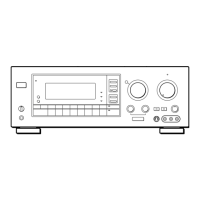
Sony STR-GX415 - Front Panel Controls and Indicators; STR-GX415;GX315 Front Panel Controls; STR-GX215 Front Panel Controls

Sony STR-GX415
31 pages
Print Icon
To Next Page IconTo Next Page
To Previous Page IconTo Previous Page
Loading...
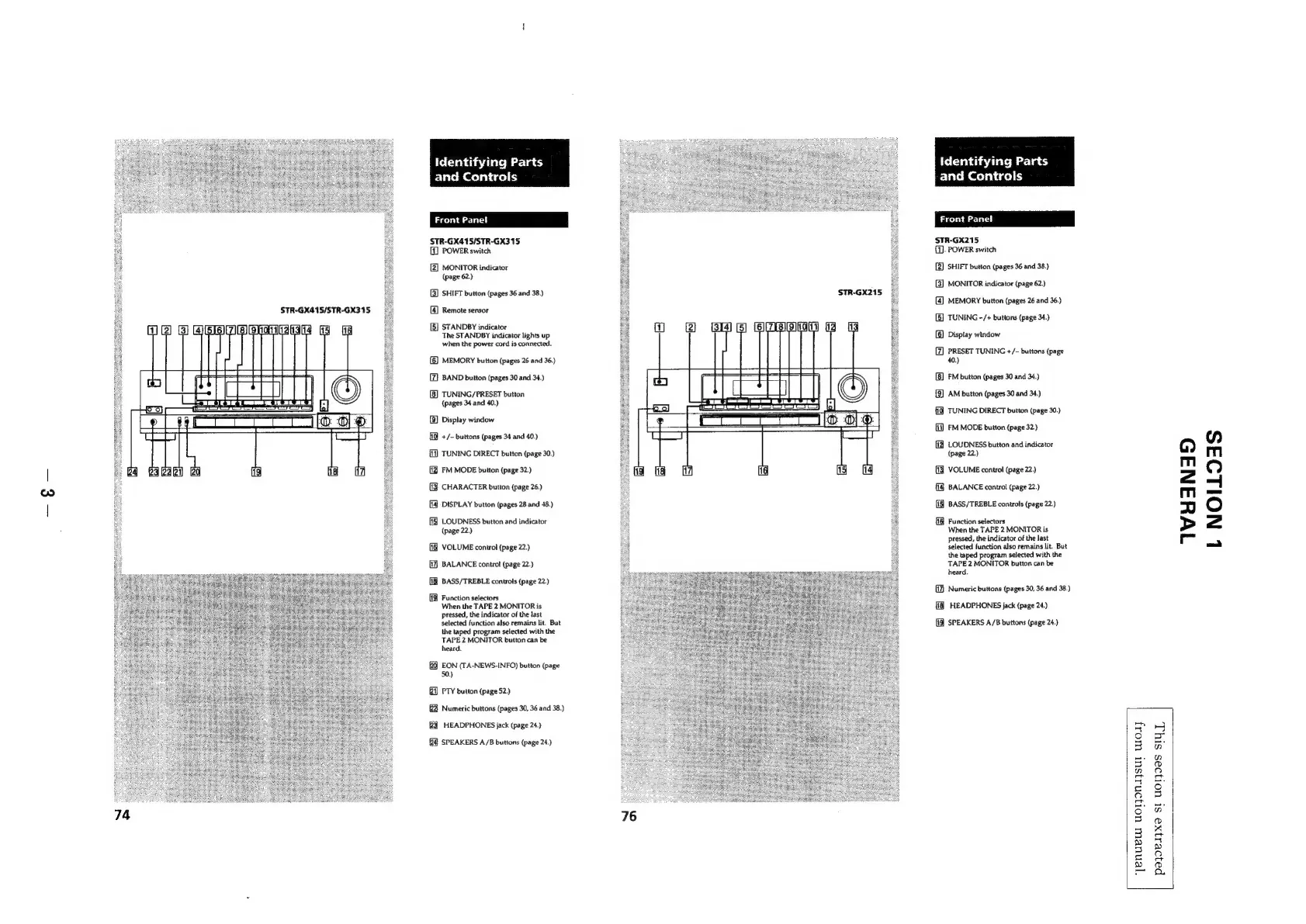
STR-GX415/STR-GX315
Identifying
Parts
and
Controls
STR-GX415/STR-GX315
(1
POWER
switch
[2]
MONITOR
indicator
(page
62.)
(3)
SHIFT
button
(pages
36
and
38.)
4
Remote
sensor
a
STANDBY
indicator
The
STANDBY
indicator
lights
up
when
the
power
cord
is
connected.
(@)
MEMORY
button
(pages
26
and
36.)
(Z}
BAND
button
(pages
30
and
34.)
(B)
TUNING/PRESET
button
(pages
34
and
40.)
[8]
Display
window
+/-
buttons
(pages
34
and
40.)
{1
TUNING
DIRECT
button
(page
30.)
(J
FM
MODE
button
(page
32.)
(J
CHARACTER
button
(page
26.)
(4
DISPLAY
button
(pages
28
and
48.)
(f]
LOUDNESS
button
and
indicator
(page
22.)
VOLUME
control
(page
22.)
(1
BALANCE
control
(page
22.)
[1%
BASS/TREBLE
controls
(page
22.)
(19
Function
selectors
When
the
TAPE
2
MONITOR
is
pressed,
the
indicator
of
the
last
selected
function
also
remains
lit.
But
the
taped
program
selected
with
the
TAPE
2
MONITOR
button
can
be
heard.
20
EON
(TA-NEWS-INFO)
button
(page
50.)
i)
PTY
button
(page
52.)
Numeric
buttons
(pages
30,
36
and
38.)
HEADPHONES
jack
(page
24.)
SPEAKERS
A/B
buttons
(page
24.)
STR-GX215
Identifying
Part:
and
Controls
Front
Panel
STR-GX215
1).
POWER
switch
2)
SHIFT
button
(pages
36
and
38.)
[3]
MONITOR
indicator
(page
62.)
[4]
MEMORY
button
(pages
26
and
36.)
[5]
TUNING
-/+
buttons
(page
34.)
(6)
Display
window
(7)
PRESET
TUNING
+/-
buttons
(page
40.)
[8]
FM
button
(pages
30
and
34.)
{9]
AM
button
(pages
30
and
34.)
TUNING
DIRECT
button
(page
30.)
[1)
FM
MODE
button
(page
32)
{1
LOUDNESS
button
and
indicator
(page
22.)
(3
VOLUME
control
(page
22.)
BALANCE
control
(page
22.)
ff]
BASS/TREBLE
controls
(page
22.)
Function
selectors
When
the
TAPE
2
MONITOR
is
pressed,
the
indicator
of
the
last
selected
function
also
remains
lit.
But
the
taped
program
selected
with
the
TAPE
2
MONITOR
button
can
be
heard.
(1)
Numeric
buttons
(pages
30,
36
and
38.)
{13
HEADPHONES
jack
(page
24.)
SPEAKERS
A/B
buttons
(page
24.)
*‘JEnNueUT
UOTJONAJSUL
WOT
payoeiyxe
St
UOI}eS
SIUT,
TWHANAD
L
NOILOAS

Related product manuals