5
STR-KS600PM/KS600PW
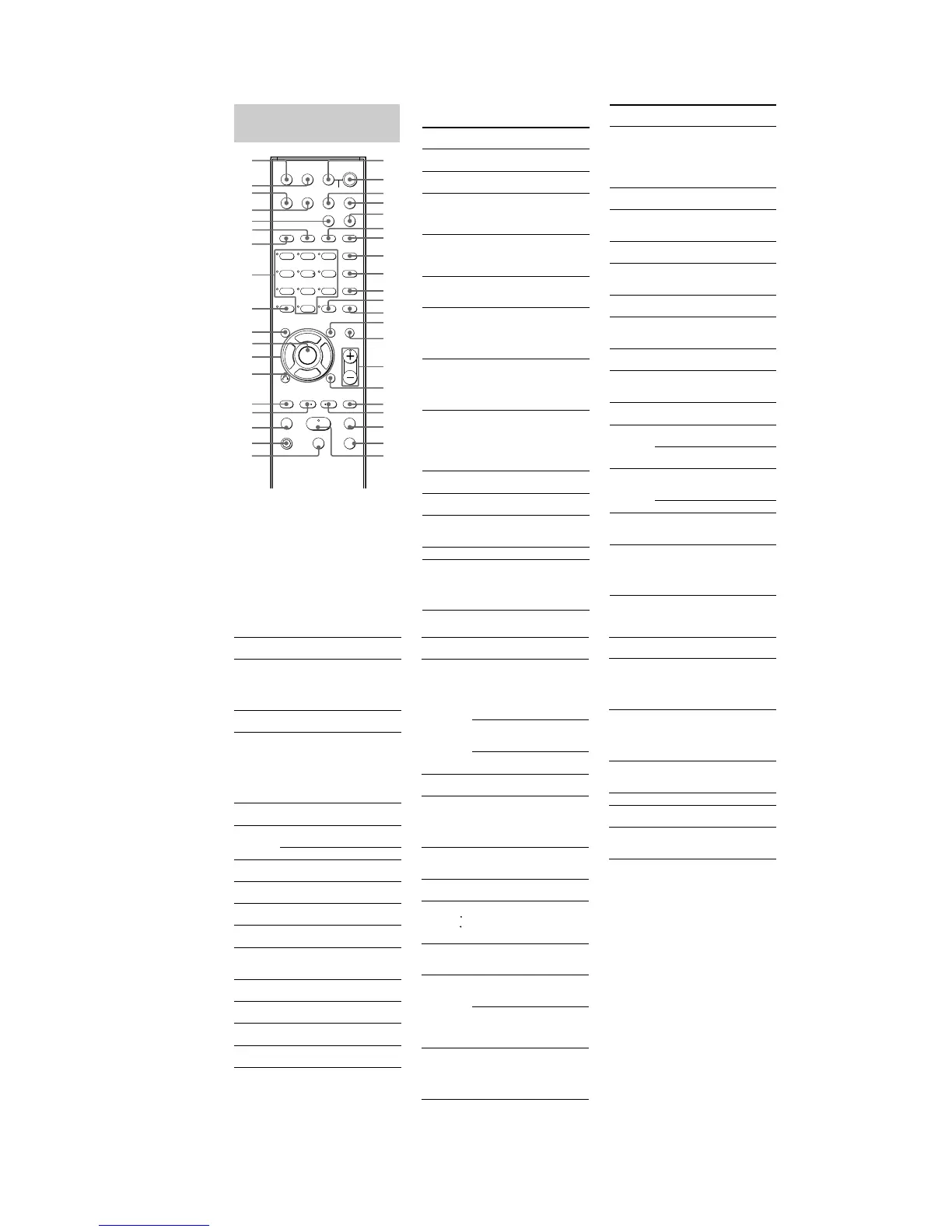
*TheMASTER VOL +, numeric button 5 and H
buttons have a tactile dot. Use the tactile dot as a
reference when operating the receiver and other
audio/video components.
Remote button
description
123
46
78
0/10
ENTER
9
SYSTEM STANDBY
TV/VIDEO
SLEEP
TEST
TONE
AV
?/1
VIDEO 1 VIDEO 2 DVD SA-CD/CD
2CH A.F.D.
RETURN/EXIT
TV CH –
PRESET –
TV CH +
PRESET +
TUNING –
TV
TUNING +
REPLAY ADVANCE
c STEP C
DISPLAY
MOVIE MUSIC
MEMORY SHIFT
D.SKIPCLEAR ANGLE
AV
MENU
TOP MENU/
GUIDE MUTING
TV VOL
MASTER VOL
FM MODE
MPX
AUDIO
D.TUNING
ANT
JUMP
SUBTITLE
DUAL MONO
TUNER
MAIN MENU
TV
?/1
?/1
>10
-
F
Gg
f
ENTER
.
HmM
Xx
<
<
>
5
1
3
2
4
ej
ek
el
eh
8
9
q;
qa
qs
qf
qd
qj
qh
qk
w;
wa*
ws
wd
wf
wh
wj
e;
wg
wk
wl
ea
*es
ef
eg
ql
qg*
5
6
7
ed
The tables below show the settings of each
button.
Remote
Button
Operations Function
A.F.D. ef Receiver Selects the decoding
mode for audio sound.
ANGLE
qs
DVD player Selects viewing angle or
changes the angles.
ANT 0 VCR/
Satellite tuner
Selects output signal
from the antenna
terminal: TV signal or
VCR program.
AUDIO
9
DVD player/
Satellite tuner
Changes the sound to
Multiplex or Bilingual
or Multi channel TV
sound.
AV
MENU qd
VCR/
DVD player/
Satellite tuner
Displays menu.
AV ?/1
1
VCR/
CD player/
DVD player/
Satellite tuner/
MD deck
Turns the audio and
video components on or
off.
CLEAR
ea
DVD player/
Satellite tuner
Clears a mistake when
you press the incorrect
numeric buttons or
returns to continuous
playback etc.
DISPLAY
qh
Receiver/
CD player/
VCR/
DVD player/
Satellite tuner/
MD deck
Selects information
displayed on the TV
screen.
D.SKIP
qa
CD player/
DVD player
Skips discs (multi-disc
changer only).
D.TUNING
0
Receiver Enters direct tuning
mode.
DUAL
MONO 8
Receiver Selects the language you
want during digital
broadcast.
DVD 3 Receiver To watch DVD.
ENTER
qa
TV/VCR/
Satellite tuner
After selecting a
channel, disc or track
using the numeric
buttons, press to enter
the value.
Remote
Button
Operations Function
ENTER wl Receiver/
VCR/
DVD player/
Satellite tuner/
CD player/
MD deck
Enters the selection.
FM MODE
9
Receiver Selects FM monaural
or stereo reception.
JUMP qs Satellite tuner Toggles between the
previous and the
current channels.
MAIN
MENU 5
Receiver Selects the menu of
the receiver.
MASTER
VOL +/–
qg
Receiver/TV Adjusts the master
volume of the
receiver.
MEMORY
qa
Receiver Stores the radio
stations.
MOVIE 6 Receiver Selects the pre-
programmed sound
fields for movie.
MPX 9 VCR Select main or sub
language.
MUSIC 7 Receiver Selects the pre-
programmed sound
fields for music.
MUTING qf Receiver Mutes the sound from
the receiver.
PRESET +/–
qjwh
Receiver Selects preset stations.
TV/VCR/
Satellite tuner
Select preset channel.
RETURN/
EXIT wj
DVD player Returns to the
previous menu or
exits the menu.
Satellite tuner Exits the menu.
SA-CD/CD
4
Receiver To listen to Super
Audio CD or compact
disc.
SHIFT qs Receiver Selects a memory
page for presetting
radio stations or
tuning to preset
stations.
Notes
•Some functions explained in this section may not
work depending on the model.
•The above explanation is intended to serve as an
example only. Therefore, depending on the
component the above operation may not be possible
or may operate differently than described.
•When you press input buttons (VIDEO 1, VIDEO 2
or DVD), the input mode of the TV might not switch
to the corresponding input mode that you want. In
this case, press TV/VIDEO button to switch the input
mode of the TV.
•To activate the buttons with orange printing, press
TV and the button you want simultaneously.
.
Remote
Button
Operations Function
X ws VCR/
CD player/
DVD player/
MD deck/
Tape deck
Pauses playback or
recording. (Also starts
recording with
components in
recording standby.)
x w; VCR/
CD player/
DVD player/
MD deck/
Tape deck
Stops playback.
O wj DVD player Returns to the
previous menu or
exits the menu.
V/v wk Receiver Selects a menu item.
B/b wk Receiver Adjusts or changes
the setting.
V/v/B/b wk VCR/
Satellite tuner/
DVD player
Selects a menu item.
Remote
Button
Operations Function
SLEEP el Receiver Activates the sleep
function and the
duration which the
receiver turns off
automatically.
SUBTITLE
0
DVD player Changes the subtitles.
SYSTEM
STANDBY
(Press AV
?/1 1 and
?/1 2 at
the same
time)
Receiver/
TV/VCR/
CD player/
DVD player/
Satellite tuner/
MD deck
Turns off the receiver
and other Sony audio/
video components.
TEST
TONE ek
Receiver Outputs test tone.
TOP MENU/
GUIDE e;
DVD player Displays DVD title.
Satellite tuner Display guide menu.
TUNER eg Receiver To listen to radio
programs.
TUNING +/–
ql wf
Receiver Scans radio station.
TV wd TV To watch TV
programs.
TV CH +/–
qj wh
TV Selects preset TV
channels.
TV/VIDEO
el
TV Selects input signal:
TV input or video
input.
TV VOL
+/– qg
TV Adjusts the volume of
the TV.
TV ?/1 2 TV Turns the TV on or
off.
VIDEO 1
ej
Receiver To watch VCR.
(VTR mode 3)
VIDEO 2
eh
Receiver To watch VCR.
(VTR mode 1)
Remote
Button
Operations Function
1-9 and
0/10 es
Receiver Use with SHIFT to
preset radio station or
tuning to preset
stations and with
D.TUNING for
direct tuning.
CD player/
DVD player/
MD deck
Selects track
numbers.
0/10 selects track 10.
TV/VCR/
Satellite tuner
Selects channel
numbers.
2CH ed Receiver Selects 2CH
STEREO mode.
>10 ea VCR/
CD player/
DVD player/
Satellite tuner/
MD deck
Selects track
numbers over 10.
-/-- ea TV Selects the channel
entry mode, either
one or two digit.
?/1 2 Receiver Turns the receiver on
or off.
c
STEP
C
REPLAY /
ADVANCE
wg qk
VCR/
DVD player
Replay the previous
scene or fast forward
the current scene.
./>
wh qj
VCR/
CD player/
DVD player
Skips tracks.
m/M
wf ql
DVD player Searches tracks in the
forward or backward
direction.
VCR/
CD player/
MD deck/
Tape deck
Fastforwards or
rewinds.
H wa VCR/
CD player/
DVD player/
MD deck/
Tape deck
Starts playback.
<
<


 To Next Page