[13] Preparation Connecting audio-visual devices and the antennas (aerials)
Connecting a TV (for STR-ZA2000ES/STR-ZA1000ES)
Connect a TV to the HDMI OUT or MONITOR VIDEO OUT jack. You can operate this
receiver using a GUI (Graphical User Interface). GUI is used only for HDMI OUT A jack.
Be sure to disconnect the AC power cord (mains lead) before connecting cables.
To watch 4K resolution content
The HDMI jacks designated as being “HDCP 2.2” (HDMI IN 2, HDMI OUT A) support High-
bandwidth Digital Content Protection System Revision 2.2 (HDCP 2.2). Connect these HDMI
jacks to jacks that support HDCP 2.2 on a TV or a player. Refer to the operating instructions
of the connected device for details.
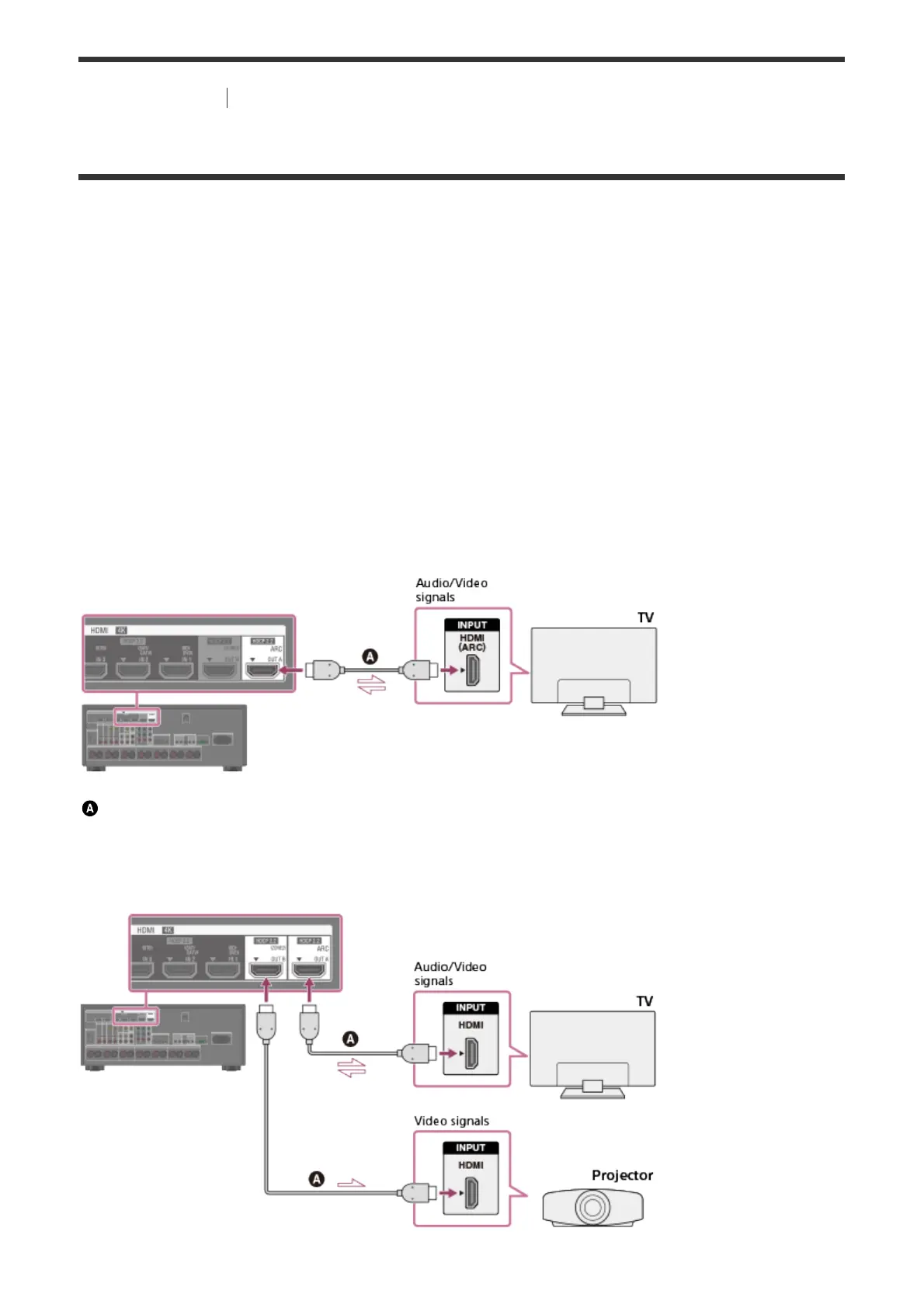
Connecting a TV compatible with the Audio Return Channel (ARC)
function via an HDMI connection
To use the ARC function, set [HDMI Out B Mode] to [Main] and [Control for HDMI] to [On].
HDMI cable (not supplied)
Sony recommends that you use an HDMI-authorized cable or HDMI cable made by Sony.
Connecting a TV and a projector



 To Next Page