User Guide
How to Use
Windows 8: The Basics
Parts Description
Setup
Network / Internet
Connections
Settings
Playback
Backup / Recovery
Security
Other Operations
Notifications
Troubleshooting
List of Topics
Print
Personal Computer
VAIO Fit 14E/15E SVF1421/SVF1521
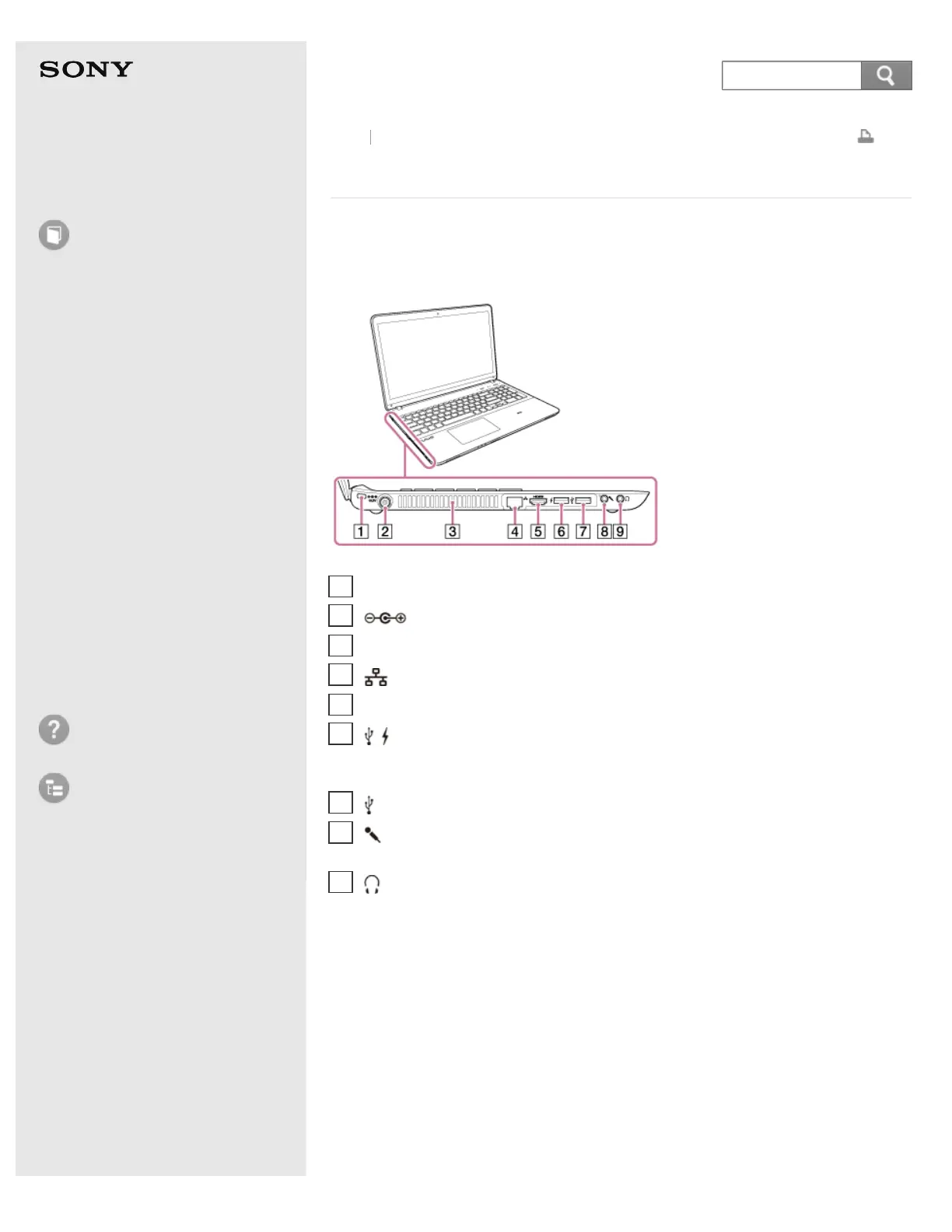
Parts and Controls on the Sides
Describes the features on the sides of the VAIO computer, such as connection
ports.
Back Back to Top
Security slot
1
DC IN port (Connecting a Power Source)
2
Air exhaust vent
3
LAN port (Connecting to the Internet with a Wired Connection)
4
HDMI output port (Connecting a TV with an HDMI Input Port)
5
USB port (Connecting a USB Device)
This USB port supports USB charging. See Charging a USB Device for more
information.
6
USB port (Connecting a USB Device)
7
Microphone jack (Connecting an External Microphone (Microphone jack
equipped models))
8
Headphone jack (Connecting External Speakers or Headphones)
9










 To Next Page