EasyManua.ls Logo

Sony TC-V3 - Page 3

Sony TC-V3
29 pages
Print Icon
To Next Page IconTo Next Page
To Previous Page IconTo Previous Page
Loading...
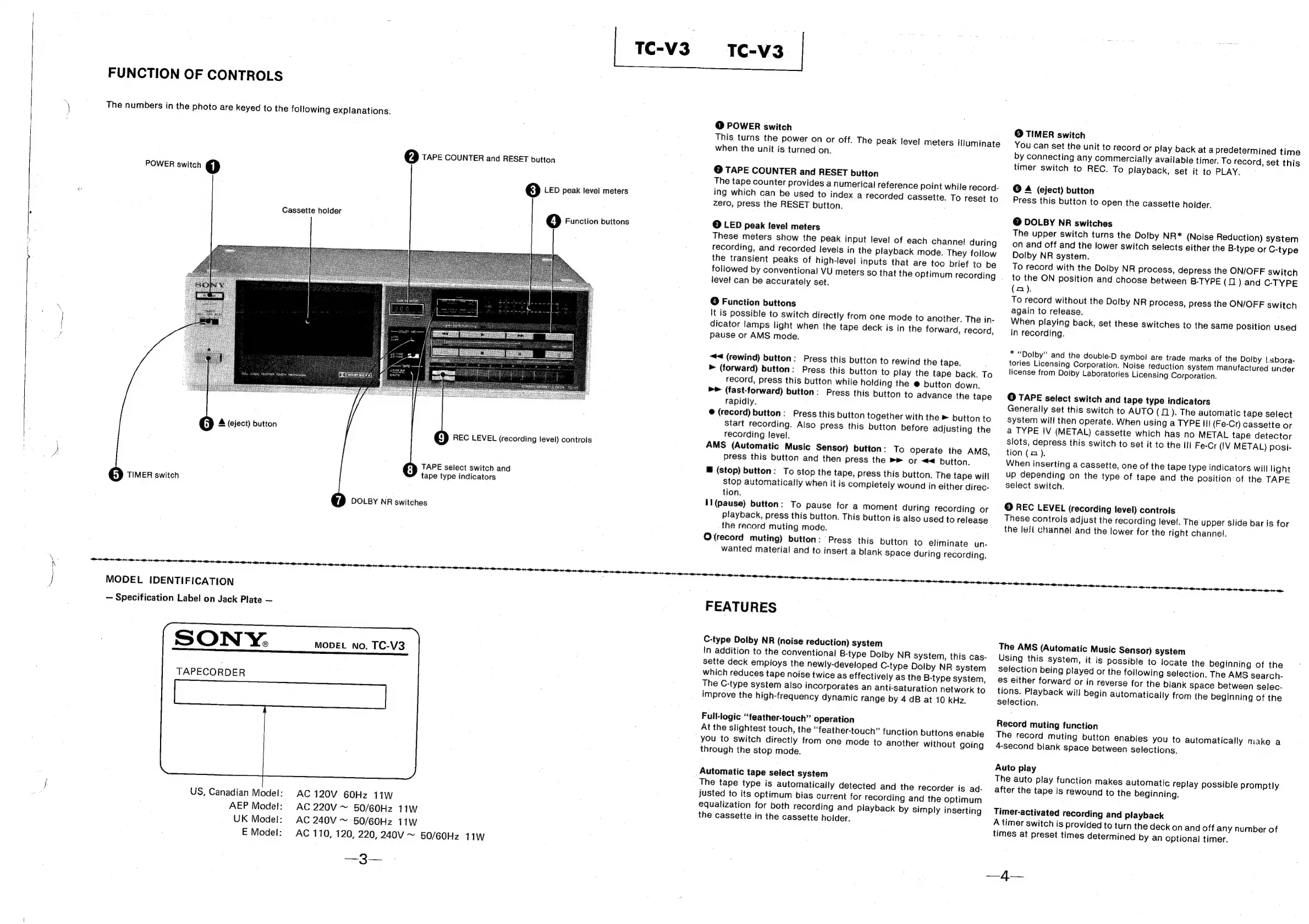
FUNCTION
OF
CONTROLS
The
numbers
in
the
photo
are
keyed
to
the
following
explanations.
POWER
switch
1)
Cassette
holder
@Q
TAPE
COUNTER
and
RESET
button
3)
LED
peak
level
meters
4]
Function
buttons
Sp
A
(eject)
button
TIMER
switch
DR
REC
LEVEL
(recording
level)
controis
TAPE
select
switch
and
tape
type
indicators
1)
DOLBY
NR
switches
MODEL
{IDENTIFICATION
Specification
Label
on
Jack
Plate
SONY.
TAPECORDER
US,
Canadian
Model:
MODEL
No.
TC-V3
AC
120V
60Hz
11W
AEP
Model:
AC
220V
~
50/60Hz
11W
UK
Model:
AC
240V
~
50/60Hz
11W
E
Model:
—3—
AC
110,
120,
220,
240V
~
50/60Hz
11W
@
POWER
switch
This
turns
the
power
on
or
off.
The
peak
level
meters
illuminate
when
the
unit
is
turned
on.
@
TAPE
COUNTER
and
RESET
button
The
tape
counter
provides
a
numerical
reference
point
while
record-
ing
which
can
be
used
to
index
a
recorded
cassette.
To
reset
to
zero,
press
the
RESET
button.
©
LED
peak
level
meters
These
meters
show
the
peak
input
level
of
each
channel
during
recording,
and
recorded
levels
in
the
playback
mode.
They
follow
the
transient
peaks
of
high-level
inputs
that
are
too
brief
to
be
followed
by
conventional
VU
meters
so
that
the
optimum
recording
.
level
can
be
accurately
set.
@
Function
buttons
It
is
possible
to
switch
directly
from
one
mode
to
another.
The
in-
dicator
lamps
light
when
the
tape
deck
is
in
the
forward,
record,
Pause
or
AMS
mode.
~#<
(rewind)
button:
Press
this
button
to
rewind
the
tape.
>
(forward)
button:
Press
this
button
to
play
the
tape
back.
To
record,
press
this
button
while
holding
the
@
button
down.
>>
(fast-forward)
button:
Press
this
button
to
advance
the
tape
rapidly.
@
(record)
button:
Press
this
button
together
with
the
»
button
to
Start
recording.
Also
press
this
button before
adjusting
the
recording
level.
AMS
(Automatic
Music
Sensor)
button:
To
operate
the
AMS,
press
this
button
and
then
press
the
»®
or
<4
button.
@
(stop)
button:
To
stop
the
tape,
press
this
button.
The
tape
will
stop
automatically
when
it
is
compietely
wound
in
either
direc-
tion.
Il(pause)
button:
To
pause
for
a
moment
during
recording
or
playback,
press
this
button.
This
button
is
also
used
to
release
the
record
muting
mode.
O
(record
muting)
button:
Press
this
button
to
eliminate
un-
wanted
material
and
to
insert
a
blank
Space
during
recording.
FEATURES
C-type
Dolby
NR
(noise
reduction)
system
In
addition
to
the
conventional
B-type
Dolby
NR
system,
this
cas-
sette
deck
employs
the
newly-developed
C-type
Dolby
NR
system
which
reduces
tape
noise
twice
as
effectively
as
the
B-type
system,
The
C-type
system
also
incorporates
an
anti-saturation
network
to
improve
the
high-frequency
dynamic
range
by
4
dB
at
10
kHz.
Full-logic
“feather-touch”
operation
At
the
slightest
touch,
the
“feather-touch”
function
buttons
enable
you
to
switch
directly
from
one
mode
to
another
without
going
through
the
stop
mode.
Automatic
tape
select
system
The
tape
type
is
automatically
detected
and
the
recorder
is
ad-
justed
to
its
optimum
bias
current
for
recording
and
the
optimum
equalization
for
both
recording
and
playback
by
simply
inserting
the
cassette
in
the
cassette
holder.
©
TIMER
switch
You
can
set
the
unit
to
record
or
play
back
at
a
predetermined
time
by
connecting
any
commercially
available
timer.
To
record,
set
this
timer
switch
to
REC.
To
playback,
set
it
to
PLAY.
@
A
(eject)
button
Press
this
button
to
open
the
cassette
holder.
@
DOLBY
NR
switches
The
upper
switch
turns
the
Dolby
NR*
(Noise
Reduction)
system
on
and
off
and
the
lower
switch
selects
either
the
B-type
or
C-type
Dolby
NR
system.
To
record
with
the
Dolby
NR
process,
depress
the
ON/OFF
switch
to
the
ON
position
and
choose
between
B-TYPE
(01)
and
C-TYPE
(no).
To
record
without
the
Dolby
NR
process,
press
the
ON/OFF
switch
again
to
release.
When
playing
back,
set
these
switches
to
the
same
position
used
in
recording.
*
“Dolby”
and
the
double-D
symbol
are
trade
marks
of
the
Dolby
!.abora-
tories
Licensing
Corporation.
Noise
reduction
system
manufactured
under
license
from
Doiby
Laboratories
Licensing
Corporation.
©
TAPE
select
switch
and
tape
type
indicators
Generally
set
this
switch
to
AUTO
(1).
The
automatic
tape
select
system
will
then
operate.
When
using
a
TYPE
III
(Fe-Cr)
cassette
or
a
TYPE
IV
(METAL)
cassette
which
has
no
METAL
tape
detector
Slots,
depress
this
switch
to
set
it
to
the
III
Fe-Cr
(IV
METAL)
posi-
tion
(2).
.
When
inserting
a
cassette,
one
of
the
tape
type
indicators
will
light
up
depending
on
the
type
of
tape
and
the
position
of.
the
TAPE
select
switch.
:
©
REC
LEVEL
(recording
level)
controls
These
controls
adjust
the
recording
level.
The
upper
slide
bar
is
for
the
left
channel
and
the
lower
for
the
right
channel.
TE aa
ih
as
Si
al
Bl
et
The
AMS
(Automatic
Music
Sensor)
system
Using
this
system,
it
is
possible
to
locate
the
beginning
of
the
selection
being
played
or
the
following
selection.
The
AMS
search-
es
either
forward
or
in
reverse
for
the
blank
space
between
selec-
tions.
Playback
will
begin
automatically
from
the
beginning
of
the
selection.
Record
muting
function
The
record
muting
button
enables
you
to
automatically
make
a
4-second
blank
space
between
selections.
Auio
piay
The
auto
play
function
makes
automatic
replay
possible
promptly
after
the
tape
is
rewound
to
the
beginning.
Timer-activated
recording
and
playback
A
timer
switch
is
provided
to
turn
the
deck
on
and
off
any
number
of
times
at
preset
times
determined
by
an
optional
timer.
—4g—

Related product manuals