EasyManua.ls Logo

Sony TCM-939 - Section 1: General Operations; Recording Procedures; Playing a Tape

Sony TCM-939
13 pages
Print Icon
To Next Page IconTo Next Page
To Previous Page IconTo Previous Page
Loading...
SECTION
1
This
section
is
extracted
from
instruction
manual.
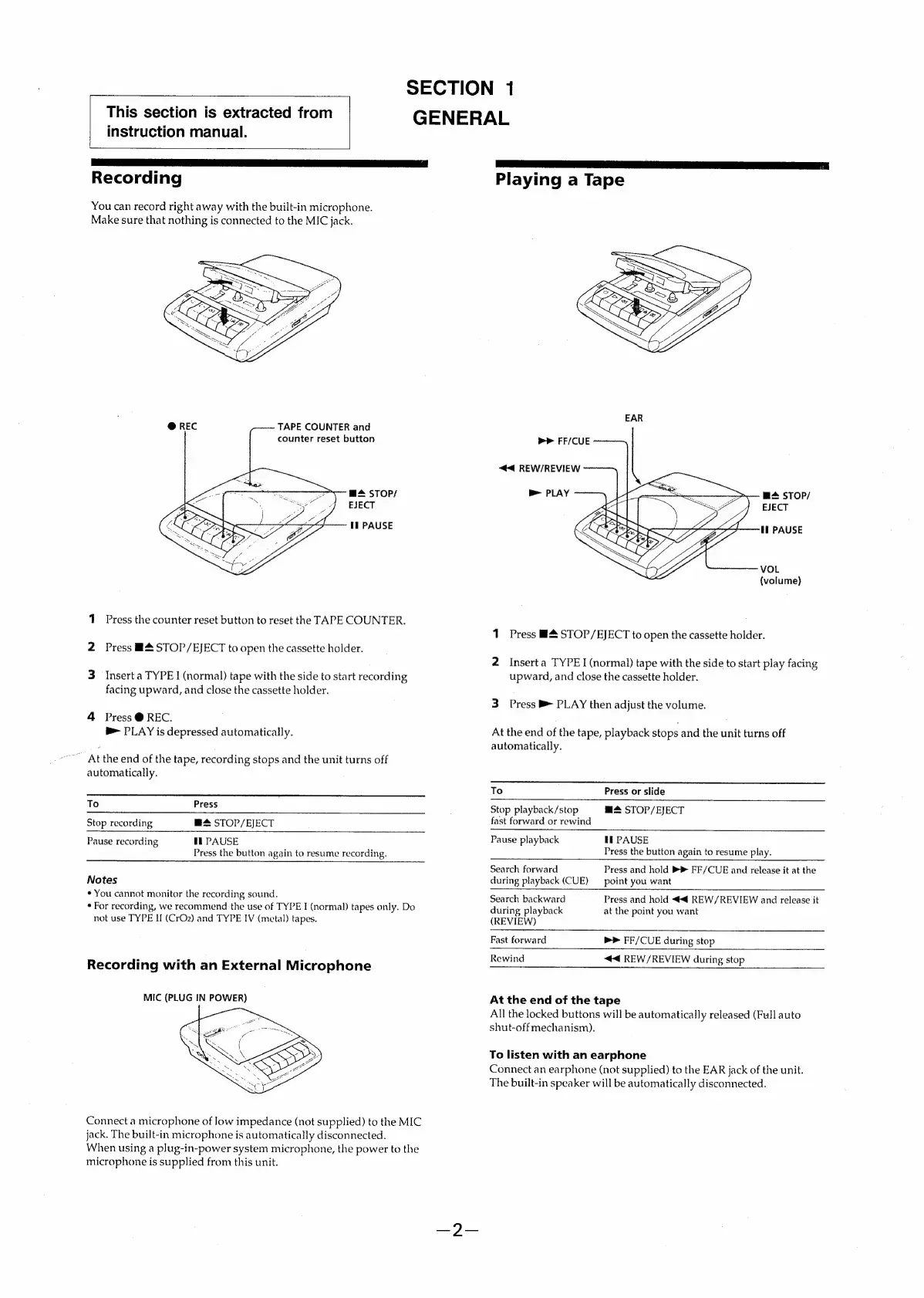
Recording
You
can
record
right
away
with
the
built-in
microphone.
Make
sure
that
nothing
is
connected
to
the
MIC
jack.
TAPE
COUNTER
and
counter
reset
button
@
REC
mA
STOP/
EJECT
Il
PAUSE
1
Press
the
counter
reset
button
to
reset
the
TAPE
COUNTER.
2
Press
ยง&
STOP/EJECT
to
open
the
cassette
holder.
3
Insert
a
TYPE
|
(normal)
tape
with
the
side
to
start
recording
facing
upward,
and
close
the
cassette
holder.
4
Press
@
REC.
-
PLAY
is
depressed
automatically.
At
the
end
of
the
tape,
recording
stops
and
the
unit
turns
off
automatically.
To
Press
Stop
recording
M+
STOP/EJECT
Pause
recording
ti
PAUSE
Press
the
button
again
to
resume
recording.
Notes
*
You
cannot
monitor
the
recording
sound.
*
For
recording,
we
recommend
the
use
of
TYPE
I
(normal)
tapes
only.
Do
not
use
TYPE
II
(CrO2)
and
TYPE
IV
(metal)
tapes.
Recording
with
an
External
Microphone
MIC
(PLUG
IN
POWER)
Connect
a
microphone
of
low
impedance
(not
supplied)
to
the
MIC
jack.
The
built-in
microphone
is
automatically
disconnected.
When
using
a
plug-in-power
system
microphone,
the
power
to
the
microphone
is
supplied
from
this
unit.
GENERAL
Playing
a
Tape
EAR
bP
FF/CUE
<4
REW/REVIEW
p>
PLAY
ms
STOP/
EJECT
Ii
PAUSE
VOL
(volume)
1
Press
B&
STOP/EJECT
to
open
the
cassette
holder.
2
Insert
a
TYPE
I
(normal)
tape
with
the
side
to
start
play
facing
upward,
and
close
the
cassette
holder.
3
Press
B
PLAY
then
adjust
the
volume.
At
the
end
of
the
tape,
playback
stops
and
the
unit
turns
off
automatically.
To
Press
or
slide
m@@
STOP/EJECT
Stop
playback/stop
fast
forward
or
rewind
HE
PAUSE
Press
the
button
again
to
resume
play.
Press
and
hold
>ยป
FF/CUE
and
release
it
at
the
point
you
want
Press
and
hold
<<
REW/REVIEW
and
release
it
at
the
point
you
want
Pause
playback
Search
forward
during
playback
(CUE)
Search
backward
during
playback
(REVIEW)
Fast
forward
bP
FF/CUE
during
stop
Rewind
<4
REW/REVIEW
during
stop
At
the
end
of
the
tape
All
the
locked
buttons
will
be
automatically
released
(Full
auto
shut-offmechanism).
To
listen
with
an
earphone
Connect
an
earphone
(not
supplied)
to
the
EAR
jack
of
the
unit.
The
built-in
speaker
will
be
automatically
disconnected.

Other manuals for Sony TCM-939

Related product manuals