Step 4: Setting
up
Your
Channels
Setting Up the TV Automatically
KV-20M40,
20S40,
20S41 only
The Easy
Set Up
Guide allows you to
set up
the
on-screen language
and set all
receivable
channels. (The Easy
Set Up Guide screen
appears
every time you
turn on the TV until
you perform AUTO
PROGRAM).
ENGLISH:
ICH+]
ESPANOL: [CH-]
PUTO SET UP:
[UOL+]
OEMO:
IUOL-]
First please connect
cable/antenna.
Press tSETUPIto exit
Press
POWER to turn on
your TV.
The Easy
Set Up
Guide screen
appears.
(Except
Canadian Models) Press
CH + to select English screens or
CH
-
to select
Spanish screens.
Press
VOL + to
continue or VOL
-
for
a DEMO of functions and menus.
To perform
this
function again
Press
the SET UP button on your TV.
Auto Programming Your Channels (AUTO PROGRAM)
The AUTO PROGRAM feature allows
you to set
all
receivable
channels in one step. After this function is completed,
you may
delete unwanted channels or add additional channels.
Notes
•
If the TV is set to VIDEO, you cannot run AUTO PROGRAM. Press
TV/VIDEO
on the
remote control until a channel number
appears.
•
It is usually best to preset
channels
during the day when more channels
are broadcasting and receivable.
A
3
5'
3
A
3
C
3
IO
c
fil
10
A
•
I
3
«Q
-
C
"O
c
n
3*
fil
3
3
A
<
in
r+
a
T3
1
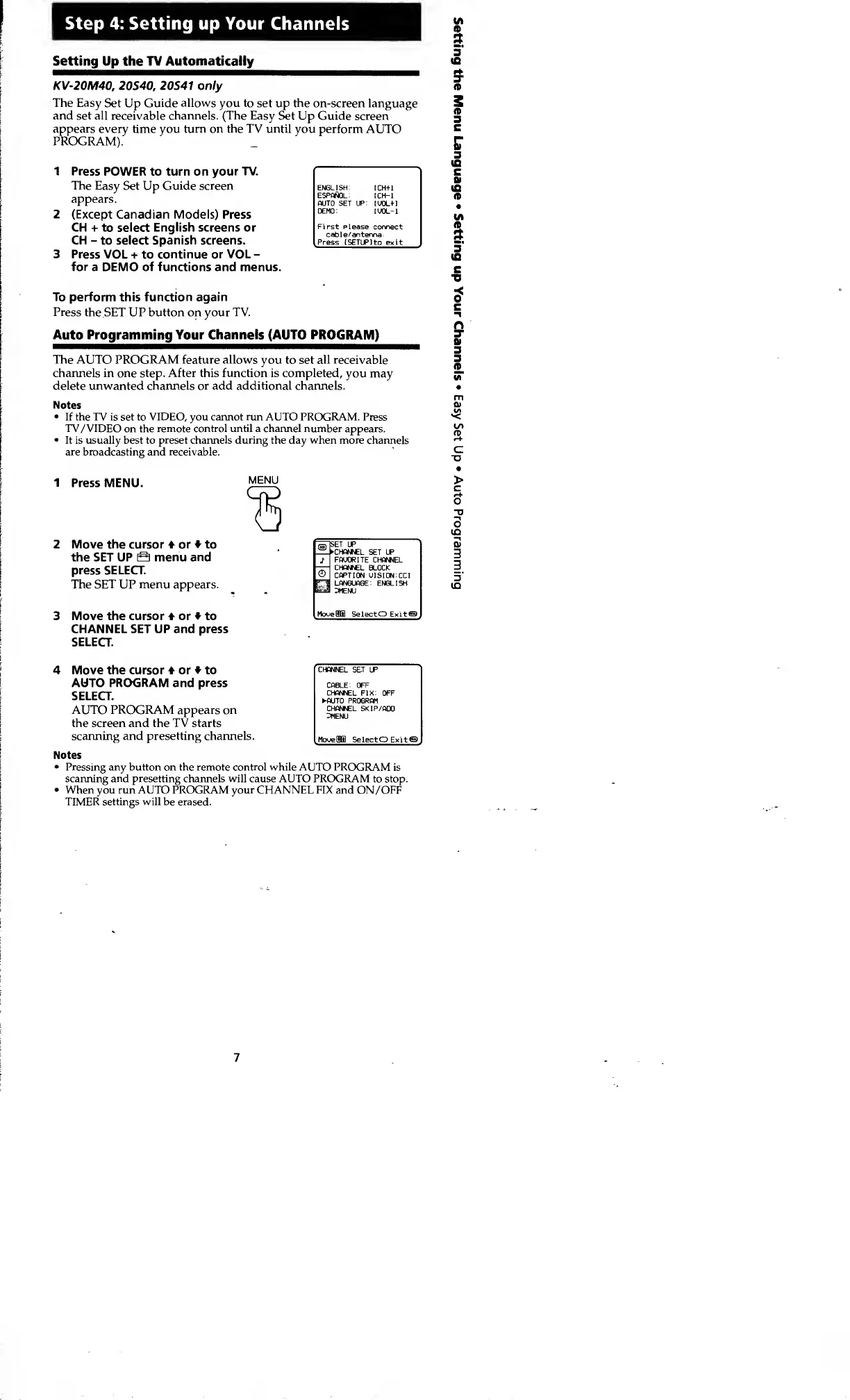
Press MENU.
Move the cursor 4 or to
the SET UP S menu
and
press SELECT.
The
SET
UP
menu appears.
Move the cursor or to
CHANNEL SET UP and press
SELECT.
MENU
SET
UP
CHANNEL SET UP
FAUORITE CHANNEL
CHANNEL
BLOCK
CAPTION
UISION:CCI
LANGUAGE: ENGLISH
3MENU
MoueBHI
SelectO
Exit©
>
C
r+
O
T>
—\
o
(£>
01
3
3
5'
IO
4 Move the cursor or to
AUTO PROGRAM and
press
SELECT.
AUTO PROGRAM appears on
the screen and the TV starts
scanning and presetting channels.
Notes
•
Pressing any button on the remote control while AUTO PROGRAM
is
scanning
and
presetting channels will cause AUTO PROGRAM to stop.
•
When you run AUTO PROGRAM your CHANNEL FIX and
ON
/OFF
TIMER settings will be erased.
CHANNEL SET
UP
CABLE : OFF
CHANNEL
FIX: OFF
AUTO PROGRAM
CHANNEL SKIP/ADO
3MENU
MoveBBl SelectO Exit©
7








 To Next Page