Step
2: Using the Remote
Control
Inserting
Batteries
Insert
two size AA (R6) batteries (supplied) by
matching the
+ and
-
on
the batteries
to
the + and
-
inside the battery
compartment.
With normal
use,
the batteries should last
for
approximately six
months.
Notes
•
Remove the
batteries to avoid possible damage from
battery leakage
if you will not be
using the remote control for an extended
period of
time.
•
Handle the remote
control with care. Avoid dropping it,
getting it
wet, or
placing it in direct sunlight,
near
a
heater, or where the
humidity is high.
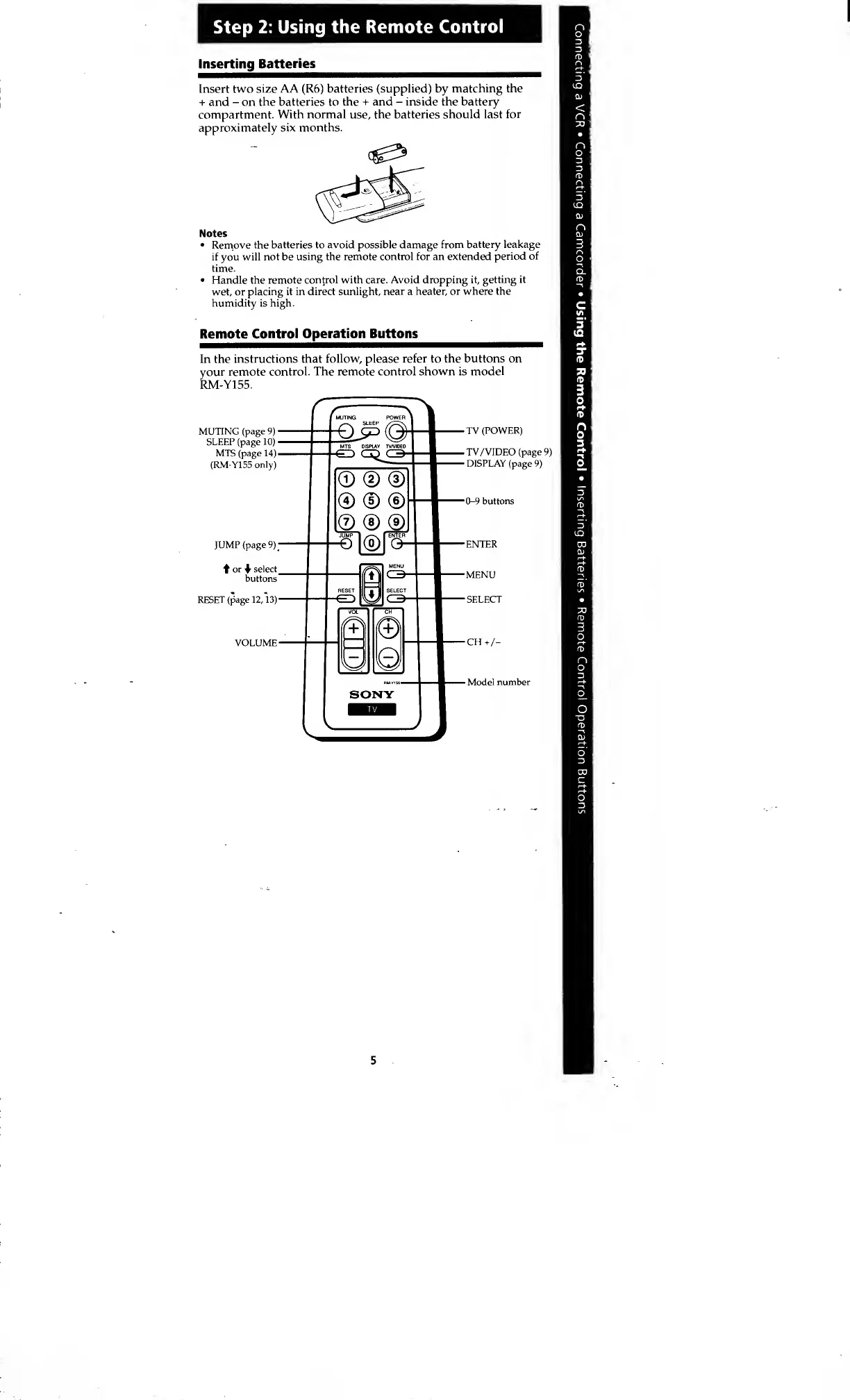
Remote
Control Operation Buttons
In the
instructions that
follow,
please
refer to the buttons on
your remote
control. The remote control shown is
model
RM-Y155.
MUTING
(page
9)
SLEEP (page
10)
MTS (page
14)
(RM-Y155
only)
JUMP
(page
9);
or
select
buttons
RESET (page
12,
13)
VOLUME
TV
(POWER)
TV/VIDEO (page
9)
DISPLAY (page
9)
0-9
buttons
Model number
5








 To Next Page