EasyManua.ls Logo

Sony TRINITRON KV-1442 - OPERATION; VIEWING TV PROGRAM

Sony TRINITRON KV-1442
35 pages
Print Icon
To Next Page IconTo Next Page
To Previous Page IconTo Previous Page
Loading...
KV-1442ECPS
RM-651
1-3.
OPERATION
VIEWING
TV
PROGRAM
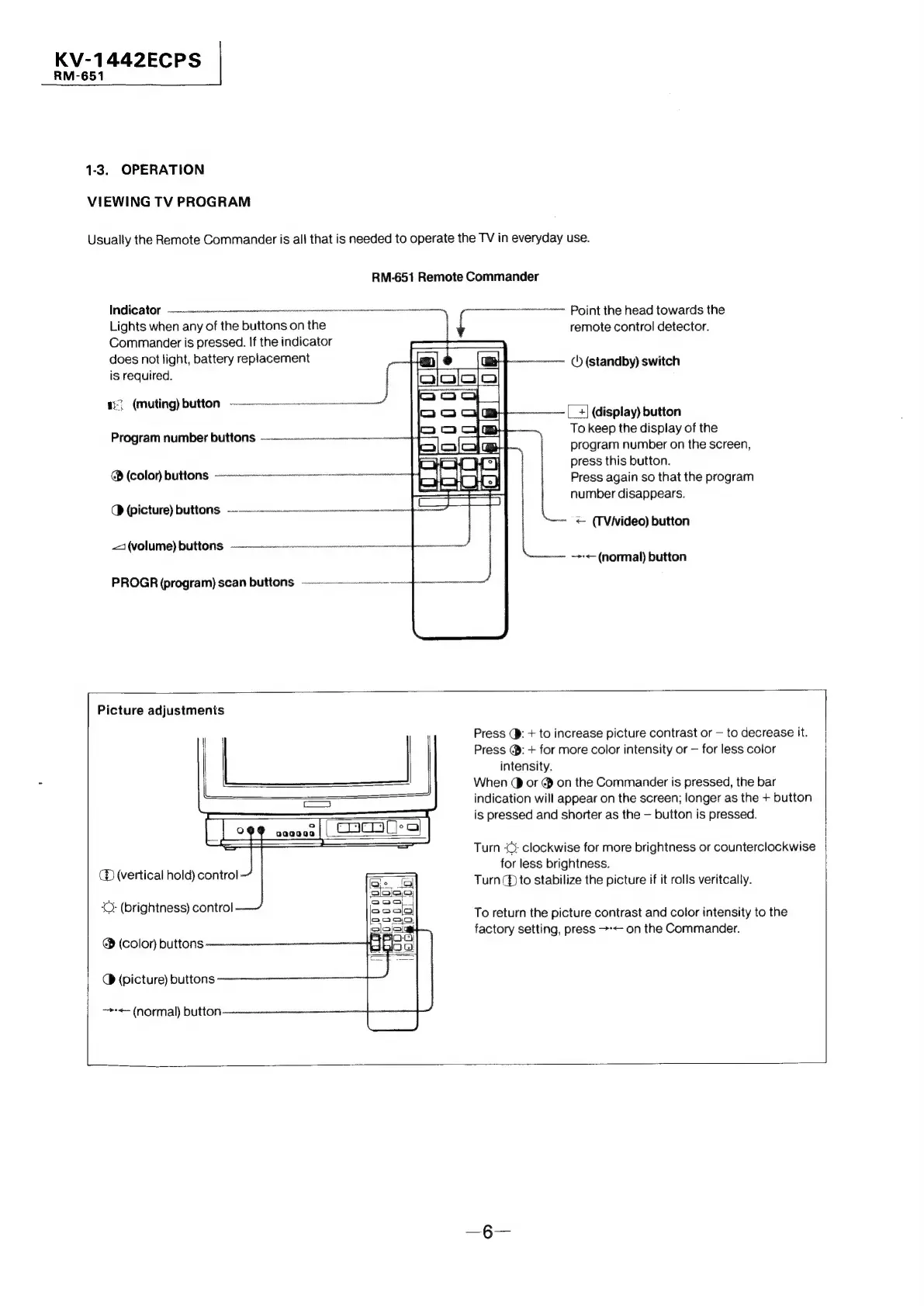
Usually
the
Remote
Commander
is
all
that
is
needed
to
operate
the
TV
in
everyday
use.
RM-651
Remote
Commander
Tate
|
Cor:
|
(¢)
saeaenennennennnnnneenre
eee
Lights
when
any
of
the
buttons
on
the
Commander
is
pressed.
If
the
indicator
does
not
light,
battery
replacement
is
required.
1}
(muting)
button
Program
number
buttons
—
Point
the
head
towards
the
remote
control
detector.
()
(standby)
switch
(_
+]
(display)
button
To
keep
the
display
of
the
@
(color)
buttons
Q
(picture)
buttons
~~
21
(VOTE)
Ut
OFS
ann
nen
PROGR
(program)
scan
buttons
Picture
adjustments
es
=<
o
aaaa
oa
(
cacatles|
(D
(vertical
hold)
control
‘C:
(brightness)
control
@
(color)
buttons
Q
(picture)
buttons
—-<=
(normal)
button
program
number
on
the
screen,
press
this
button.
Press
again
so
that
the
program
number
disappears.
<
(TVivideo)
button
~>-<—
(normal)
button
Press
(}:
+
to
increase
picture
contrast
or
—
to
decrease
it.
Press
@:
+
for
more
color
intensity
or
—
for
less
color
intensity.
When
@
or
@
on
the
Commander
is
pressed,
the
bar
indication
will
appear
on
the
screen;
longer
as
the
+
button
is
pressed
and
shorter
as
the
—
button
is
pressed.
Turn
‘©;
clockwise
for
more
brightness
or
counterclockwise
for
less
brightness.
Turn
(to
stabilize
the
picture
if
it
rolls
veritcally.
To
return
the
picture
contrast
and
color
intensity
to
the
factory
setting,
press
>-<—
on
the
Commander.