EasyManua.ls Logo

Sony TRINITRON KV-1442 - VIEWING TELETEXT; TELETEXT OPERATION

Sony TRINITRON KV-1442
35 pages
Print Icon
To Next Page IconTo Next Page
To Previous Page IconTo Previous Page
Loading...
KV-1442ECPS
RM-651
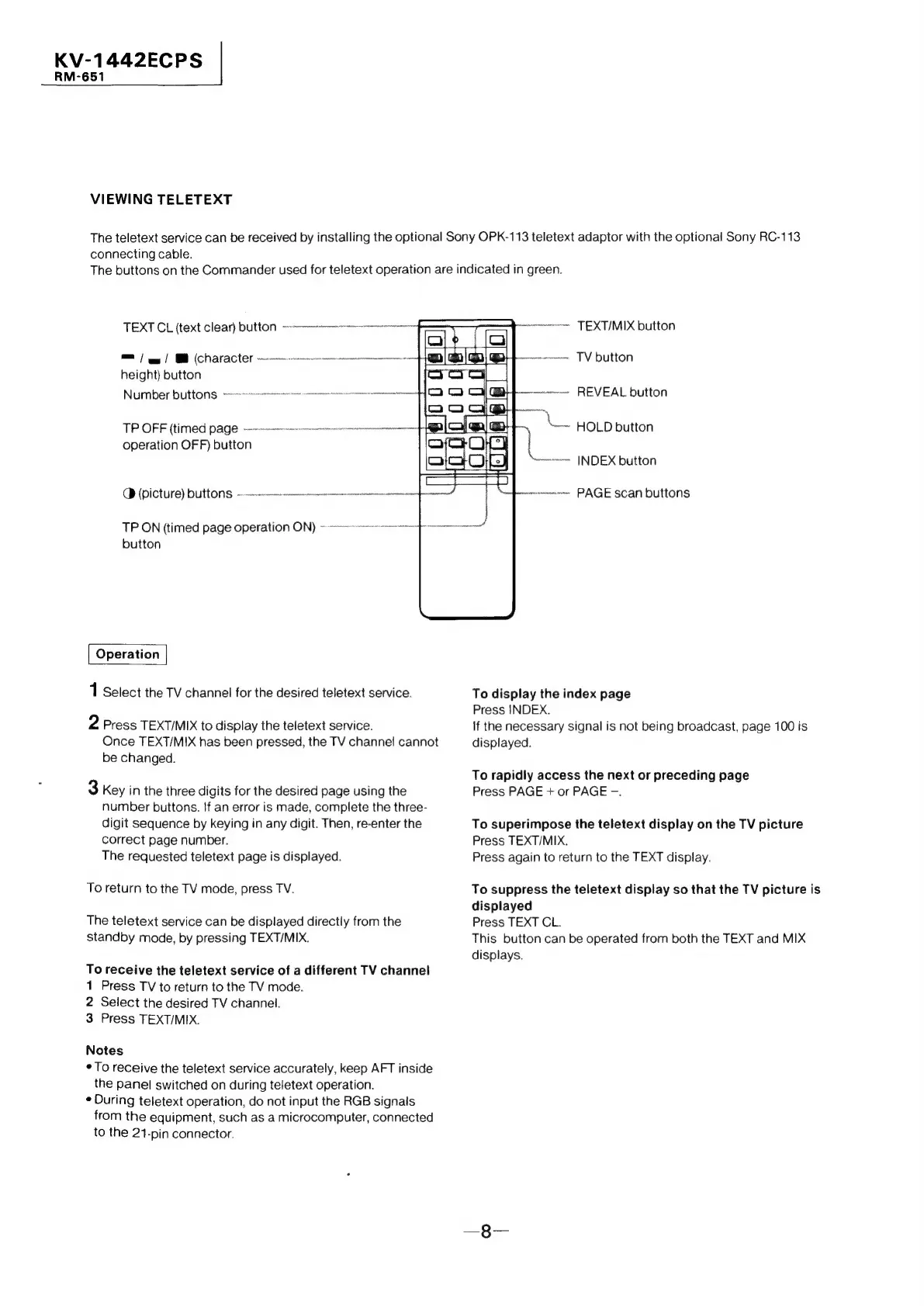
VIEWING
TELETEXT
The
teletext
service
can
be
received
by
installing
the
optional
Sony
OPK-113
teletext
adaptor
with
the
optional
Sony
RC-113
connecting
cable.
The
buttons
on
the
Commander
used
for
teletext
operation
are
indicated
in
green.
TEXT
CL
(text
Clear)
DUttON
msn
om
/
_
im
|
(character
NUESTRO
Te
LN
TRESS
tae
Ey
eee
eee
height}
button
N
um
ber
b
utton
Srnec
emma
emmmamac
inert
tt
TP
OFF
(timed
page
~--—---
rr
operation
OFF)
button
CD
(PICT)
UBL
ene
TP
ON
(timed
page
operation
ON)
~~
cae
a
button
Operation
1
Select
the
TV
channel
for
the
desired
teletext
service.
2
Press
TEXT/MIX
to
display
the
teletext service.
Once
TEXT/MIX
has
been
pressed,
the
TV
channel
cannot
be
changed.
3
Key
in
the
three
digits
for
the
desired
page
using
the
number
buttons.
If
an
error
is
made,
complete
the
three-
digit
sequence
by
keying
in
any
digit.
Then,
re-enter
the
correct
page
number.
The
requested
teletext
page
is
displayed.
To
return
to
the
TV
mode,
press
TV.
The
teletext
service
can
be
displayed
directly
from
the
standby
mode,
by
pressing
TEXT/MIX.
To
receive
the
teletext
service
of
a
different
TV
channel
1
Press
TV
to
return
to
the
TV
mode.
2
Select
the
desired
TV
channel.
3
Press
TEXT/MIX.
Notes
*
To
receive
the
teletext
service
accurately,
keep
AFT
inside
the
panel
switched
on
during
teletext
operation.
¢
During
teletext
operation,
do
not
input
the
RGB
signals
from
the
equipment,
such
as
a
microcomputer,
connected
to
the
21-pin
connector.
wer
TEXTIMIX
button
ronnwormnes
TV
button
~vwene
REVEAL
button
|
.
oo
HOLD
button
~~~
INDEX
button
~-nmnnnr
PAGE
Scan
buttons
To
display
the
index
page
Press
INDEX.
If
the
necessary
signal
is
not
being
broadcast,
page
100
is
displayed.
To
rapidly
access
the
next
or
preceding
page
Press
PAGE
+
or
PAGE
-.
To
superimpose
the
teletext
display
on
the
TV
picture
Press
TEXT/MIX.
Press
again
to
return
to
the
TEXT
display.
To
suppress
the
teletext
display
so
that
the
TV
picture
is
displayed
Press
TEXT
CL.
This
button
can
be
operated
from
both
the
TEXT
and
MIX
displays.