EasyManua.ls Logo

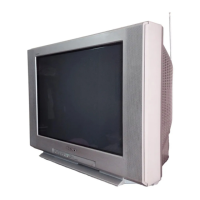
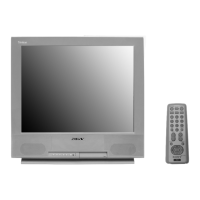
Sony Trinitron KV-24FS100 - User Manual

Sony Trinitron KV-24FS100
140 pages
Print Icon
To Next Page IconTo Next Page
Loading...
TRINITRON
®
COLOR TELEVISION
SERVICE MANUAL
BA-6
CHASSIS
MODEL NAME REMOTE COMMANDER DESTINATION CHASSIS NO.
9-965-928-01
KV-24FS100
RM-Y173 US SCC-S61D-A
KV-24FS100
RM-Y173 CND SCC-S59D-A
KV-25FS100
RM-Y173 LATIN NORTH SCC-S60J-A
KV-25FS100
RM-Y173 LATIN SOUTH SCC-S60K-A
HISTORY INFORMATION FOR THE FOLLOWING MANUAL:
ORIGINAL MANUAL ISSUE DATE: 5/2002
ALL REVISIONS AND UPDATES TO THE ORIGINAL MANUAL ARE APPENDED TO THE END OF THE PDF FILE.
REVISION DATE REVISION TYPE SUBJECT
5/2002 No revisions or updates are applicable at this time.

Table of Contents

Question and Answer IconNeed help?

Do you have a question about the Sony Trinitron KV-24FS100 and is the answer not in the manual?

Summary

Specifications

Warnings and Cautions

Safety Check-Out

Self-Diagnostic Function

Section 1: Disassembly

1-1. Rear Cover Removal

Procedure for removing the rear cover.

1-2. Chassis Assembly Removal

Procedure for removing the chassis assembly.

1-4. Picture Tube Removal

Procedure for safely removing the picture tube and anode cap.

Section 2: Set-Up Adjustments

2-1. Beam Landing

Procedure for adjusting beam landing for color purity.

2-2. Convergence

Steps for adjusting vertical and horizontal convergence of color dots.

2-5. Service Adjustment Mode

How to enter and operate the service adjustment mode.

2-6. White Balance Adjustments

Steps to adjust white balance for accurate color reproduction.

Section 3: Safety Related Adjustments

3-1. HV Hold-Down Confirmation

HV hold-down confirmation and readjustment procedure.

3-2. B+ Voltage Confirmation and Adjustment

Procedure to confirm and adjust B+ voltage.

Section 4: Circuit Adjustments

4-1. Setting Service Adjustment Mode

Steps to enter the service adjustment mode.

4-3. Remote Adjustment Buttons

Explanation of remote control buttons used for adjustments.

Adjustment Items List (Part 1)

4-4. ID Map Table

4-5. A Board Adjustments Overview

H. Frequency (Free Run) Check

Procedure to check horizontal frequency.

V. Frequency (Free Run) Check

Procedure to check vertical frequency.

Display Position Adjustment (DISP)

Adjusting the position of on-screen display text.

Sub Bright Adjustment (SBRT)

Adjusting the sub-bright level.

Sub Hue, Sub Color Adjustment (SHUE, SCOL)

Adjusting sub-hue and sub-color settings.

A Board Adjustments (Continued)

V. Size Adjustment (VSIZ)

Procedure for adjusting vertical size.

V. Center Adjustment (VPOS)

Procedure for adjusting vertical picture center.

H. Center Adjustment (HPOS)

Procedure for adjusting horizontal picture center.

H. Size Adjustment (HSIZ)

Procedure for adjusting horizontal picture size.

V. Linearity, V. Correction, Pin Amp, and Horizontal Trapezoid Adjustments

Adjustments for V. Linearity, V. Correction, Pin Amp, and H. Trapezoid.

A Board Adjustments (Final)

V. Angle, V. Bow, Upper Pin and Low Pin Adjustments

Adjustments for V. Angle, V. Bow, Upper Pin, and Low Pin.

Section 5: Diagrams

5-1. Circuit Boards Location

Identifies the location of main circuit boards.

5-3. Block Diagram and Schematics

Provides block diagrams and schematic diagrams for the TV.

Block Diagram

A Board Schematic Diagram

A Board Waveforms

CV Board Schematic Diagram

CV Board Waveforms

M3 Board Schematic Diagram

5-4. Semiconductors

Section 6: Exploded Views

6-1. Chassis

Exploded view of the TV chassis and parts.

Section 7: Electrical Parts List

Capacitors List

List of all capacitors with part numbers and values.

Resistors List

List of all resistors with part numbers and values.

Diodes List

List of all diodes with part numbers and values.

ICs and Transistors List

List of ICs and transistors with part numbers.

Summary

Specifications

Warnings and Cautions

Safety Check-Out

Self-Diagnostic Function

Section 1: Disassembly

1-1. Rear Cover Removal

Procedure for removing the rear cover.

1-2. Chassis Assembly Removal

Procedure for removing the chassis assembly.

1-4. Picture Tube Removal

Procedure for safely removing the picture tube and anode cap.

Section 2: Set-Up Adjustments

2-1. Beam Landing

Procedure for adjusting beam landing for color purity.

2-2. Convergence

Steps for adjusting vertical and horizontal convergence of color dots.

2-5. Service Adjustment Mode

How to enter and operate the service adjustment mode.

2-6. White Balance Adjustments

Steps to adjust white balance for accurate color reproduction.

Section 3: Safety Related Adjustments

3-1. HV Hold-Down Confirmation

HV hold-down confirmation and readjustment procedure.

3-2. B+ Voltage Confirmation and Adjustment

Procedure to confirm and adjust B+ voltage.

Section 4: Circuit Adjustments

4-1. Setting Service Adjustment Mode

Steps to enter the service adjustment mode.

4-3. Remote Adjustment Buttons

Explanation of remote control buttons used for adjustments.

Adjustment Items List (Part 1)

4-4. ID Map Table

4-5. A Board Adjustments Overview

H. Frequency (Free Run) Check

Procedure to check horizontal frequency.

V. Frequency (Free Run) Check

Procedure to check vertical frequency.

Display Position Adjustment (DISP)

Adjusting the position of on-screen display text.

Sub Bright Adjustment (SBRT)

Adjusting the sub-bright level.

Sub Hue, Sub Color Adjustment (SHUE, SCOL)

Adjusting sub-hue and sub-color settings.

A Board Adjustments (Continued)

V. Size Adjustment (VSIZ)

Procedure for adjusting vertical size.

V. Center Adjustment (VPOS)

Procedure for adjusting vertical picture center.

H. Center Adjustment (HPOS)

Procedure for adjusting horizontal picture center.

H. Size Adjustment (HSIZ)

Procedure for adjusting horizontal picture size.

V. Linearity, V. Correction, Pin Amp, and Horizontal Trapezoid Adjustments

Adjustments for V. Linearity, V. Correction, Pin Amp, and H. Trapezoid.

A Board Adjustments (Final)

V. Angle, V. Bow, Upper Pin and Low Pin Adjustments

Adjustments for V. Angle, V. Bow, Upper Pin, and Low Pin.

Section 5: Diagrams

5-1. Circuit Boards Location

Identifies the location of main circuit boards.

5-3. Block Diagram and Schematics

Provides block diagrams and schematic diagrams for the TV.

Block Diagram

A Board Schematic Diagram

A Board Waveforms

CV Board Schematic Diagram

CV Board Waveforms

M3 Board Schematic Diagram

5-4. Semiconductors

Section 6: Exploded Views

6-1. Chassis

Exploded view of the TV chassis and parts.

Section 7: Electrical Parts List

Capacitors List

List of all capacitors with part numbers and values.

Resistors List

List of all resistors with part numbers and values.

Diodes List

List of all diodes with part numbers and values.

ICs and Transistors List

List of ICs and transistors with part numbers.

Sony Trinitron KV-24FS100 Specifications

General IconGeneral
Screen Size24 inches
Display TechnologyCRT
Resolution480i
Aspect Ratio4:3
Comb Filter3D Digital Comb Filter
Speakers2
InputsComposite, RF

Related product manuals