EasyManua.ls Logo

Sony TRINITRON KV-25 XSD - First of All; Powering On and Tuning Channels; Automatic Channel Tuning; Manual Channel Tuning

Sony TRINITRON KV-25 XSD
30 pages
Print Icon
To Next Page IconTo Next Page
To Previous Page IconTo Previous Page
Loading...
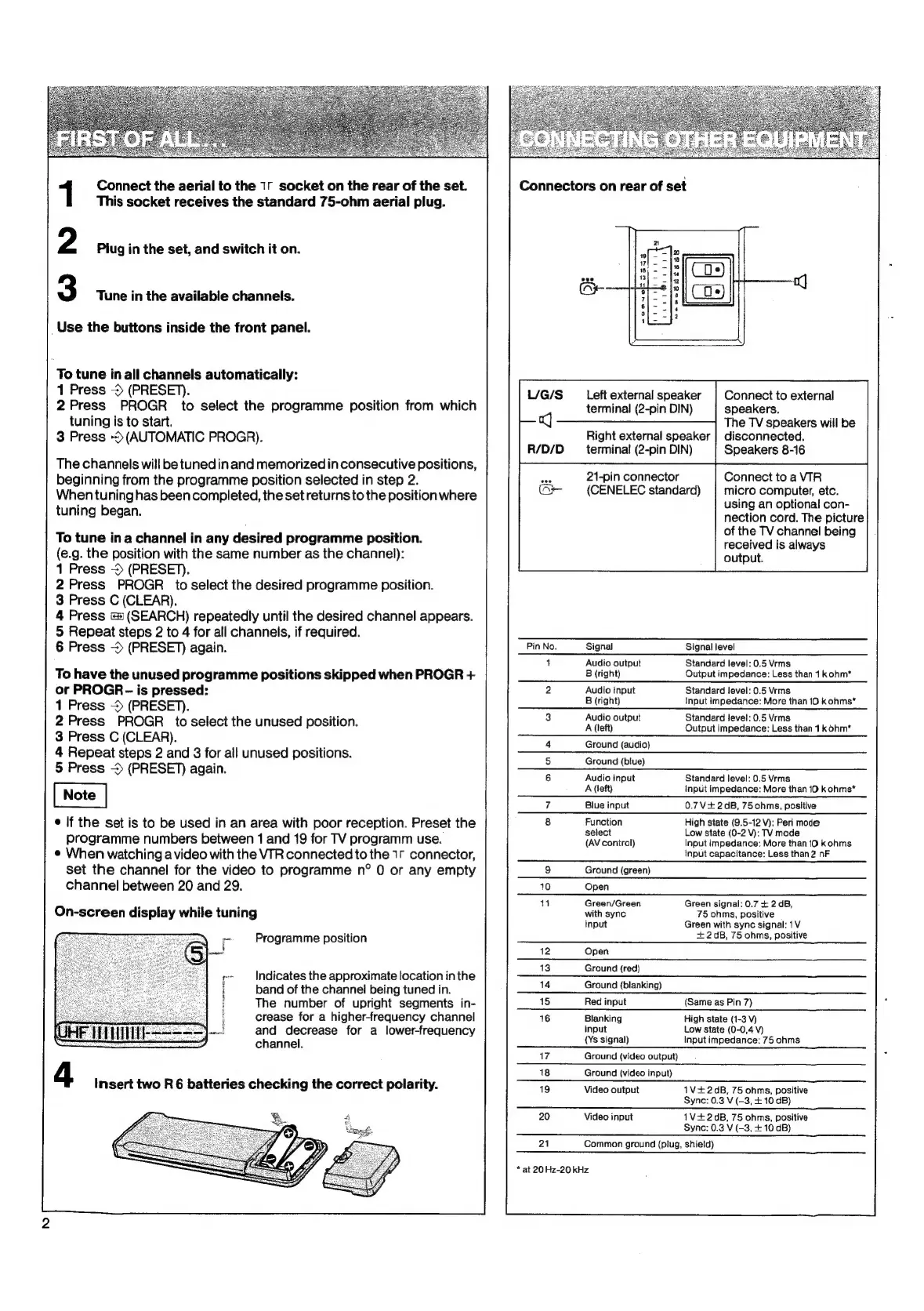
Connect
the
aerial
to
the
1.
socket
on
the
rear
of
the
set.
This
socket
receives
the
standard
75-ohm
aerial
plug.
Piug
in
the
set,
and
switch
it
on.
Tune
in
the
available
channels.
Use
the
buttons
inside
the
front
panel.
To
tune
in
all
channels
automatically:
1
Press
->
(PRESET).
2
Press
PROGR
to
select
the
programme
position
from
which
tuning
is
to
start.
3
Press
(AUTOMATIC
PROGR).
The
channels
will
be
tunedin
and
memorized
in
consecutive
positions,
beginning
from
the
programme
position
selected
in
step
2.
When
tuning
has
been
completed,
the
set
returns
to
the
position
where
tuning
began.
To
tune
ina
channel
in
any
desired
programme
position.
(e.g.
the
position
with
the
same
number
as
the
channel):
1
Press
->
(PRESET).
2
Press
PROGR
to
select
the
desired
programme
position.
3
Press
C
(CLEAR).
4
Press
=
(SEARCH)
repeatedly
until
the
desired
channel
appears.
5
Repeat
steps
2
to
4
for
all
channels,
if
required.
6
Press
~
(PRESET)
again.
To
have
the
unused
programme
positions
skipped
when
PROGR
+
or
PROGR
-
is
pressed:
1
Press
>
(PRESET).
2
Press
PROGR
to
select
the
unused
position.
3
Press
C
(CLEAR).
4
Repeat
steps
2
and
3
for
all
unused
positions.
5
Press
~
(PRESET)
again.
e
lf
the
set
is
to
be
used
in
an
area
with
poor
reception.
Preset
the
programme
numbers
between
1
and
19
for
TV
programm
use.
e
When
watching
a
video
with
the
VIR
connected
to
the
1r
connector,
set
the
channel
for
the
video
to
programme
n°
0
or
any
empty
channel
between
20
and
29.
On-screen
display
while
tuning
Programme
position
Indicates
the
approximate
location
in
the
band
of
the
channel
being
tuned
in.
The
number
of
upright
segments
in-
crease
for
a
higher-frequency
channel
and
decrease
for
a
lower-frequency
channel.
4
Insert
two
R
6
batteries
checking
the
correct
polarity.
Left
external
speaker
terminal
(2-pin
DIN)
Right
external
speaker
terminal
(2-pin
DIN)
21-pin
connector
(CENELEC
standard)
Pin
No.
Signal
1
Audio
output
B
(right)
2
Audio
input
B
(right)
3
Audio
output
A
(left)
4
Ground
(audio)
5
Ground
(blue)
6
Audio
input
A
(left)
Blue
input
Function
select
(AV
control)
Ground
(green)
Open
Green/Green
with
sync
input
Open
Ground
(red)
Ground
(blanking)
Red
input
Blanking
input
(Ys
signal)
Ground
(video
output)
Ground
{video
input)
Video
output
Video
input
Connect
to
external
speakers.
The
TV
speakers
will
be
disconnected.
Speakers
8-16
Connect
to
a
VIR
micro
computer,
etc.
using
an
optional
con-
nection
cord.
The
picture
of
the
TV
channel
being
received
is
always
output.
Signal
level
Standard
level:
0.5
Vrms
Output
impedance:
Less
than
1
kohm*
Standard
level:
0.5
Vrms
Input
impedance:
More
than
10
kohms*
Standard
level:
0.5
Vrms
Output
impedance:
Less
than
4
kohm*
Standard
level:
0.5
Vrms
Input
impedance:
More
than
10
k
ohms*
0.7V+
2dB,
75ohms,
positive
High
state
(9.5-12
V):
Peri
mode
Low
state
(0-2
V):
TV
mode
Input
impedance:
More
than
10
kohms
Input
capacitance:
Less
than
2
nF
Green
signal:
0.7
+
2
dB,
75
ohms,
positive
Green
with
sync
signal:
1V
+
2dB,
75
ohms,
positive
(Same
as
Pin
7)
High
state
(1-3
Vv)
Low
state
(0-0,4
V)
Input
impedance:
75
ohms
1V+2dB,
75
ohms,
positive
Sync:
0.3
V
(-3,
+
10
dB)
1V+
2dB,
75
ohms,
positive
Sync:
0.3
V
(-3,
+
10
dB)
21
Common
ground
(plug,
shield)
*
at
20
Hz-20
kHz

Related product manuals